
Immersive Craft Mod für Minecraft 1.12.2
Fügt eine immersivere Art hinzu, Objekte in Minecraft zu handhaben, herzustellen und zu lagern
Über die Immersive Craft-Mod
This mod adds a more immersive way to handle, craft and store objects in Minecraft. It features the following:
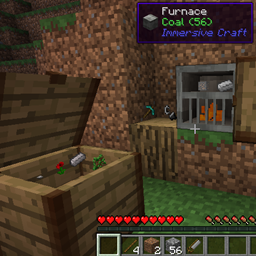
- Adds a chest where you can visually see and interact with the items in the chest
- Adds a cupboard that works in a similar way but is mounted on the wall
- Adds a furnace that works like a regular furnace but also features in-world interaction. You need to use flint and steel to ignite the coal in the furnace
- Allows the player to place tools (axes, swords, ...) on any block by right clicking it or pressing 'p'. You can put 4 items on a flat or vertical face that way
- Adds worldgen for sticks and rocks in the world (can be disabled)
- Adds a workbench to have an immersive way to craft. This workbench is still work in progress as you can now only craft a limited number of items. This will be improved later. To make a workbench (if you want to try it out) just place two logs in the world and right click with a stone axe
- Adds a chisel and saw which are intented to be used in the toolslot of the workbench
- Sticks can be placed on the ground in stacks of up to 64. Using flint and steel you can also make them burn (model slightly broken currently)
Note! This mod works on 1.10.2 and 1.11.2 with the same JAR!
1.12 is another release and doesn't require CompatLayer anymore
This mod is still work in progress but works well enough to be usable in my opinion. Feedback is of course welcome.
You can freely use this mod in any modpack. No restrictions.
Installation von Immersive Craft
With Millida Launcher
Install Millida Launcher
The launcher is free: download it at millida.net/launcher and sign in with any nickname.
Click “Install” on this page
The launcher opens and installs the mod for Minecraft 1.12.2 automatically.
Launch the game
A profile with it appears in the launcher: click “Play”.
Manually
Download the file for your version
In the version list above, pick the file immcraft-1.12-1.6.0.jar (998 KB) for your game version.
Put it in the mods folder
The folder is inside .minecraft (Windows: %appdata%\.minecraft\mods). If it does not exist, create it.
Launch the loader profile
Open “Mods” in the main menu: Immersive Craft should be in the list.
Minecraft 1.12.2 runs on Java 8: with a different Java version the game may close right after launch.
Versionen
Mit Abhängigkeiten
| Minecraft | Loader | Datei | Datum | Aktionen |
|---|---|---|---|---|
| 1.12.2 | — | ImmersiveCraft - 1.12-1.6.0998 KB | ||
| 1.12.2 | — | ImmersiveCraft - 1.12-1.5.0-alpha1002 KB |
FAQ
Which Minecraft versions does Immersive Craft work on?
Only Minecraft 1.12.2: there are no files for other versions.
Which Java does Immersive Craft need?
Minecraft 1.12.2 runs on Java 8. If the game closes right after launch, the usual cause is the wrong Java version in the profile settings.
Where can I download Immersive Craft safely?
On this page: the file immcraft-1.12-1.6.0.jar (998 KB) is stored on Millida’s server, with no link shorteners. SHA-1 checksum: 1a3b1306838152d4bed38688844ffd8218878fa4.
Bewertungen
Bewerten Sie Immersive Craft als Erster


