
 NeoForge
 Forge
ForgeÜber die Heads-Mod
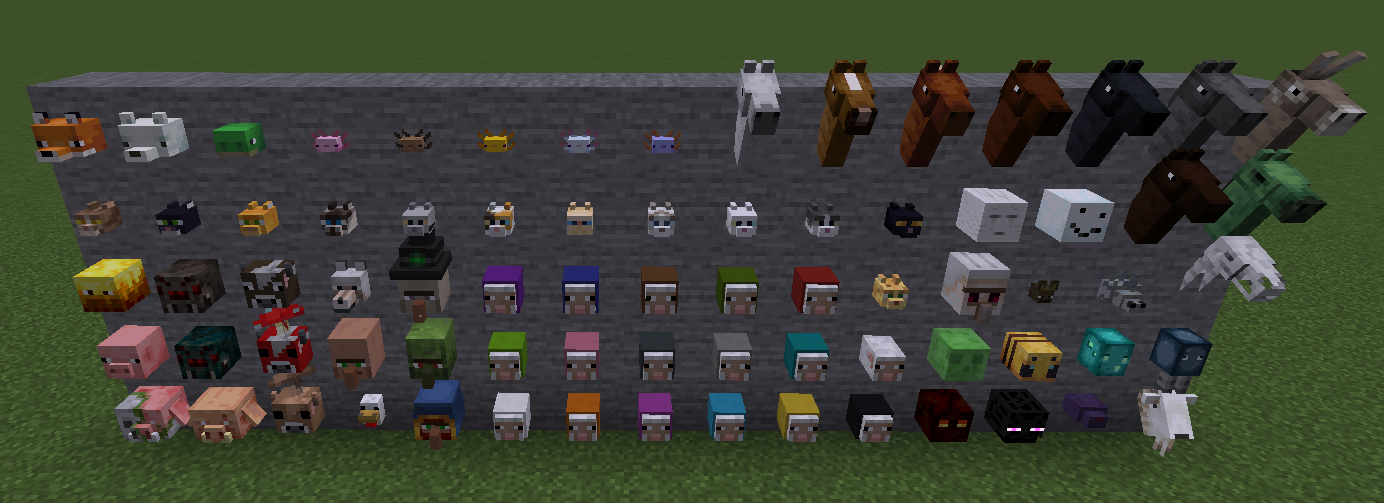
Ever thought Minecraft didn't have enough mob heads? Well then the "Heads" mod is for you. This mod adds heads for almost all Minecraft Mobs.
From Foxes to turtles, axolotls to horses. We got you covered with place-able and wear-able heads.
List of mobs that have heads added by this mod:
- Axolotl (All variants)
- Bat
- Bee
- Blaze
- Cat (All variants)
- Cave Spider
- Chicken
- Cow
- Donkey
- Enderman
- Endermite
- Fox (Both snow and regular)
- Ghast
- Glow Squid
- Goat
- Horse (All main colors)
- Horse (Skeleton variants)
- Horse (Zombie variant)
- Iron Golem
- Magmacube
- Mooshroom (Both red and brown)
- Ocelot
- Pig
- Piglin
- Piglin Brute
- Sheep (All colors and a sheared variant)
- Silverfish
- Slime
- Snow Golem
- Spider
- Squid
- Turtle
- Villager
- Wandering Trader
- Witch
- Wolf
- Zombie Villager
- Zombified Piglin
This mod is heavily inspired by the Headcrumbs mod which added mob heads back in the day.
Incompatabilities: Currently the mod is incompatible with "Fresh Animations"
Need a server? Get 20% off your first month by using promo code "mrbysco"
For questions feel free to join my Discord.
Want to support us?
-Mrbysco
Installation von Heads
With Millida Launcher
Install Millida Launcher
The launcher is free: download it at millida.net/launcher and sign in with any nickname.
Click “Install” on this page
The launcher opens and installs the mod for Minecraft 1.20–26.1.2 on Forge or NeoForge automatically.
Launch the game
A profile with it appears in the launcher: click “Play”.
Manually
Install Forge or NeoForge
The loader must match the game version of the mod file, for example Minecraft 26.1.2. After installing it, a separate profile appears in your launcher.
Download the file for your version
In the version list above, pick the file Heads-26.1.2-4.0.0.jar (256 KB) for your game version and loader.
Put it in the mods folder
The folder is inside .minecraft (Windows: %appdata%\.minecraft\mods). If it does not exist, create it.
Launch the loader profile
Open “Mods” in the main menu: Heads should be in the list.
Versionen
Mit Abhängigkeiten
| Minecraft | Loader | Datei | Datum | Aktionen |
|---|---|---|---|---|
| 26.1.2 | NeoForge | Heads-26.1.2-4.0.0.jar256 KB | ||
| 1.21.1 | NeoForge | Heads-1.21.1-2.1.0.jar246 KB | ||
| 1.20.1 | Forge | Heads-1.20.1-1.1.3.jar244 KB | ||
| 1.20.1 | Forge | Heads-1.20.1-1.1.2.jar227 KB |
FAQ
Which Minecraft versions does Heads work on?
There are files for 26.1.2, 1.21.1, 1.20.1, 1.20. The newest is 26.1.2.
Is Heads for Forge or Fabric?
There are files for Forge: 1.20–1.20.1 and for NeoForge: 1.21.1–26.1.2. There are no files for Fabric: a mod for another loader will not start.
Does Heads need other mods?
The author lists no required dependencies: the Forge or NeoForge loader is enough.
Where can I download Heads safely?
On this page: the file Heads-26.1.2-4.0.0.jar (256 KB) is stored on Millida’s server, with no link shorteners. SHA-1 checksum: 942eba70a6c3f4280e76fd47e863d10311ef16c0.
Bewertungen
Bewerten Sie Heads als Erster


