

Dark Paintings Mod für Minecraft 1.20.1, 1.19.2
Fügt Minecraft neue Gemälde hinzu
 NeoForge
 Fabric
 Forge
Forge Quilt
QuiltÜber die Dark Paintings-Mod
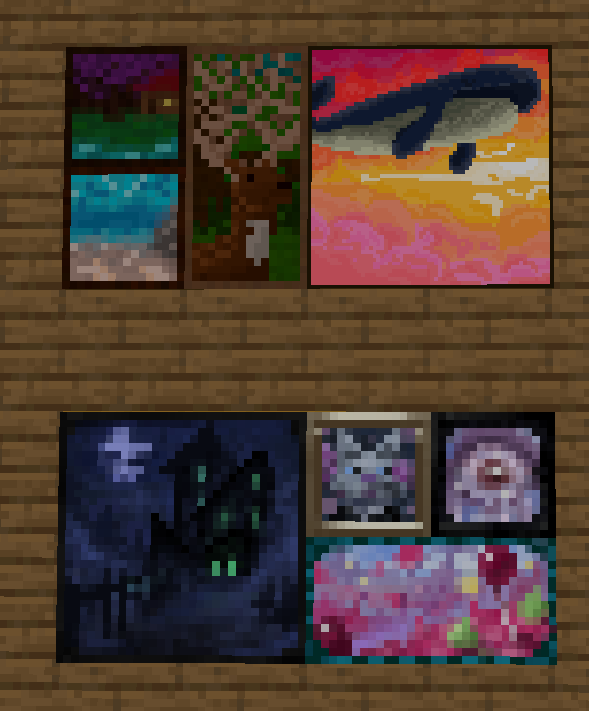
Diese Mod fügt dem Spiel viele neue Gemälde hinzu! Diese Gemälde gibt es in einer Vielzahl von Größen und Kunststilen. Jedes Gemälde wurde von einem Mitglied unserer Community entworfen und illustriert! Diese Gemälde sind nahtlos in die Vanilla-Gemälde integriert und können mit dem normalen Gemälde-Gegenstand in der Welt platziert werden. Außerdem gibt es Gegenstände im Kreativ-Tab, mit denen ein bestimmtes Design genau dort platziert werden kann, wo du es haben möchtest!
Dank an die vielen talentierten Künstler, die mit mir an dieser Mod zusammengearbeitet haben, darunter mmg28rtt, FuryDev, Axeonlotl, Wouter, Absolem Jackdaw, Punpudle, Superkat32 und ich, Darkhax lol.
Dieses Projekt wird von Nodecraft gesponsert. Verwende den Code DARKHAX für 30 % Rabatt auf deinen ersten Monat des Dienstes!
Installation von Dark Paintings
With Millida Launcher
Install Millida Launcher
The launcher is free: download it at millida.net/launcher and sign in with any nickname.
Click “Install” on this page
The launcher opens and installs the mod for Minecraft 1.15.2–26.3 on Fabric, Forge, NeoForge or Quilt automatically.
Launch the game
A profile with it appears in the launcher: click “Play”.
Manually
Install Fabric, Forge, NeoForge or Quilt
The loader must match the game version of the mod file, for example Minecraft 26.3. After installing it, a separate profile appears in your launcher.
Download the file for your version
In the version list above, pick the file DarkPaintings-neoforge-MC26.3-26.3.0.1.jar (55 KB) for your game version and loader.
Put it in the mods folder
The folder is inside .minecraft (Windows: %appdata%\.minecraft\mods). If it does not exist, create it.
Launch the loader profile
Open “Mods” in the main menu: Dark Paintings should be in the list.
Versionen
Mit Abhängigkeiten
| Minecraft | Loader | Datei | Datum | Aktionen |
|---|---|---|---|---|
| 26.3 | NeoForge | DarkPaintings-neoforge-MC26.3-26.3.0.1.jar55.3 KB | ||
| 26.3 | Fabric | DarkPaintings-fabric-MC26.3-26.3.0.1.jar57.8 KB 19 | ||
| 1.20.1 | Forge, NeoForge | DarkPaintings-Forge-1.20.1-17.0.6.jar51.4 KB 5 | ||
| 1.19.2 | Forge | DarkPaintings-Forge-1.19.2-13.1.4.jar38.6 KB | ||
| 1.19.2 | Fabric, Quilt | DarkPaintings-Fabric-1.19.2-13.1.4.jar33.8 KB | ||
| 1.17 | Fabric | DarkPaintings-fabric-1.17-rc2-3.0.5.jar12.7 KB | ||
| 1.15.2 | — | DarkPaintings-1.15.2-1.0.2.jar7.1 KB | ||
| 1.15.2 | — | DarkPaintings-1.15.2-1.0.1.jar28.8 KB |
FAQ
Which Minecraft versions does Dark Paintings work on?
There are files for 26.3, 1.20.1, 1.19.2, 1.17, 1.15.2. The newest is 26.3.
Is Dark Paintings for Forge or Fabric?
There are files for Fabric: 1.17–26.3, for Forge: 1.19.2–1.20.1, for NeoForge: 1.20.1–26.3 and for Quilt: 1.19.2.
Does Dark Paintings need other mods?
The author lists no required dependencies: the Fabric, Forge, NeoForge or Quilt loader is enough.
Where can I download Dark Paintings safely?
On this page: the file DarkPaintings-neoforge-MC26.3-26.3.0.1.jar (55 KB) is stored on Millida’s server, with no link shorteners. SHA-1 checksum: 15c9f13e2fa48507f646c9f0b133940516f6350c.
Bewertungen
Bewerten Sie Dark Paintings als Erster


