
Craftable Saplings Mod für Minecraft 1.21.1, 1.19.2
Mit dieser Mod kannst du alle Setzlinge und Pilze herstellen
 Forge
Forge Fabric
 NeoForge
Über die Craftable Saplings-Mod
With this mod you can finally craft all saplings and fungus.
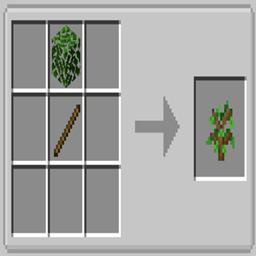
The recipe is very simple: you need a stick and a leaves of the type of sapling you want.
For example: a stick + an oak leaves = oak sapling.
For fungus you always need a stick but instead of leaves you have to use a nether wart block (crimson fungus) or a warped nether block (warped fungus)
The mod is compatible with: Just Enough Items (JEI) The mod is compatible with: Biomes O' Plenty
- Crafting Example
Thanks to VegaCraftYT for the video tutorial: https://youtu.be/GlveI_PRBuM (in German)
BisectHosting offers quick, simple and high quality server hosting with over a dozen locations available across the world, ensuring low latency. After your purchase, the server is already configured and ready to use. With their 24/7 support and fast-response time, no issues shall stand in your way!
Use the promo code BLACKWOLF to get a 25% discount off your first month when buying any of their gaming servers.
https://bisecthosting.com/blackwolf
Feel free to use this mod on your modpack
Installation von Craftable Saplings
With Millida Launcher
Install Millida Launcher
The launcher is free: download it at millida.net/launcher and sign in with any nickname.
Click “Install” on this page
The launcher opens and installs the mod for Minecraft 1.19.2–26.2 on Fabric, Forge or NeoForge automatically.
Launch the game
A profile with it appears in the launcher: click “Play”.
Manually
Install Fabric, Forge or NeoForge
The loader must match the game version of the mod file, for example Minecraft 26.2. After installing it, a separate profile appears in your launcher.
Download the file for your version
In the version list above, pick the file EasySaplings-forge-26.2-1.3.1.jar (23 KB) for your game version and loader.
Put it in the mods folder
The folder is inside .minecraft (Windows: %appdata%\.minecraft\mods). If it does not exist, create it.
Launch the loader profile
Open “Mods” in the main menu: Craftable Saplings should be in the list.
Versionen
Mit Abhängigkeiten
| Minecraft | Loader | Datei | Datum | Aktionen |
|---|---|---|---|---|
| 26.1.2 | Fabric | EasySaplings-fabric-26.1.2-1.3.0.jar15.1 KB | ||
| 26.2 | Forge | EasySaplings-forge-26.2-1.3.1.jar23 KB | ||
| 26.1.2 | NeoForge | EasySaplings-neoforge-26.1.2-1.3.0.jar22.8 KB | ||
| 1.21.4 | NeoForge | EasySaplings-neoforge-1.24-1.1.7.jar23 KB | ||
| 1.21.1 | Fabric | Easy Saplings-fabric-1.21.1-1.0.6.1.jar24.7 KB | ||
| 1.19.2 | Forge | EasySaplings-1.19.2-1.0.7-[FORGE]6 KB |
FAQ
Which Minecraft versions does Craftable Saplings work on?
There are files for 26.2, 26.1.2, 1.21.4, 1.21.1, 1.19.2. The newest is 26.2.
Is Craftable Saplings for Forge or Fabric?
There are files for Fabric: 1.21.1–26.1.2, for Forge: 1.19.2–26.2 and for NeoForge: 1.21.4–26.1.2.
Does Craftable Saplings need other mods?
The author lists no required dependencies: the Fabric, Forge or NeoForge loader is enough.
How do I download Craftable Saplings?
With Millida Launcher: it installs Craftable Saplings into a modpack by itself, for the right game version and loader. The launcher is free.
Bewertungen
Bewerten Sie Craftable Saplings als Erster


