

 NeoForge
 Fabric
Über die Cooking for Blockheads-Mod
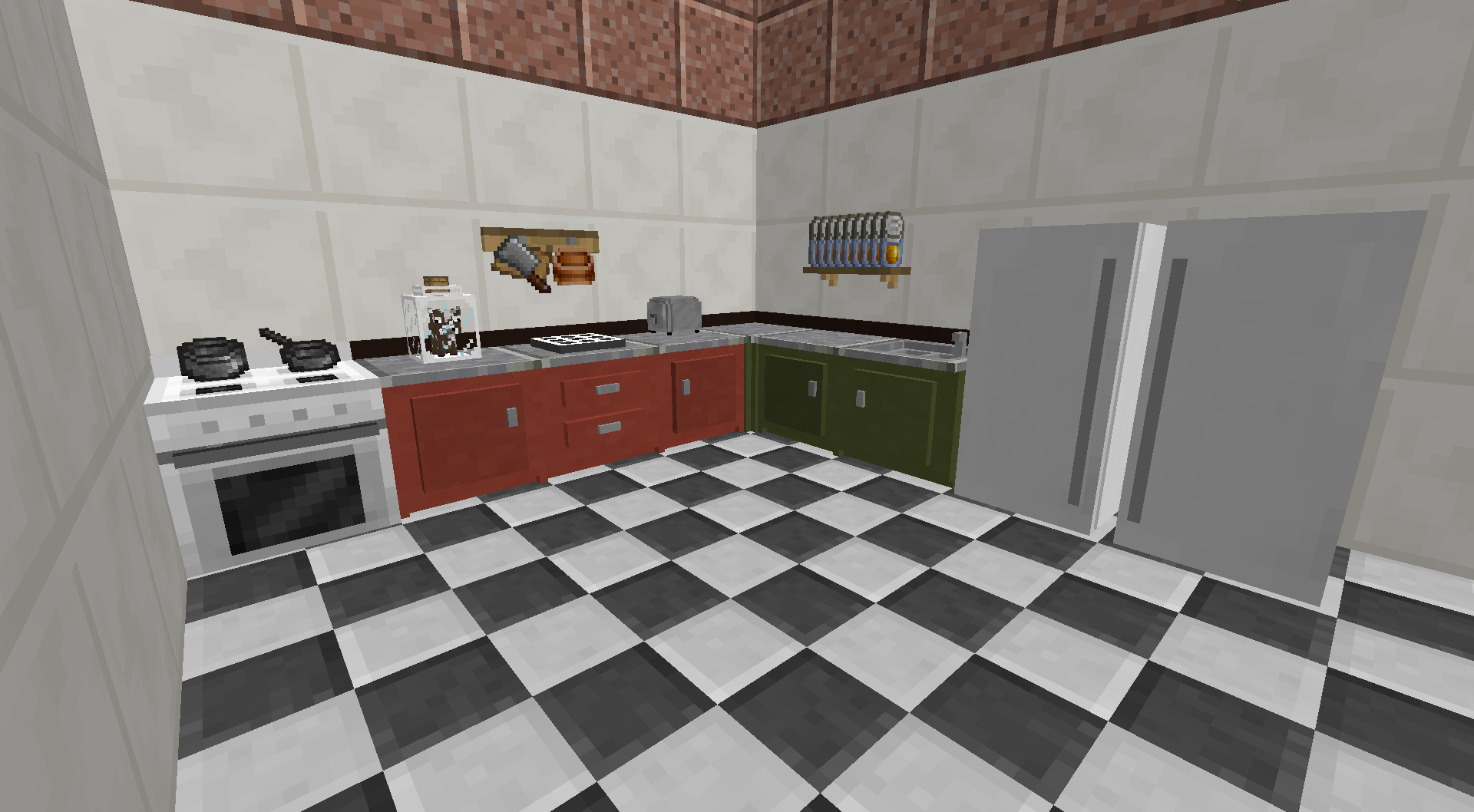
This mod adds a functional kitchen to Minecraft. Use the Cooking Table to find out what you can cook with what ingredients you currently have available, and start cooking immediately through a single click.
The kitchen is modular and can be upgraded through additional blocks, such as cupboards for expanded storage, a sink for infinite water, or efficient cooking with the oven. Some people even went as far as capturing a Cow in a Jar to provide them with infinite milk!

This mod requires Balm, which must be installed alongside the mod.
- Multiblock Kitchens consisting of several components that each unlock new abilities
- Browse food recipes that you can create with the ingredients you have available
- #NoFilter book to simply show all food item recipes (no matter what ingredients you have available)
- Sorting options to see the most nutritious foods you can make
- Supports Pam's Harvestcraft as well as many other food mods
Installation von Cooking for Blockheads
With Millida Launcher
Install Millida Launcher
The launcher is free: download it at millida.net/launcher and sign in with any nickname.
Click “Install” on this page
The launcher opens and installs the mod for Minecraft 26.1.2–26.3 on Fabric or NeoForge automatically, together with its dependencies: Balm, Fabric API.
Launch the game
A profile with it appears in the launcher: click “Play”.
Manually
Install Fabric or NeoForge
The loader must match the game version of the mod file, for example Minecraft 26.3. After installing it, a separate profile appears in your launcher.
Download the file for your version
In the version list above, pick the file cookingforblockheads-neoforge-26.3-26.3.0.2.jar (1.6 MB) for your game version and loader.
Put it in the mods folder
The folder is inside .minecraft (Windows: %appdata%\.minecraft\mods). If it does not exist, create it. Required dependencies go there too: Balm, Fabric API.
Launch the loader profile
Open “Mods” in the main menu: Cooking for Blockheads should be in the list.
On a server
A server on Fabric or NeoForge
The mod only works on a server with the same loader and game version, for example 26.3.
File goes into the server’s mods folder
Stop the server, put the mod file into the mods folder and start the server again.
Use the “To server” button
On Millida Hosting, the button at the top of the page uploads the file to your server and restarts it for you.
Versionen
Mit Abhängigkeiten
| Minecraft | Loader | Datei | Datum | Aktionen |
|---|---|---|---|---|
| 26.3 | NeoForge | 26.31.6 MB 2 | ||
| 26.3 | Fabric | 26.31.7 MB 2 | ||
| 26.1.2 | NeoForge | 26.1.21.6 MB | ||
| 26.2 | NeoForge | 26.21.6 MB | ||
| 26.1.2 | Fabric | 26.1.21.7 MB | ||
| 26.2 | Fabric | 26.21.7 MB 2 | ||
| 26.3 | NeoForge | 26.31.6 MB | ||
| 26.3 | Fabric | 26.31.7 MB |
Was zum Ausführen nötig ist
- Balmerforderlich
- Fabric APIerforderlich
Inhalte, die dies benötigen
FAQ
Which Minecraft versions does Cooking for Blockheads work on?
There are files for 26.3, 26.2, 26.1.2. The newest is 26.3.
Is Cooking for Blockheads for Forge or Fabric?
There are files for Fabric: 26.1.2–26.3 and for NeoForge: 26.1.2–26.3. There are no files for Forge: a mod for another loader will not start.
What does Cooking for Blockheads need to work?
Required: Balm, Fabric API. Without them the mod will not start: dependencies go into the same mods folder.
Does Cooking for Blockheads work on a server?
Yes. Cooking for Blockheads works both in singleplayer and on a server.
Where can I download Cooking for Blockheads safely?
On this page: the file cookingforblockheads-neoforge-26.3-26.3.0.2.jar (1.6 MB) is stored on Millida’s server, with no link shorteners. SHA-1 checksum: 7a92b2a11c3f5fcb05a272203c4ec6ce0dec5c83.
Bewertungen
Bewerten Sie Cooking for Blockheads als Erster


