
- Aufrufe
- 46 Aufrufe
- Aktualisiert
- Aktualisiert 18.10.2026
- 1.21.4
 Forge
Über die CobbleForDays-Mod
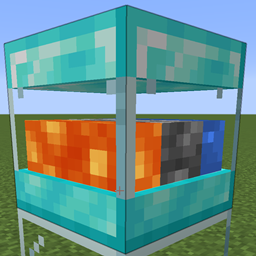
Hier ist ein einfacher Bruchsteingenerator. Es sind 5 Stufen verfügbar, falls mehrere Versionen hinzugefügt werden sollen.
Dies wurde hauptsächlich als eigenständiger Block erstellt, um Servern zu helfen. Es ist deutlich leistungsfähiger, eine einzelne tickende TE zu haben als eine Vielzahl und Bruchsteingenerierung in der Welt.
Aber fühlt euch frei, es zu verwenden, wie ihr wollt.
Jede Stufe hat Einstellungen, die in der Server-Konfigurationsdatei bearbeitet werden können.
[server.1]
Die maximale Anzahl an Gegenständen, die im internen Puffer gehalten werden.
Bereich: > 1
max = 64
Die Anzahl der Gegenstände, die bei jedem Update generiert werden.
Bereich: > 1
count = 1
Die Anzahl der Ticks zwischen jedem Generierungsupdate.
Bereich: > 1 interval = 40
Auf true setzen, um automatisch in Inventare über diesem Block zu schieben.
pushes = true
Danke an Drullkus für das hübsche Modell für sie.
Dies sind die Standardrezepte, aber sie können natürlich in Datenpaketen bearbeitet werden.
Installation von CobbleForDays
With Millida Launcher
Install Millida Launcher
The launcher is free: download it at millida.net/launcher and sign in with any nickname.
Click “Install” on this page
The launcher opens and installs the mod for Minecraft 1.21.4 on Forge automatically.
Launch the game
A profile with it appears in the launcher: click “Play”.
Manually
Install Forge
The loader must match the game version of the mod file, for example Minecraft 1.21.4. After installing it, a separate profile appears in your launcher.
Download the file for your version
In the version list above, pick the file CobbleForDays-1.14.1.jar (49 KB) for your game version.
Put it in the mods folder
The folder is inside .minecraft (Windows: %appdata%\.minecraft\mods). If it does not exist, create it.
Launch the loader profile
Open “Mods” in the main menu: CobbleForDays should be in the list.
Minecraft 1.21.4 runs on Java 21: with a different Java version the game may close right after launch.
Versionen
Mit Abhängigkeiten
| Minecraft | Loader | Datei | Datum | Aktionen |
|---|---|---|---|---|
| 1.21.4 | Forge | CobbleForDays-1.14.1.jar49.4 KB |
FAQ
Which Minecraft versions does CobbleForDays work on?
Only Minecraft 1.21.4: there are no files for other versions.
Is CobbleForDays for Forge or Fabric?
Only for Forge: 1.21.4. There are no files for Fabric or NeoForge: a mod for another loader will not start.
Does CobbleForDays need other mods?
The author lists no required dependencies: the Forge loader is enough.
Which Java does CobbleForDays need?
Minecraft 1.21.4 runs on Java 21. If the game closes right after launch, the usual cause is the wrong Java version in the profile settings.
Where can I download CobbleForDays safely?
On this page: the file CobbleForDays-1.14.1.jar (49 KB) is stored on Millida’s server, with no link shorteners. SHA-1 checksum: 5268375f91bf686fe063c4855c65317c92bc4555.
Bewertungen
Bewerten Sie CobbleForDays als Erster


