

 NeoForge
 Fabric
 Forge
Über die Brooms Unofficial-Mod
This mod is an unofficial 1.20.1+ Forge/NeoForge/Fabric port of the Brooms mod, following the MIT license.
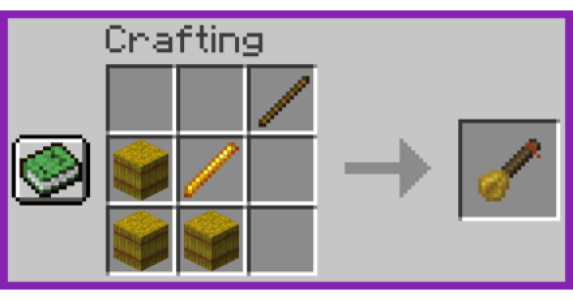
It adds an enchantable broom that is very easy to craft and use: right-click to place it on the ground, right-click on the Broom Entity to mount, press Space to take off.

Currently the content is basically the same as Brooms. However, since Mojang changed the CreativeTabs in 1.20, the wooden broom has been moved to the TOOLS_AND_UTILITIES tab.
EnchantmentBooks about brooms might appear in loot chests from NeoForge 1.21.1-1.2.0.
After NeoForge-1.21.1-1.3.0 you can craft Succuba Hat (Fake) and Succuba Hat.
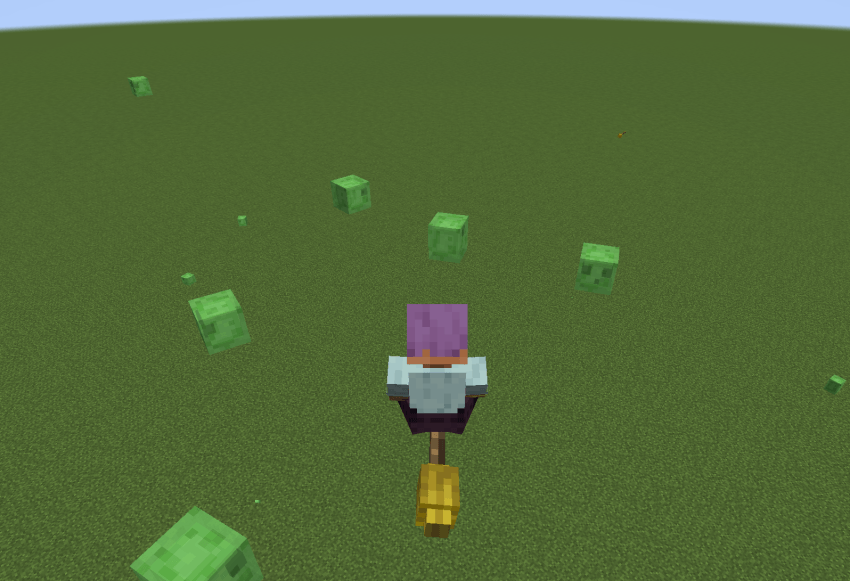
- Wearing either version of the Succuba Hat boosts your broom flying speed!
- Wearing the real Succuba Hat transforms you into Elaina (Wandering Witch: The Journey of Elaina.) 🧙‍♀️✨
Please do not report any issues to the original author.
Installation von Brooms Unofficial
With Millida Launcher
Install Millida Launcher
The launcher is free: download it at millida.net/launcher and sign in with any nickname.
Click “Install” on this page
The launcher opens and installs the mod for Minecraft 1.20.1–1.21.1 on Fabric, Forge or NeoForge automatically.
Launch the game
A profile with it appears in the launcher: click “Play”.
Manually
Install Fabric, Forge or NeoForge
The loader must match the game version of the mod file, for example Minecraft 1.21.1. After installing it, a separate profile appears in your launcher.
Download the file for your version
In the version list above, pick the file BroomsModUnofficial-NeoForge-1.21.1-1.3.0.jar (90 KB) for your game version and loader.
Put it in the mods folder
The folder is inside .minecraft (Windows: %appdata%\.minecraft\mods). If it does not exist, create it.
Launch the loader profile
Open “Mods” in the main menu: Brooms Unofficial should be in the list.
Minecraft 1.21.1 runs on Java 21: with a different Java version the game may close right after launch.
Versionen
Mit Abhängigkeiten
| Minecraft | Loader | Datei | Datum | Aktionen |
|---|---|---|---|---|
| 1.21.1 | NeoForge | BroomsModUnofficial-NeoForge-1.21.1-1.3.0.jar90.2 KB | ||
| 1.21.1 | Fabric | BroomsModUnofficial-Fabric-1.21.1-1.2.0.jar71 KB | ||
| 1.21.1 | NeoForge | BroomsModUnofficial-1.21.1-1.2.0.jar69.5 KB | ||
| 1.20.1 | Forge | BroomsModUnofficial-1.20.1-1.1.2.jar62 KB |
FAQ
Which Minecraft versions does Brooms Unofficial work on?
There are files for 1.21.1, 1.20.1. The newest is 1.21.1.
Is Brooms Unofficial for Forge or Fabric?
There are files for Fabric: 1.21.1, for Forge: 1.20.1 and for NeoForge: 1.21.1.
Does Brooms Unofficial need other mods?
The author lists no required dependencies: the Fabric, Forge or NeoForge loader is enough.
Which Java does Brooms Unofficial need?
Minecraft 1.21.1 runs on Java 21. If the game closes right after launch, the usual cause is the wrong Java version in the profile settings.
Where can I download Brooms Unofficial safely?
On this page: the file BroomsModUnofficial-NeoForge-1.21.1-1.3.0.jar (90 KB) is stored on Millida’s server, with no link shorteners. SHA-1 checksum: 219a018fa883cff2da7e395fc1fda6dcbf3239a2.
Bewertungen
Bewerten Sie Brooms Unofficial als Erster


