

Boring Default Game Rules Mod für Minecraft 1.20.1, 1.21.8
Ein Mod, der es ermöglicht, die Standardwerte der Spielregeln über praktische Methoden zu ändern.
 Fabric
 Quilt
QuiltBoring Default Game Rules
Boring Default Game Rules is a simple mod that allows for changing the default values of all games rules. This mod aims to be the most convenient way to edit the default values of a game rule by not only offering a config screen, but also easy off-game configuration by generating a JSON Schema!
Part of the Boring series. Don't forget to check out Boring Backgrounds and Damage Incorporated!
Dependencies
As of Minecraft 1.20.6+, this mod requires Fabric API and either Fabric Loader or Quilt Loader.
This mod also has optional support with Mod Menu.
Configuration
With this mod, there are two main methods in which you can edit the default game rules.
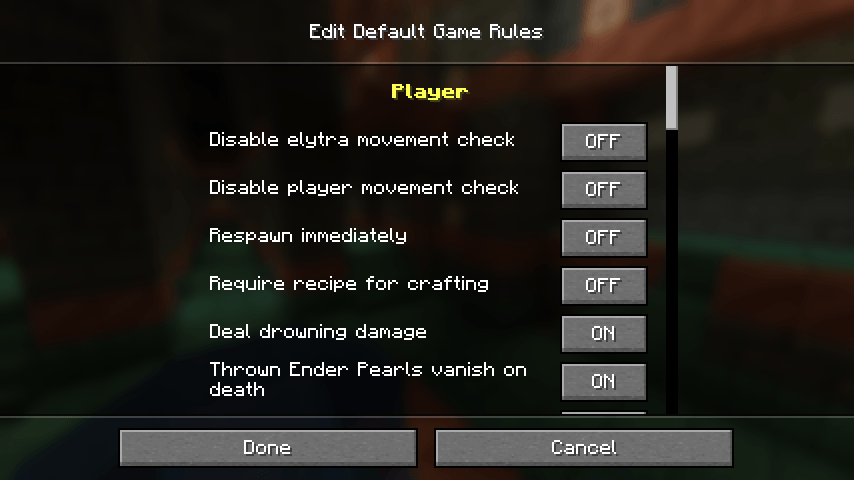
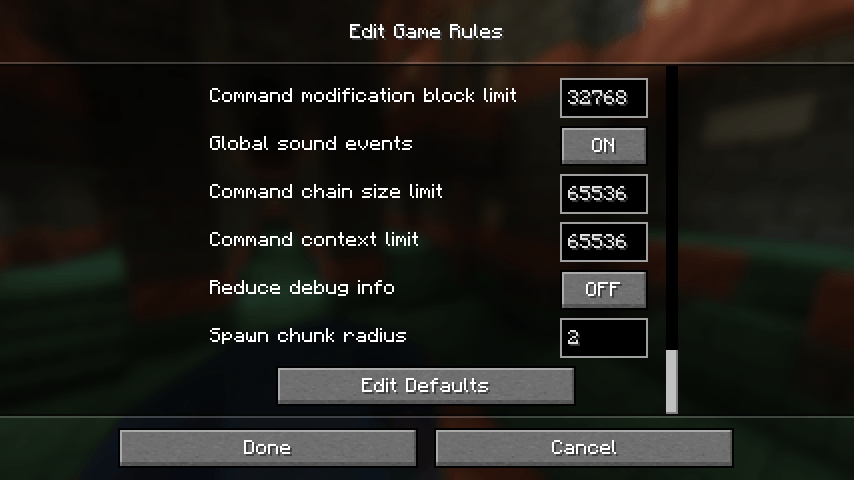
The main way to edit the defaults is through the "Edit Default Game Rules" screen, which can be opened either thanks to a button at the bottom of Vanilla's "Game Rules" screen or through the mod's config button on Mod Menu. On this screen, you can change the defaults like you would change the game rule values on a regular world, with a "Reset Defaults" button being available at the bottom of the list if needed.
However, If you aren't in-game and have at least started it once, don't worry! There is a config file is located at .minecraft/config/boring_default_game_rules/config.json, and if you have a JSON Schema-compatible editor (Visual Studio Code is recommended if you have none), it will make use of the automatically-generated JSON Schema in order to enhance your editing experience! The generated JSON Schema contains not only documentation on the config itself, but also provides suggestions for all game rules detected on the game.
Below here is the commented format (if you are offline, the JSON Schema also contains information about the options):
{ // The file path of this mod's JSON schema. Don't worry about changing this value! "$schema": "config.schema.json", // A map of game rules and the new default value that will override the original "default_game_rules": { // This will set "keepInventory" to true as the default value // Autocompletions are provided by the JSON schema, so don't worry about having to memorize all game rule options "keepInventory": true }, // Defines if a JSON schema should be generated or not. Only disable this if you know what you are doing "generate_json_schema": true }
Installation von Boring Default Game Rules
With Millida Launcher
Install Millida Launcher
The launcher is free: download it at millida.net/launcher and sign in with any nickname.
Click “Install” on this page
The launcher opens and installs the mod for Minecraft 1.20–1.21.8 on Fabric or Quilt automatically.
Launch the game
A profile with it appears in the launcher: click “Play”.
Manually
Install Fabric or Quilt
The loader must match the game version of the mod file, for example Minecraft 1.21.8. After installing it, a separate profile appears in your launcher.
Download the file for your version
In the version list above, pick the file boring_default_game_rules-2.0.0+1.21.5.jar (37 KB) for your game version and loader.
Put it in the mods folder
The folder is inside .minecraft (Windows: %appdata%\.minecraft\mods). If it does not exist, create it.
Launch the loader profile
Open “Mods” in the main menu: Boring Default Game Rules should be in the list.
Minecraft 1.21.8 runs on Java 21: with a different Java version the game may close right after launch.
Versionen
Mit Abhängigkeiten
| Minecraft | Loader | Datei | Datum | Aktionen |
|---|---|---|---|---|
| 1.21.5 | Fabric, Quilt | 2.0.0+1.21.5-fabric36.9 KB | ||
| 1.20.2 | Quilt | 1.1.0+1.20.1-quilt61.4 KB |
Bewertungen
Bewerten Sie Boring Default Game Rules als Erster


