
Blue Flame Burning Mod für Minecraft 1.20.1, 1.21.1
Lässt Seelenfeuer Entitäten mit einer blauen Flamme statt mit normalen Flammen verbrennen
 NeoForge
 Forge
ForgeÜber die Blue Flame Burning-Mod
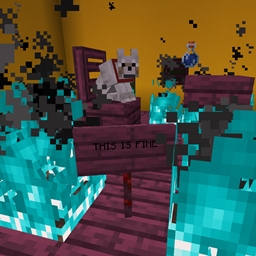
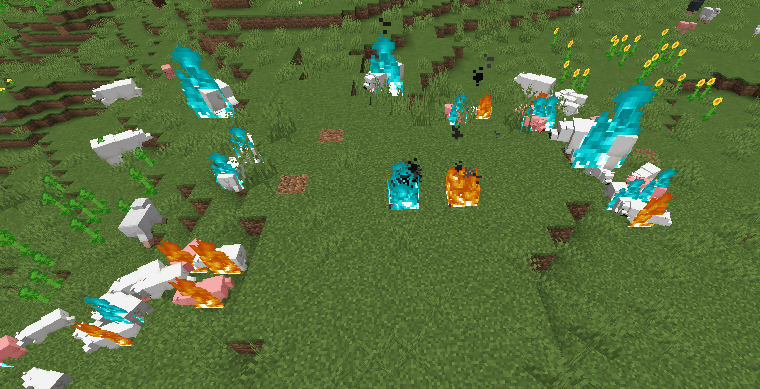
Lässt Seelenfeuer Entitäten mit einer blauen Flamme brennen statt mit den gewöhnlichen langweiligen gelben Flammen, wenn sie durch eine Seelenfeuerquelle in Brand geraten.
- Wenn Seelenfeuer den Spieler oder eine Entität in Brand setzt, brennt die Entität mit einer blauen Flamme
- Brennt ein Zombie mit einer blauen Flamme und setzt andere Entitäten in Brand, brennen diese Entitäten ebenfalls blau
- Unterstützung für Mod-Flüssigkeiten, die den Spieler in Brand setzen
Die von dieser Mod hinzugefügte Änderung ist rein visuell.
Die Mod wird auf beiden Seiten benötigt.
Komm auf Discord, wenn du Hilfe brauchst oder Fragen hast: https://discord.gg/69YVMbvhTC
Bei der Erstellung dieser Mod wurden viele Eisbären verletzt
Installation von Blue Flame Burning
With Millida Launcher
Install Millida Launcher
The launcher is free: download it at millida.net/launcher and sign in with any nickname.
Click “Install” on this page
The launcher opens and installs the mod for Minecraft 1.18.2–1.21.1 on Forge or NeoForge automatically.
Launch the game
A profile with it appears in the launcher: click “Play”.
Manually
Install Forge or NeoForge
The loader must match the game version of the mod file, for example Minecraft 1.21.1. After installing it, a separate profile appears in your launcher.
Download the file for your version
In the version list above, pick the file blueflame-1.21.1-1.1.1.jar (18 KB) for your game version and loader.
Put it in the mods folder
The folder is inside .minecraft (Windows: %appdata%\.minecraft\mods). If it does not exist, create it.
Launch the loader profile
Open “Mods” in the main menu: Blue Flame Burning should be in the list.
Minecraft 1.21.1 runs on Java 21: with a different Java version the game may close right after launch.
Versionen
Mit Abhängigkeiten
| Minecraft | Loader | Datei | Datum | Aktionen |
|---|---|---|---|---|
| 1.21.1 | NeoForge | blueflame-1.21.1-1.1.1.jar17.5 KB 1 | ||
| 1.20.1 | NeoForge, Forge | blueflame-1.20.0-1.0.3.jar26 KB | ||
| 1.18.2 | Forge | blueflame-1.18.2-0.1.0.0.jar26.2 KB |
FAQ
Which Minecraft versions does Blue Flame Burning work on?
There are files for 1.21.1, 1.20.1, 1.20, 1.18.2. The newest is 1.21.1.
Is Blue Flame Burning for Forge or Fabric?
There are files for Forge: 1.18.2–1.20.1 and for NeoForge: 1.20–1.21.1. There are no files for Fabric: a mod for another loader will not start.
Does Blue Flame Burning need other mods?
The author lists no required dependencies: the Forge or NeoForge loader is enough.
Which Java does Blue Flame Burning need?
Minecraft 1.21.1 runs on Java 21. If the game closes right after launch, the usual cause is the wrong Java version in the profile settings.
Where can I download Blue Flame Burning safely?
On this page: the file blueflame-1.21.1-1.1.1.jar (18 KB) is stored on Millida’s server, with no link shorteners. SHA-1 checksum: 0e78defafd6cf08759c656a54f8a33315e3ab924.
Bewertungen
Bewerten Sie Blue Flame Burning als Erster


