

Better Zoom Mod für Minecraft 1.20.1, 1.21.1
Zoome sanft mit Mausrad und Hotkeys so viel du willst, auf einfache Weise mit Anpassungen
 NeoForge
 Forge
ForgeÜber die Better Zoom-Mod

Better Zoom v2.9, allows you to zoom smoothly with wheel scrolling and hotkeys. It offers a simple and efficent zoom with customizations. All of that without any mixin/asm, in order to improve the speed.
The goal of this mod is to provide a simple & suitable zoom with both wheel and hotkeys smooth zooming. No fancy or complicated parameters included. It still offers customizations (see screenshots below) on a Configuration GUI while running without any mixin or any additional library.
It's also meant to be simple, compatible but still including all the necessary features, without fancy stuff.

Press "c" by default to toggle zoom. (Configurable keybind)
Press "+"/"-" or scroll with wheel to zoom in/out ( Configurable) - You can also hold these keybinds!
*A new video and logo are being made!

Configuration GUI (Forge 1.20.1 v2.9.0 reference): (open with ' V' keybind by default) and at mods/config..:
Details:
Zoom Increment - How much zoom it increments per scroll wheel. (useful to zoom/dezoom very quickly)
Mouse Sensitivity - The mouse sensitivity that will be multiplited by when you zoom. (adjust as you need so the camera doesn't move too fast when zooming a lot) Auto Adjust - Adjust the mouse sensitivty automatically according to the zoom level. Less sensitive when Cinematic Camera is on. Smooth Zoom - A real Smooth Fade in/out when zooming Hold to Zoom - Require to hold the zoom keybind in order to keep zooming Easing Factor - Easing factor for the smooth transitions. Lowers = slower/smoother Disable Bobbing - Disable the bob biew/bobbing while zooming Cinematic Camera - Cinematic Camera movements while zooming. Slow and smooth, useful for cinematic animations/videos. Note: it's regulated with Auto-adjust mode, if you want a stronger cinematic feel, disable Auto-adjust and set lower value for Mouse sensitivity
(Tooltips are avilable ingame for more informations)
Recommended: (What I use :D)
- Zoom Increment: ~5
- Mouse Sensitivity: Auto-adjust
- Easing Factor: 0.20
- Smooth Zoom: enabled
- Hold to Zoom: it depends..
- Zoom Mode: Both (yes, you can use wheel and hotkeys!)
- Disable bobbing: enabled
- Cinematic camera: it depends..
Custom keybinds:
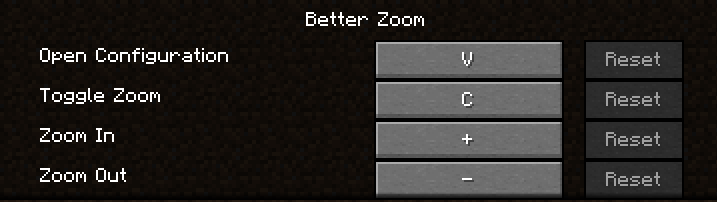
*You can even hold keybinds of zoom in/out

Translations are available for French and English yet. Feel free to suggest better one, or directly add translations on github with a pull request!
Feel free to add the mod in any modpack published on curseforge! This is highly appreciated.
The code is open source: https://github.com/AwesomeHippo/BetterZoom under MIT license
Installation von Better Zoom
With Millida Launcher
Install Millida Launcher
The launcher is free: download it at millida.net/launcher and sign in with any nickname.
Click “Install” on this page
The launcher opens and installs the mod for Minecraft 1.20.1–1.21.1 on Forge or NeoForge automatically.
Launch the game
A profile with it appears in the launcher: click “Play”.
Manually
Install Forge or NeoForge
The loader must match the game version of the mod file, for example Minecraft 1.21.1. After installing it, a separate profile appears in your launcher.
Download the file for your version
In the version list above, pick the file betterzoom-neoforge-1.21.1-2.9.0.jar (110 KB) for your game version and loader.
Put it in the mods folder
The folder is inside .minecraft (Windows: %appdata%\.minecraft\mods). If it does not exist, create it.
Launch the loader profile
Open “Mods” in the main menu: Better Zoom should be in the list.
Better Zoom works on the player’s side only: there is no need to install it on a server.
Minecraft 1.21.1 runs on Java 21: with a different Java version the game may close right after launch.
Versionen
Mit Abhängigkeiten
| Minecraft | Loader | Datei | Datum | Aktionen |
|---|---|---|---|---|
| 1.21.1 | NeoForge | 1.21.1110 KB 42 | ||
| 1.20.4 | Forge | 1.20.4113 KB 9 | ||
| 1.21.1 | NeoForge | 1.21.120.3 KB | ||
| 1.20.5 | Forge | 1.20.522.9 KB | ||
| 1.20.5 | Forge | 1.20.522.8 KB | ||
| 1.20.5 | Forge | 1.20.520.9 KB | ||
| 1.20.5 | Forge | 1.20.520.6 KB | ||
| 1.20.5 | Forge | 1.20.520.6 KB |
FAQ
Which Minecraft versions does Better Zoom work on?
There are files for 1.21.1, 1.20.5, 1.20.4, 1.20.3, 1.20.2, 1.20.1. The newest is 1.21.1.
Is Better Zoom for Forge or Fabric?
There are files for Forge: 1.20.1–1.20.5 and for NeoForge: 1.21.1. There are no files for Fabric: a mod for another loader will not start.
Does Better Zoom need other mods?
The author lists no required dependencies: the Forge or NeoForge loader is enough.
Do I need to install Better Zoom on a server?
No. Better Zoom works on the player’s side only: there is no need to install it on a server.
Which Java does Better Zoom need?
Minecraft 1.21.1 runs on Java 21. If the game closes right after launch, the usual cause is the wrong Java version in the profile settings.
Where can I download Better Zoom safely?
On this page: the file betterzoom-neoforge-1.21.1-2.9.0.jar (110 KB) is stored on Millida’s server, with no link shorteners. SHA-1 checksum: 0e9179ce1c22ebccab50c8ec47978a9ce5bbbdf3.
Bewertungen
Bewerten Sie Better Zoom als Erster


