

Cobblemon: Mega Showdown مود لماينكرافت 1.21.1
يضيف التطور الضخم والحركات Z والتيراليزيشن والدينا/جيغانتاماكس والانفجار الفائق والاندماجات إلى Cobblemon!
 NeoForge
 Fabric

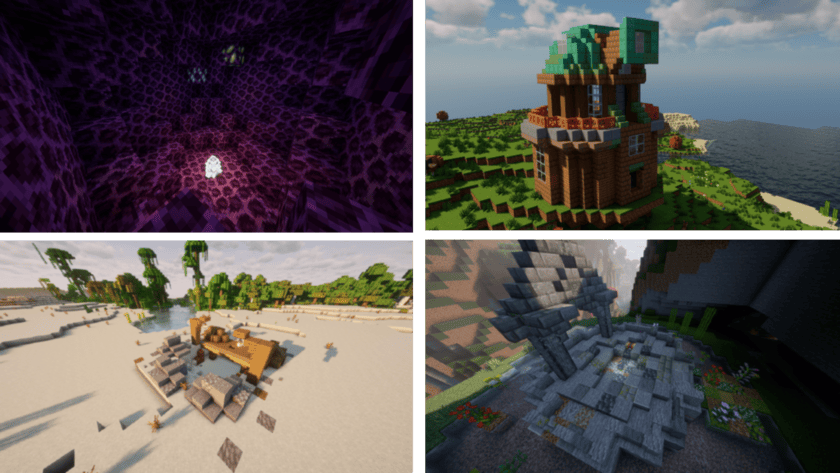

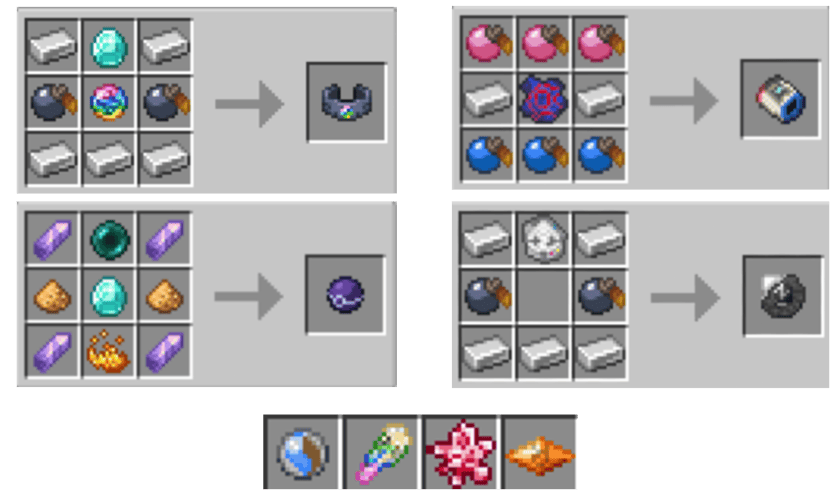

أنشئ Mega الخاص بك والعناصر والمزيد!
يعمل Mega Showdown كمنصة تعديل تتيح لك إنشاء حزم بيانات لكل ما يمكنك تخيله تقريبًا! لدينا 📖 Wiki خاص بنا لمنشئي الإضافات، ويضم تقريبًا كل ما يمكنك فعله باستخدام MSD - بما في ذلك:
Megas مخصصة وGmax والاندماجات وتغييرات الأشكال العامة عناصر Showdown مخصصة، بما في ذلك تغييرات الأشكال المحمولة تأثيرات حالة أو ظروف أو أجواء مخصصة سكربتات Showdown/Battle مخصصة والمزيد!
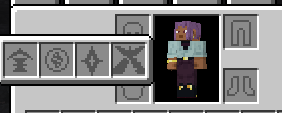
تكامل Accessories!
جميع عناصر Gimmick في Mega Showdown يمكن ارتداؤها في فتحات Gimmick الخاصة بها، دون الحاجة إلى الاختيار بين كل إضافات الإكسسوارات التي قمت بتثبيتها!

الميزات العامة!
العديد من الميزات القابلة لحزم البيانات دعم العناصر التجميلية دعم Accessories جميع بوكيمونات الاندماج جميع تغييرات الأشكال دعم الركوب جميع أكثر من 90 Mega جميع Gimmicks
الشكر
الشكر لجميع مساهمينا الرائعين ومعلومات حول نماذج من نستخدمها في المود مدرجة 👉 هنا
التعارضات
يمكن العثور على معظم الإضافات وحزم البيانات والمودات المتعارضة المعروفة 👉 هنا
التواصل الاجتماعي
لأي مساعدة أو أسئلة قد تكون لديك - بخصوص المود نفسه أو تطوير إضافتك الخاصة له - يمكنك الانضمام إلى Discord الخاص بـ Mega Showdown:

كيفية تثبيت Cobblemon: Mega Showdown
With Millida Launcher
Install Millida Launcher
The launcher is free: download it at millida.net/launcher and sign in with any nickname.
Click “Install” on this page
The launcher opens and installs the mod for Minecraft 1.21.1 on Fabric or NeoForge automatically, together with its dependencies: Cobblemon, Fabric API, oωo (owo-lib), Accessories, Architectury API.
Launch the game
A profile with it appears in the launcher: click “Play”.
Manually
Install Fabric or NeoForge
The loader must match the game version of the mod file, for example Minecraft 1.21.1. After installing it, a separate profile appears in your launcher.
Download the file for your version
In the version list above, pick the file mega_showdown-neoforge-1.3.3+1.8.4+1.21.1-release.jar (19 MB) for your game version and loader.
Put it in the mods folder
The folder is inside .minecraft (Windows: %appdata%\.minecraft\mods). If it does not exist, create it. Required dependencies go there too: Cobblemon, Fabric API, oωo (owo-lib), Accessories, Architectury API.
Launch the loader profile
Open “Mods” in the main menu: Cobblemon: Mega Showdown should be in the list.
On a server
A server on Fabric or NeoForge
The mod only works on a server with the same loader and game version, for example 1.21.1.
File goes into the server’s mods folder
Stop the server, put the mod file into the mods folder and start the server again.
Use the “To server” button
On Millida Hosting, the button at the top of the page uploads the file to your server and restarts it for you.
Minecraft 1.21.1 runs on Java 21: with a different Java version the game may close right after launch.
الإصدارات
مع المتطلبات
| Minecraft | المشغّل | الملف | التاريخ | الإجراءات |
|---|---|---|---|---|
| 1.21.1 | NeoForge | 1.21.119.4 ميغابايت 5 | ||
| 1.21.1 | Fabric | 1.21.119.3 ميغابايت 6 | ||
| 1.21.1 | NeoForge | 1.21.119.4 ميغابايت 2 | ||
| 1.21.1 | Fabric | 1.21.119.3 ميغابايت 2 | ||
| 1.21.1 | NeoForge | 1.21.119.4 ميغابايت 2 | ||
| 1.21.1 | Fabric | 1.21.119.3 ميغابايت 10 | ||
| 1.21.1 | Fabric | 1.21.119.3 ميغابايت | ||
| 1.21.1 | Fabric | 1.21.119.3 ميغابايت |
ما يلزم لتشغيله
- Cobblemonمطلوب
- Fabric APIمطلوب
- oωo (owo-lib)مطلوب
- Accessoriesمطلوب
- Architectury APIمطلوب
التقييمات
كن أول من يقيّم Cobblemon: Mega Showdown


