

Accessories مود لماينكرافت 1.20.1, 1.21.1
مود إكسسوارات قابل للتوسيع ومدفوع بالبيانات لـ Minecraft
 Fabric
 NeoForge
 Forge
Forgeحول مود Accessories
Accessories هو مود إكسسوارات مدفوع بالبيانات لـ NeoForge و Fabric مع التركيز على استخدام واجهة برمجة تطبيقات مشتركة لكلتا المنصتين عندما يكون ذلك ممكنًا.
يعتمد أسلوب واجهة برمجة تطبيقات المكتبة على أعمال Curios و Trinkets مع الإشارة إلى كل من TheIllusiveC4 و emilyploszaj لعملهما على مودات الإكسسوارات لماينكرافت.
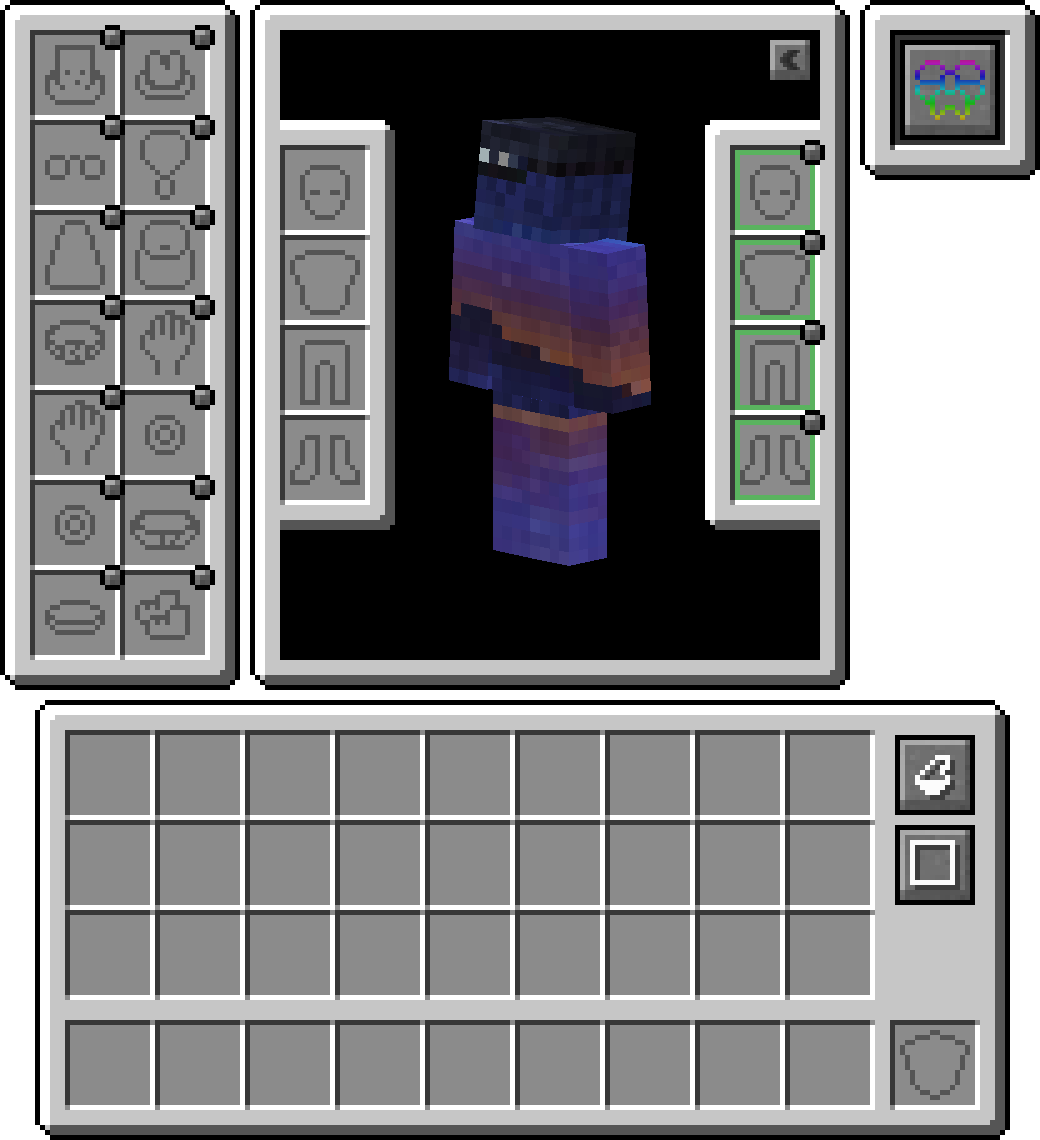
الميزات
دعم Elytra و Totem و Banner مضمّن
افتراضيًا، يمكنك تجهيز الرايات في خانة الرأس أو العباءة (قيد التطوير) لعرض راية مخصصة. بالنسبة لـ elytra أو totem، ستحتاج إلى تمكين ذلك داخل الإعدادات لأنه معطّل افتراضيًا.

طبقة التوافق
نظرًا لأن واجهات برمجة التطبيقات الحالية مثل Trinket و Curios تُستخدم بشكل أساسي، يمكنك تثبيت Accessories Compatibility Layer لجعلها تعمل تحت Accessories لتجربة موحّدة

واجهة برمجة تطبيقات ترجمة النماذج
مضمّن للمطورين واجهة برمجة تطبيقات تحويل مناسبة تُستخدم داخل عرض Accessories الأصلية، مما يسمح بالربط الصحيح بأجزاء نموذج كيان معيّن، وهو ما يتيح دعمًا صحيحًا لحزم الموارد EMF مثل Fresh Animations، وهناك خطط مستقبلية لدعم مودات عرض أخرى مثل Figura.
إدارة الإكسسوارات المجهّزة
تتيح القدرة على الوصول إلى الكيانات الأخرى المروّضة لمودات أخرى امتلاك عناصر إكسسوارات للحيوانات الأليفة أو المراكب. وإلى جانب كونها مفيدة لمشرفي الخوادم لإدارة إكسسوارات اللاعبين الآخرين عند الحاجة، دون استخدام أوامر إدارة مباشرة. ما عليك سوى الضغط على shift واستخدام 'Accessories Open Screen' على أي كيان (إذا كان مملوكًا، يجب أن تكون المالك) لإظهار الشاشة، أو تشغيل الأمر /accessories edit إذا كنت OPed.
إضافات واجهة برمجة التطبيقات
إليك بعض الأمثلة على واجهة برمجة التطبيقات المطبقة في Accessories والتي قد تساعدك في تطوير مودك:
- دعم كامل للإكسسوارات المبنية على NBT: Wiki
- أحداث واجهة برمجة التطبيقات الحالية لعناصر Piglin المحايدة، وأقنعة Enderman، وتعديلات Looting، وتعديلات Fortune، وقدرة المشي على الثلج: Wiki
- واجهة برمجة تطبيقات خانة فريدة لإكسسوارات خاصة بالمود: Wiki
كيفية تثبيت Accessories
With Millida Launcher
Install Millida Launcher
The launcher is free: download it at millida.net/launcher and sign in with any nickname.
Click “Install” on this page
The launcher opens and installs the mod for Minecraft 1.20–1.21.1 on Fabric, Forge or NeoForge automatically, together with its dependencies: Cloth Config API, Fabric API, oωo (owo-lib).
Launch the game
A profile with it appears in the launcher: click “Play”.
Manually
Install Fabric, Forge or NeoForge
The loader must match the game version of the mod file, for example Minecraft 1.21.1. After installing it, a separate profile appears in your launcher.
Download the file for your version
In the version list above, pick the file accessories-fabric-1.1.0-beta.54+1.21.1.jar (1.1 MB) for your game version and loader.
Put it in the mods folder
The folder is inside .minecraft (Windows: %appdata%\.minecraft\mods). If it does not exist, create it. Required dependencies go there too: Cloth Config API, Fabric API, oωo (owo-lib).
Launch the loader profile
Open “Mods” in the main menu: Accessories should be in the list.
On a server
A server on Fabric, Forge or NeoForge
The mod only works on a server with the same loader and game version, for example 1.21.1.
File goes into the server’s mods folder
Stop the server, put the mod file into the mods folder and start the server again.
Use the “To server” button
On Millida Hosting, the button at the top of the page uploads the file to your server and restarts it for you.
Minecraft 1.21.1 runs on Java 21: with a different Java version the game may close right after launch.
الإصدارات
مع المتطلبات
| Minecraft | المشغّل | الملف | التاريخ | الإجراءات |
|---|---|---|---|---|
| 1.20.1 | Fabric | 1.20.1751 KB 2 | ||
| 1.20.1 | Forge | 1.20.11 ميغابايت 30 | ||
| 1.21.1 | Fabric | 1.21.11.1 ميغابايت 12 | ||
| 1.21.1 | NeoForge | 1.21.11 ميغابايت 21 | ||
| 1.21 | NeoForge | 1.2110.3 ميغابايت 14 | — | |
| 1.20.1 | Fabric | 1.20.1751 KB 3 | — |
ما يلزم لتشغيله
- Cloth Config APIمطلوب
- Fabric APIمطلوب
- oωo (owo-lib)مطلوب
محتوى يتطلبه
الأسئلة الشائعة
Which Minecraft versions does Accessories work on?
There are files for 1.21.1, 1.21, 1.20.1, 1.20. The newest is 1.21.1.
Is Accessories for Forge or Fabric?
There are files for Fabric: 1.20–1.21.1, for Forge: 1.20–1.20.1 and for NeoForge: 1.21–1.21.1.
What does Accessories need to work?
Required: Cloth Config API, Fabric API, oωo (owo-lib). Without them the mod will not start: dependencies go into the same mods folder.
Does Accessories work on a server?
Yes. Accessories works both in singleplayer and on a server.
Which Java does Accessories need?
Minecraft 1.21.1 runs on Java 21. If the game closes right after launch, the usual cause is the wrong Java version in the profile settings.
Where can I download Accessories safely?
On this page: the file accessories-fabric-1.1.0-beta.54+1.21.1.jar (1.1 MB) is stored on Millida’s server, with no link shorteners. SHA-1 checksum: e1165f3d5b31d4296f932ec1bc428f2a832c5def.
التقييمات
كن أول من يقيّم Accessories


