

Pix Android Boost بناء لماينكرافت 1.20.1, 1.21.1
تكامل التحسين لـ ZalithLauncher/Fold Craft Launcher يرجى الذهاب إلى قناة QQ PixABoost1798 للإبلاغ عن المشكلات أو الاقتراحات.
 Fabric
 NeoForge
 Forge
ForgePix Android Boost
Make Minecraft Run Smoothly on Your Phone
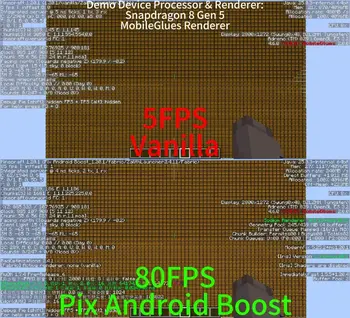
An optimization modpack built specifically for Android devices, designed to let mid-to-low-end phones run Minecraft smoothly without lag.

What It Does For You
- Boosts FPS & Reduces Lag – Enjoy buttery-smooth gameplay, even on older hardware
Mod Compatibility
Because this modpack is stuffed with a ton of mods, its compatibility is quite poor. As for what it's incompatible with, I can't really list them out—there are probably a lot. But don't worry, you can use the Lite version, which usually has better compatibility.

Notes
- 1.17+: Use MobileGlues MobileGL or ZinkKopper as renderer
- 1.16.5 and below: Use Krypton Wrapper, GL4ES Plus, or ZinkKopper as renderer
- ZinkKopper is not recommended on non-Adreno devices
- Crash reports caused by incorrect renderer configuration will not be supported
كيفية تثبيت Pix Android Boost
With Millida Launcher
Install Millida Launcher
The launcher is free: download it at millida.net/launcher and sign in with any nickname.
Click “Install” on this page
The launcher opens and installs the modpack for Minecraft 1.12.2–26.3 on Fabric, Forge or NeoForge automatically.
Launch the game
A profile with it appears in the launcher: click “Play”.
Manually
Download the modpack archive
In the version list above, pick the file Pix Android Boost_26.3.mrpack (1.9 MB).
Import it into a launcher
A launcher that supports modpacks (Millida Launcher, Prism) takes the archive via “Add modpack”, then “From file”. No need to unpack it yourself.
Allocate memory
Modpacks need more memory than the plain game: set 4–6 GB in the profile settings.
On a server
Use the “To server” button
On Millida Hosting, the button at the top of the page uploads the file to your server and restarts it for you.
Invite friends: they install the same modpack
To join the server, every player needs the same modpack version.
الإصدارات
مع المتطلبات
| Minecraft | المشغّل | الملف | التاريخ | الإجراءات |
|---|---|---|---|---|
| 1.20.1 | Fabric | 1.20.1386 KB | ||
| 1.12.2 | — | 1.12.2303 KB | ||
| 1.12.2 | — | 1.12.2303 KB | ||
| 1.20.1 | Fabric | 1.20.1387 KB | ||
| 1.21.1 | Fabric | 1.21.1533 KB | ||
| 1.21.1 | Fabric | 1.21.1533 KB | ||
| 1.20.1 | Forge | 1.20.18.2 ميغابايت | ||
| 1.21.1 | NeoForge | 1.21.12.5 ميغابايت |
ما يلزم لتشغيله
- Dependencyمضمّن بالفعل
- Dependencyمضمّن بالفعل
- Dependencyمضمّن بالفعل
- Dependencyمضمّن بالفعل
- Dependencyمضمّن بالفعل
- Dependencyمضمّن بالفعل
- Dependencyمضمّن بالفعل
- Dependencyمضمّن بالفعل
- Memory Leak Fixمضمّن بالفعل
- Dependencyمضمّن بالفعل
- Fzzy Configمضمّن بالفعل
- Dependencyمضمّن بالفعل
- Dependencyمضمّن بالفعل
- Dependencyمضمّن بالفعل
- Dependencyمضمّن بالفعل
- (Sodium) Chlorideمضمّن بالفعل
- Dependencyمضمّن بالفعل
- Immersive Optimizationمضمّن بالفعل
- Fabric Language Kotlinمضمّن بالفعل
- Dependencyمضمّن بالفعل
- Dependencyمضمّن بالفعل
- Dependencyمضمّن بالفعل
- Dependencyمضمّن بالفعل
- Dependencyمضمّن بالفعل
- Dependencyمضمّن بالفعل
- Dependencyمضمّن بالفعل
- Dependencyمضمّن بالفعل
- Dependencyمضمّن بالفعل
- VanillaIcecreamFixمضمّن بالفعل
- Dependencyمضمّن بالفعل
- TxniLibمضمّن بالفعل
- Async Locatorمضمّن بالفعل
- Kotlin for Forgeمضمّن بالفعل
- Redirectedمضمّن بالفعل
- Sodium Extrasمضمّن بالفعل
- Dependencyمضمّن بالفعل
- Dependencyمضمّن بالفعل
- Dependencyمضمّن بالفعل
- Dependencyمضمّن بالفعل
- Dependencyمضمّن بالفعل
- Dependencyمضمّن بالفعل
- Dependencyمضمّن بالفعل
- Architectury APIمضمّن بالفعل
- Dependencyمضمّن بالفعل
- Dependencyمضمّن بالفعل
- More Cullingمضمّن بالفعل
- Fleroviumمضمّن بالفعل
- Dependencyمضمّن بالفعل
- Async Loggerمضمّن بالفعل
- ModernFix-mVUSمضمّن بالفعل
- Dependencyمضمّن بالفعل
- Entity Cullingمضمّن بالفعل
- Lithiumمضمّن بالفعل
- Forge Config API Portمضمّن بالفعل
- Sodiumمضمّن بالفعل
- Concurrent Chunk Management Engine (Fabric)مضمّن بالفعل
- Very Many Players (Fabric)مضمّن بالفعل
- GPUBoosterمضمّن بالفعل
- Asyncمضمّن بالفعل
- Dependencyمضمّن بالفعل
- BadOptimizationsمضمّن بالفعل
- FastEventمضمّن بالفعل
- Dependencyمضمّن بالفعل
- Palladiumمضمّن بالفعل
- ScalableLuxمضمّن بالفعل
- Cloth Config APIمضمّن بالفعل
- Dependencyمضمّن بالفعل
- Faster Iris Shadow Mapper [FISM]مضمّن بالفعل
- Fabric APIمضمّن بالفعل
- Dependencyمضمّن بالفعل
- Dependencyمضمّن بالفعل
- Dependencyمضمّن بالفعل
- Particle Coreمضمّن بالفعل
- Dependencyمضمّن بالفعل
- ImmediatelyFastمضمّن بالفعل
- Ceruleanمضمّن بالفعل
- LightSpeedReمضمّن بالفعل
- TT20 (TPS Fixer)مضمّن بالفعل
- Alternate Currentمضمّن بالفعل
- Gnetumمضمّن بالفعل
- Iris Shadersمضمّن بالفعل
- Dependencyمضمّن بالفعل
- Better Block Entitiesمضمّن بالفعل
- Kryptonمضمّن بالفعل
- ToadLibمضمّن بالفعل
- Structure Layout Optimizerمضمّن بالفعل
- Optimized Block Entities [OBE]مضمّن بالفعل
- Forgified Fabric APIمضمّن بالفعل
- Starlight (Forge)مضمّن بالفعل
- Krypton Renoمضمّن بالفعل
- Embeddiumمضمّن بالفعل
- ModernFixمضمّن بالفعل
- FastSuiteمضمّن بالفعل
- Dependencyمضمّن بالفعل
- Dependencyمضمّن بالفعل
- Exordiumمضمّن بالفعل
- Ksyxisمضمّن بالفعل
- Placeboمضمّن بالفعل
- Resourceful Configمضمّن بالفعل
- More Culling Extraمضمّن بالفعل
- ThreadTweakمضمّن بالفعل
- Sodium Options APIمضمّن بالفعل
- Dependencyمضمّن بالفعل
- Dependencyمضمّن بالفعل
- Dependencyمضمّن بالفعل
- Dependencyمضمّن بالفعل
- Grapheneمضمّن بالفعل
- Particle Cullingمضمّن بالفعل
- Dependencyمضمّن بالفعل
- Smart Particlesمضمّن بالفعل
- Dependencyمضمّن بالفعل
- Dependencyمضمّن بالفعل
- Mod Menuمضمّن بالفعل
- FerriteCoreمضمّن بالفعل
التقييمات
كن أول من يقيّم Pix Android Boost


