

Sodium Options API مود لماينكرافت 1.20.1
واجهة برمجة إعدادات لإضافة خيارات Sodium مع قائمة فئات أفضل
- تنزيلات
- 165 تنزيلات
- مشاهدة
- 452 مشاهدة
- محدّث
- محدّث 03.09.2026
- 1.20 — 1.20.1
 Forge
Forge- العميل
حول مود Sodium Options API

تضيف هذه الإضافة أحداثًا متعددة المنصات لإضافة تكامل قائمة خيارات Sodium/Embeddium. على سبيل المثال، يمكنك إضافة صفحة خيارات إلى Embeddium على Forge، وFabric Sodium 0.5 على 1.20.1، وFabric/NeoForge Sodium 0.6 على 1.21.1 بحدث واحد:
OptionGUIConstruction.EVENT.register((pages) -> pages.add(new TestOptionPage()));
إذا كنت مستخدمًا نهائيًا ولم تكن هذه الإضافة مثبتة لديك بالفعل كمكتبة لإضافة Sodium أخرى، يمكنك تثبيتها إلى جانب Reese's Options للحصول على قائمة فئات محسّنة، مع دعم القوائم المنسدلة لتسهيل التنقل. سيسري هذا حتى على الإضافات التي لا تستخدم هذه الواجهة البرمجية وتحُقن مباشرة في خيارات Sodium.
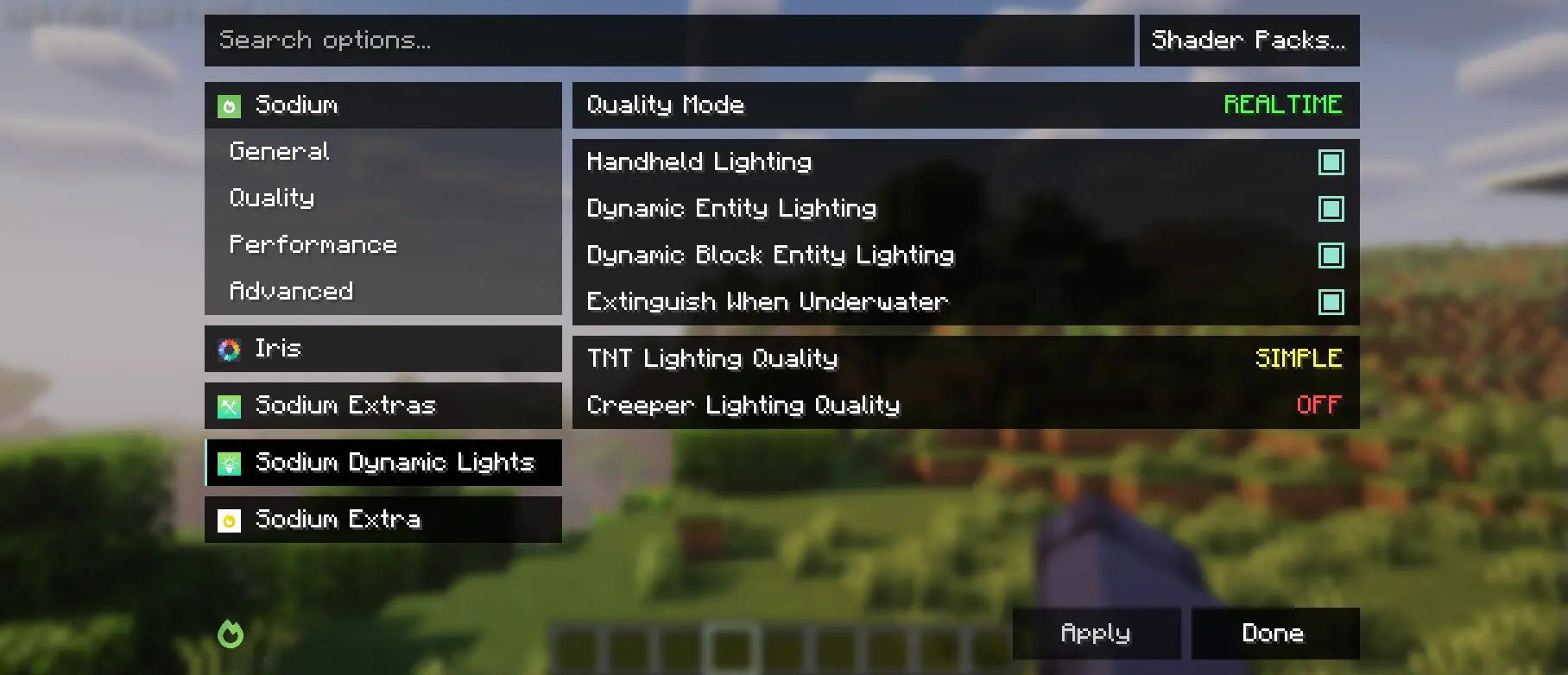
هذه الإضافة هي جزئيًا تفرّع من واجهة فئات Embeddium وأحداث الخيارات، مع تغييرات كبيرة لدعم Sodium الأصلي. وبينما تُجري تغييرات على قائمة Reese's Sodium Options، فإنها تفعل ذلك عبر mixin لأسباب التوافق، لذا ستحتاج إلى تثبيت كليهما.
استخدام الواجهة البرمجية
أولًا، ستحتاج إلى إضافة هذه الإضافة إلى بيئة التطوير لديك، باستخدام إصدار Maven الخاص بـ Curseforge أو Modrinth.
modImplementation("maven.modrinth:sodium-options-api:version")
بعد ذلك، توفر هذه الإضافة ثلاثة أحداث في toni.sodiumoptionsapi.api:
- OptionGUIConstruction.EVENT، يُستدعى مرة واحدة في مُنشئ الواجهة الرسومية، ويسمح بإضافة صفحات كاملة. هذا هو الحدث الذي تريده على الأرجح.
- OptionPageConstruction.EVENT، يُستدعى لكل OptionPage. استخدم هذا إذا أردت إضافة مجموعة من المفاتيح إلى تبويب الأداء أو ما شابه.
- OptionGroupConstruction.EVENT، يُستدعى لكل مجموعة من الخيارات. استخدم هذا إذا أردت إدراج خيار واحد في مجموعة موجودة، أو تعديل الخيارات الأصلية.
كيفية تثبيت Sodium Options API
With Millida Launcher
Install Millida Launcher
The launcher is free: download it at millida.net/launcher and sign in with any nickname.
Click “Install” on this page
The launcher opens and installs the mod for Minecraft 1.20–1.20.1 on Forge automatically, together with its dependencies: Embeddium.
Launch the game
A profile with it appears in the launcher: click “Play”.
Manually
Install Forge
The loader must match the game version of the mod file, for example Minecraft 1.20.1. After installing it, a separate profile appears in your launcher.
Download the file for your version
In the version list above, pick the file sodiumoptionsapi-forge-1.0.10-1.20.1.jar (434 KB) for your game version.
Put it in the mods folder
The folder is inside .minecraft (Windows: %appdata%\.minecraft\mods). If it does not exist, create it. Required dependencies go there too: Embeddium.
Launch the loader profile
Open “Mods” in the main menu: Sodium Options API should be in the list.
Sodium Options API works on the player’s side only: there is no need to install it on a server.
Minecraft 1.20.1 runs on Java 17: with a different Java version the game may close right after launch.
الإصدارات
مع المتطلبات
| Minecraft | المشغّل | الملف | الإجراءات |
|---|---|---|---|
| 1.20.1 | Forge | 1.20.1434 KB 164 |
ما يلزم لتشغيله
- Embeddiumمطلوب
الأسئلة الشائعة
Which Minecraft versions does Sodium Options API work on?
There are files for 1.20.1, 1.20. The newest is 1.20.1.
Is Sodium Options API for Forge or Fabric?
Only for Forge: 1.20–1.20.1. There are no files for Fabric or NeoForge: a mod for another loader will not start.
What does Sodium Options API need to work?
Required: Embeddium. Without it the mod will not start: dependencies go into the same mods folder.
Do I need to install Sodium Options API on a server?
No. Sodium Options API works on the player’s side only: there is no need to install it on a server.
Which Java does Sodium Options API need?
Minecraft 1.20.1 runs on Java 17. If the game closes right after launch, the usual cause is the wrong Java version in the profile settings.
Where can I download Sodium Options API safely?
On this page: the file sodiumoptionsapi-forge-1.0.10-1.20.1.jar (434 KB) is stored on Millida’s server, with no link shorteners. SHA-1 checksum: 7529fbf938787ed13a251cbf40936f8c29ec4b6c.
التقييمات
كن أول من يقيّم Sodium Options API


