
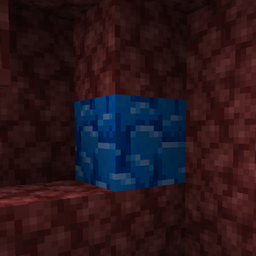
Giới thiệu gói tài nguyên Highlighted Netherite
This resource pack by jannik6879 changes the texture of Ancient Debris, i.e. Netherite, to an eye-catching blue color so as not to miss one when mining.
Cách cài đặt Highlighted Netherite
Install Millida Launcher
The launcher is free: download it at millida.net/launcher and sign in with any nickname.
Click “Install” on this page
The launcher opens and installs the resource pack for Minecraft 26.1–26.3 automatically.
Launch the game
A profile with it appears in the launcher: click “Play”.
Phiên bản
Kèm phụ thuộc
| Minecraft | Loader | Tệp | Ngày | Hành động |
|---|---|---|---|---|
| 26.1 | — | Highlighted Netherite - V.2.0 - jannik6879.zip114 KB 19 |
Câu hỏi thường gặp
Which Minecraft versions does Highlighted Netherite work on?
There are files for 26.3, 26.2, 26.1.2, 26.1.1, 26.1. The newest is 26.3.
How do I download Highlighted Netherite?
With Millida Launcher: it installs Highlighted Netherite into a modpack by itself, for the right game version and loader. The launcher is free.
Đánh giá
Hãy là người đầu tiên đánh giá Highlighted Netherite
Bình luận 0
Đăng nhập để bình luậnĐăng nhập


