
Effect Display Overlay Gói tài nguyên cho Minecraft 1.21.50
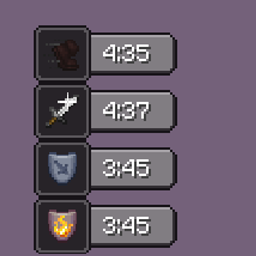
Xem hiệu ứng mob đang hoạt động khi đang di chuyển!
Giới thiệu gói tài nguyên Effect Display Overlay
This resource pack allows you to open the mob effects screen as an overlay which lets you move around while the effect screen is still opened.
How to enable:
On mobile, press the button to close.
On desktop, press the keybind to open the effect screen and press TAB to close it.
Cách cài đặt Effect Display Overlay
Install Millida Launcher
The launcher is free: download it at millida.net/launcher and sign in with any nickname.
Click “Install” on this page
The launcher opens and installs the resource pack for Minecraft 1.18.31–1.21.50 automatically.
Launch the game
A profile with it appears in the launcher: click “Play”.
Phiên bản
Kèm phụ thuộc
| Minecraft | Loader | Tệp | Ngày | Hành động |
|---|---|---|---|---|
| 1.21.50 | — | Effect-Display-Overlay.mcpack8.4 KB |
Câu hỏi thường gặp
Which Minecraft versions does Effect Display Overlay work on?
There are files for 1.18.31–1.21.50, 9 versions in total. The newest is 1.21.50.
How do I download Effect Display Overlay?
With Millida Launcher: it installs Effect Display Overlay into a modpack by itself, for the right game version and loader. The launcher is free.
Đánh giá
Hãy là người đầu tiên đánh giá Effect Display Overlay



