
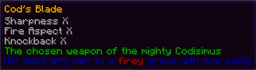
Lores Plugin cho Minecraft
Dễ dàng sửa tên và mô tả vật phẩm (có hỗ trợ màu)
Giới thiệu plugin Lores
Version 1.4.1 This Plugin was made for PhatLoots but works perfectly by its self
This plugin is a simple way to create custom Lores for Items. You hold the Item in your hand and use one of the commands below. Color can be added by using the & character.
Commands:
- /lore name <custom name> - Set the new Name of the Item
- /lore owner<custom name> - Change the Owner of a Skull
- /lore add <line of text> - Add a line to the lore
- /lore set <line #> <line of text> - Change a line of the lore
- /lore insert<line #> <line of text> - Insert a line into the lore
- /loot delete [line #] - Delete a line of the lore (last line by default)
- /lore clear - Clear all lines of the lore
- /lore undo - Undoes your last modification (up to 5 times)
Permission Nodes:
- lores.lore - Needed to modify an item's lore
- lores.name - Needed to change the name of an item
- lores.owner - Needed to set the owner of a skull
- lores.color - Needed to add color codes to lore
- lores.format - Needed to add format codes to lore
- lores.admin - Parent node for all above permissions
Cách cài đặt Lores
A server on Paper or Spigot
The plugin runs on the server core; players do not need to install anything.
File goes into the plugins folder
Download the file Lores.jar (16 KB) and put it into the server’s plugins folder.
Restart the server
On startup the plugin creates its own settings folder in plugins.
Use the “To server” button
On Millida Hosting, the button at the top of the page uploads the file to your server and restarts it for you.
Phiên bản
Kèm phụ thuộc
| Minecraft | Loader | Tệp | Ngày | Hành động |
|---|---|---|---|---|
| — | — | v1.4.116 KB |
Câu hỏi thường gặp
Do players need to install Lores?
No, the plugin goes only on the server, into the plugins folder: players do not need to download anything.
Where can I download Lores safely?
On this page: the file Lores.jar (16 KB) is stored on Millida’s server, with no link shorteners. SHA-1 checksum: c50f3bc6139d86e334c681ed32294bf604db86c8.
Đánh giá
Hãy là người đầu tiên đánh giá Lores


