

LevelHearts Plugin cho Minecraft 1.13
Tăng máu tối đa của bạn bằng cách nhận exp!
Giới thiệu plugin LevelHearts

This plugin gives players the ability to increase their maximum health just by gaining experience levels. Every few levels a player gains, his maximum health will increase. LevelHearts is highly configurable offers a set of command to change health and maximum health of any player! No client mods required!
Links
➝ Help translating / Localization
➝ Source code, Build Server and Maven Repository
➝ Issues (Create an issue)
Available in Polish, Portuguese, Russian and Thai
What it does
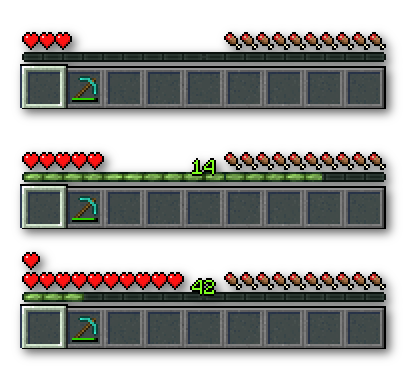
LevelHearts makes your maximum health increase when you gain levels:
Features
Click on an icon to learn more!
Installation
This is as simple as it gets: Just put it into your /plugins folder of your server and your good to go! Enjoy!
Commands
/health Displays your current health and let's you change it.
/maxhealth Displays your current maximum health and let's you change it.
/lvlhearts Displays LevelHearts version and generic help.
➝ Detailed command list
Configuration
LevelHearts will automatically generate a config.yml configuration file. If you want to reset or update it, just remove the current one and LevelHearts will create a new one. In the configuration file, you can change default maximum health and limit, increase level interval, permissions, particle effects, and more!
➝ Configuration documentation
➝ Permission documentation
Pre Made Configurations
Just replace the downloaded config.yml with your current one and reload the server.
u7uu7u7's Style Maxhealth increases every 10 levels; when you die, you loose your maxhealth. Download Pastebin
yogbox Style You start with 3 ❤ and your maxhealth increases every 5 levels. Download Pastebin
More Health Enhanced Mod Style You start with 20 ❤ and your maxhealth increases every 5 levels. Download Pastebin
Feel free to submit your own configurations!
Supported Level Modes
By default, LevelHearts will use the default Minecraft experience level to calculate the maxhealth levels. You can change the level mode in config.yml / maxHealth.levelMode. Supported modes are (other plugins may add new modes):
- exp: Vanilla experience levels
- combatLevel: McCombatLevel
Report Issues / Suggest Feature
Please use our issue tracker to report issues and suggest features.
➝ Bitbucket Issue Tracker
Media
➝ More media
Metrics / Update checking
Since v1.4.7 this plugin sends statistics information to bstats.org (and in versions prior since v1.2 to mstats.org). You can disable it in config.yml / enableMetrics = false. Also the plugin checks dev.bukkit.org if there is a new version available. LevelHearts will not download anything to your server and will just print a message with the download link. You can opt-out this in config.yml / updateChecking.enabled = false.
Cách cài đặt LevelHearts
A server on Paper or Spigot
The plugin runs on the server core for Minecraft 1.7.2–1.13; players do not need to install anything.
File goes into the plugins folder
Download the file LevelHearts.jar (167 KB) and put it into the server’s plugins folder.
Restart the server
On startup the plugin creates its own settings folder in plugins.
Use the “To server” button
On Millida Hosting, the button at the top of the page uploads the file to your server and restarts it for you.
Minecraft 1.13 runs on Java 8: with a different Java version the game may close right after launch.
Phiên bản
Kèm phụ thuộc
| Minecraft | Loader | Tệp | Ngày | Hành động |
|---|---|---|---|---|
| 1.7.2 | — | LevelHearts v1.4.8167 KB | ||
| 1.7.2 | — | LevelHearts v1.163.1 KB |
Câu hỏi thường gặp
Which Minecraft versions does LevelHearts work on?
There are files for 1.7.2–1.13, 10 versions in total. The newest is 1.13.
Which Java does LevelHearts need?
Minecraft 1.13 runs on Java 8. If the game closes right after launch, the usual cause is the wrong Java version in the profile settings.
Where can I download LevelHearts safely?
On this page: the file LevelHearts.jar (167 KB) is stored on Millida’s server, with no link shorteners. SHA-1 checksum: 1fd3de8b920c983ce3ae300e6397680972f60fab.
Đánh giá
Hãy là người đầu tiên đánh giá LevelHearts



