
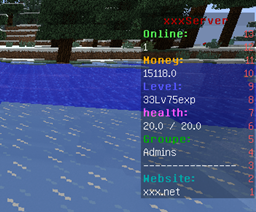
Info-Board Plugin cho Minecraft
Tạo bảng điểm tùy chỉnh bằng cách sử dụng các biến.
Giới thiệu plugin Info-Board
I have passed this project on to ktar5.
You can view his by going to this page: http://dev.bukkit.org/bukkit-plugins/ib-reborn/

Cách cài đặt Info-Board
A server on Paper or Spigot
The plugin runs on the server core; players do not need to install anything.
File goes into the plugins folder
Download the file Info-Board.jar (185 KB) and put it into the server’s plugins folder.
Restart the server
On startup the plugin creates its own settings folder in plugins.
Use the “To server” button
On Millida Hosting, the button at the top of the page uploads the file to your server and restarts it for you.
Phiên bản
Kèm phụ thuộc
| Minecraft | Loader | Tệp | Ngày | Hành động |
|---|---|---|---|---|
| — | — | Info-Board v1.0.0185 KB | ||
| — | — | (BROKEN) Info-Board v0.4.1182 KB | ||
| — | — | Info-Board v0.3.0116 KB |
Câu hỏi thường gặp
Do players need to install Info-Board?
No, the plugin goes only on the server, into the plugins folder: players do not need to download anything.
Where can I download Info-Board safely?
On this page: the file Info-Board.jar (185 KB) is stored on Millida’s server, with no link shorteners. SHA-1 checksum: b4b01d73a4dacf5354a7e74fac184a4a9360204e.
Đánh giá
Hãy là người đầu tiên đánh giá Info-Board


