
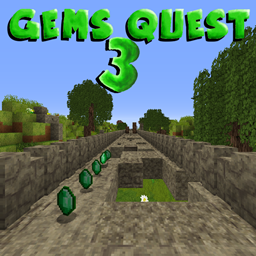
Gems Quest 3 Bản đồ cho Minecraft 1.8.8
Nhảy ngẫu nhiên như temple run | Chạy xa nhất có thể, Thu thập đá quý, Mua đồ và nhiều hơn nữa!
Giới thiệu bản đồ Gems Quest 3
Gems Quest is a simple minigame who the objective is to run on a destroyed
bridge. This bridge have the particularity to generate randomly, wich
create a different route to each party.
So, that a temple run map like. let's see more:
On the bridge, the objective is to run as far you can. There are a lot of things who spawn on the map:
● The gems: use them to purchase the biomes and powerups
● Guards: This is a wither skeleton, and he want to kill you. Shoot them before he hit you!
● Bonus chests: it's a chest who have a lot of things inside!
there are 5 uniques biomes:
<aside>
- Plains - 0 Gems(biome de base)
- Forest - 60 Gems
- Taiga - 130 Gems
- Desert - 300 Gems
- City - 500 Gems
</aside>
Every biome have uniques properties, like logs, guards, smoke, tnt etc...
The map have also Powerups:
<aside>
- Save me : Give a second live
- Double Gems : You earn the double of gems
- Static Guard : The guards are statics
- No Trees : All the logs are cut
</aside>
The map have achievements, try to complete all of them!
There are also a Best score system! don't hesitate to share your personnal best!
You can customise the guards with hats! unlock the hats on Bonus chests!
The map have a in-game guide, don't forget to test him if you test the map!
All the textures are created by myself only for the map!
Screenshots:
Version of the map: 1.8.3 or more This map is not compatable with multiplayer! language available: English and French
Note: Option -> video settings -> graphics: Fancy (fix the leaves bug texture)
Cách cài đặt Gems Quest 3
With Millida Launcher
Install Millida Launcher
The launcher is free: download it at millida.net/launcher and sign in with any nickname.
Click “Install” on this page
The launcher opens and installs the map for Minecraft 1.8.7–1.8.8 automatically.
Launch the game
A profile with it appears in the launcher: click “Play”.
Manually
Download the map archive
Pick the file Gems Quest 3 (v4.2).zip (19 MB).
Unpack it into the saves folder
The world folder (with level.dat inside) must sit directly in .minecraft/saves.
Open the world
“Singleplayer”: the map will be in your world list.
On a server
Replace the world folder
Stop the server and put the map folder in place of world (or set its name in level-name).
Use the “To server” button
On Millida Hosting, the button at the top of the page uploads the file to your server and restarts it for you.
Phiên bản
Kèm phụ thuộc
| Minecraft | Loader | Tệp | Ngày | Hành động |
|---|---|---|---|---|
| 1.8.7 | — | Gems Quest 3 (v4.2).zip18.9 MB |
Câu hỏi thường gặp
Which Minecraft versions does Gems Quest 3 work on?
There are files for 1.8.8, 1.8.7. The newest is 1.8.8.
Where can I download Gems Quest 3 safely?
On this page: the file Gems Quest 3 (v4.2).zip (19 MB) is stored on Millida’s server, with no link shorteners. SHA-1 checksum: cedeff9f92502eb904675073d7917e146763e730.
Đánh giá
Hãy là người đầu tiên đánh giá Gems Quest 3



