

Sponge Crafting Gói dữ liệu cho Minecraft 1.20.1, 1.21.1
Thêm công thức chế tạo thân thiện với vanilla, theo chủ đề đại dương cho khối Sponge không thể chế tạo.
- lượt xem
- 41 lượt xem
- Đã cập nhật
- Đã cập nhật 26.09.2026
- 1.13 — 26.1.1
 Gói dữ liệu
- Máy khách và máy chủ
Giới thiệu gói dữ liệu Sponge Crafting
🌊 Craftable Sponge is a simple, lightweight datapack that finally gives the elusive Sponge a sensible crafting recipe, making it easier to acquire for large-scale water draining projects.
The new recipe is balanced to reflect the rarity and ocean-based origin of the Sponge:
1 - 2 - 3
A - Slimeball - Yellow Dye - Slimeball B - Yellow Dye - Dried Kelp Block - Yellow Dye C - Slimeball - Yellow Dye - Slimeball
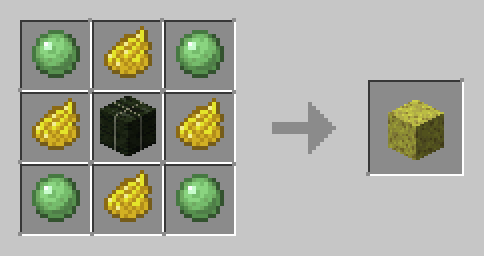
Required Ingredients:
- 4 * Yellow Dye
- 4 * Slimeball
- 1 * Dried Kelp Block
Why You Need This:
- Vanilla-Friendly: The recipe feels like it could be part of the base game.
- Utility: Makes acquiring Sponges more consistent for terraforming and building.
- Lightweight: Zero lag and extremely easy to install.
No more tedious Ocean Monument raids just for a few sponges! Start building your underwater base today!
Cách cài đặt Sponge Crafting
With Millida Launcher
Install Millida Launcher
The launcher is free: download it at millida.net/launcher and sign in with any nickname.
Click “Install” on this page
The launcher opens and installs the data pack for Minecraft 1.13–26.1.1 automatically.
Launch the game
A profile with it appears in the launcher: click “Play”.
Manually
Download the archive
Pick the file sponge-1.21.zip (1019 B) for your game version.
New world: “Data Packs”
When creating a world, click “Data Packs”, drag the archive into the window, then move it to “Selected”.
Existing world: the datapacks folder
Put the archive into saves/<world>/datapacks and type /reload in game.
On a server
Archive goes into the server world’s datapacks
The world/datapacks folder on the server; players do not need to install anything.
Reload the data
Type /reload in the server console or restart the server.
Use the “To server” button
On Millida Hosting, the button at the top of the page uploads the file to your server and restarts it for you.
Phiên bản
Kèm phụ thuộc
| Minecraft | Loader | Tệp | Ngày | Hành động |
|---|---|---|---|---|
| 26.1.1 | Gói dữ liệu | 26.1.11019 B | ||
| 1.18.2 | Gói dữ liệu | 1.18.21.1 KB | ||
| 1.17.1 | Gói dữ liệu | 1.17.11.1 KB | ||
| 1.16.5 | Gói dữ liệu | 1.16.51.1 KB | ||
| 1.15.2 | Gói dữ liệu | 1.15.21.1 KB | ||
| 1.14.4 | Gói dữ liệu | 1.14.41.1 KB |
Câu hỏi thường gặp
Which Minecraft versions does Sponge Crafting work on?
There are files for 1.13–26.1.1, 48 versions in total. The newest is 26.1.1.
Does Sponge Crafting work on a server?
Yes: the data pack goes into the datapacks folder of the server world, and players do not need to install anything.
Where can I download Sponge Crafting safely?
On this page: the file sponge-1.21.zip (1019 B) is stored on Millida’s server, with no link shorteners. SHA-1 checksum: 696879f200d2b4042cb76fae88694194d1530042.
Đánh giá
Hãy là người đầu tiên đánh giá Sponge Crafting


