

Enchantment Descriptions Java Gói dữ liệu cho Minecraft 1.20.1, 1.21.1
Gói tài nguyên này nâng cao hệ thống phù phép của Minecraft bằng cách cung cấp mô tả chi tiết cho mọi phù phép ngay trong trò chơi. Dù bạn là người mới hay đã có kinh nghiệm, nó giúp bạn đưa ra lựa chọn tốt hơn khi phù phép trang bị.
- lượt xem
- 48 lượt xem
- Đã cập nhật
- Đã cập nhật 03.09.2026
- 1.14 — 1.21.9
 Gói dữ liệu
 Game gốc
- Máy khách và máy chủ
Enchantment Descriptions
A simple but powerful resource pack that adds detailed enchantment descriptions to tooltips in Minecraft Java Edition. No more guessing what each enchantment does—this pack shows you all relevant information directly in-game.

🎨 Screenshots
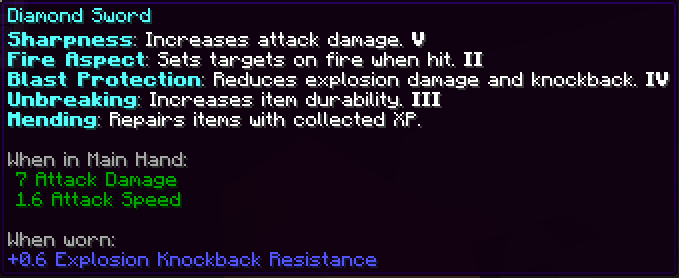
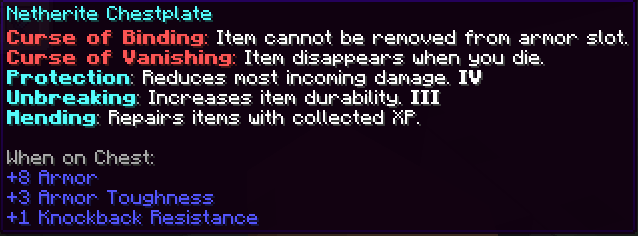
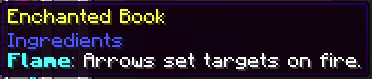


Installation (Resource Pack - .zip)
- Download the .zip file.
- Place it in your resourcepacks folder.
- Launch Minecraft → Options → Resource Packs → Enable the pack.
4.

Installation (Mod Version - .jar)
To install the .jar version of Enchantment Descriptions:
- Make sure you have Minecraft Forge or Fabric installed.
- Download the latest .jar file from the Files section.
- Place the .jar file into your mods/ folder, located in:
- Windows: %appdata%\.minecraft\mods
- macOS: ~/Library/Application Support/minecraft/mods
- Linux: ~/.minecraft/mods
- Launch Minecraft using the appropriate mod loader.
- Enjoy detailed enchantment tooltips in-game!
This is a client-side visual aid only — it does not affect gameplay or servers.
Report if you find any mistranslation or bug
Cách cài đặt Enchantment Descriptions Java
With Millida Launcher
Install Millida Launcher
The launcher is free: download it at millida.net/launcher and sign in with any nickname.
Click “Install” on this page
The launcher opens and installs the data pack for Minecraft 1.14–1.21.9 automatically.
Launch the game
A profile with it appears in the launcher: click “Play”.
Manually
Download the archive
Pick the file Enchantment_Descriptions.zip (1.7 MB) for your game version.
New world: “Data Packs”
When creating a world, click “Data Packs”, drag the archive into the window, then move it to “Selected”.
Existing world: the datapacks folder
Put the archive into saves/<world>/datapacks and type /reload in game.
On a server
Archive goes into the server world’s datapacks
The world/datapacks folder on the server; players do not need to install anything.
Reload the data
Type /reload in the server console or restart the server.
Use the “To server” button
On Millida Hosting, the button at the top of the page uploads the file to your server and restarts it for you.
Phiên bản
Kèm phụ thuộc
| Minecraft | Loader | Tệp | Ngày | Hành động |
|---|---|---|---|---|
| 1.21 | Gói dữ liệu | 1.211.7 MB | ||
| 1.20.1 | Gói dữ liệu | 1.20.11.7 MB | ||
| 1.19.2 | Gói dữ liệu | 1.19.21.7 MB | ||
| 1.17.1 | Gói dữ liệu | 1.17.11.7 MB | ||
| 1.15.2 | Gói dữ liệu | 1.15.21.7 MB | ||
| 1.14.4 | Gói dữ liệu | 1.14.41.7 MB | ||
| 1.18.2 | Gói dữ liệu | 1.18.21.7 MB | — | |
| 1.16.5 | Gói dữ liệu | 1.16.51.7 MB | — |
Đánh giá
Hãy là người đầu tiên đánh giá Enchantment Descriptions Java


