
Voxel Builder Tiện ích mở rộng cho Minecraft 1.21.51
Một addon cho phép bạn xây dựng công trình với các khối cỡ pixel trong một khối duy nhất.
Giới thiệu tiện ích mở rộng Voxel Builder
An addon that allows you to build structures with pixel-sized blocks in a single block.
How does it work?
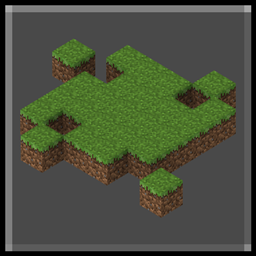
To start, place one of the available voxel layers in the creative inventory. Placing it on top of a block will bring up a grass block platform where you can start building with blocks of your choice from the creative inventory, including blocks from other addons.
Recommendations and other things you should know
- It works on mobile devices but can be very awkward to use (Split controls must be enabled in touch settings) (Crosshair)
- It is recommended to set the FOV to 50 or lower Settings/Video/FOV
- Lowering the camera sensitivity can improve accuracy when selecting blocks in the voxel.
- Some (uncommon) blocks and items will appear incorrectly rotated when placed (It will be fixed little by little in future updates)
- You can place anything even items like weapons and tools
- Some blocks such as plants and others may not be the same as the original and may be represented differently when placed.
- Water and lava blocks can be placed but they will not have physics.
- Cannot place mobs (For now)
- There are no limits when placing blocks in the voxel and you can go outside the blocks.
- If you place the voxel chunk underwater it will not represent the water blocks.
- Voxels can be pushed by water or pistons, if they get out of control remove them with the voxel eraser
- By looking at the voxel you will be able to see the selection box of the block you are selecting.
- Pay attention to the white cross in the selection box when trying to place a block as this will indicate where it will be placed.
Warning: This addon requires a high-performance device
This addon should only be used for entertainment purposes, the structures created should not be left as decoration as they can cause a lot of lag. Using the Voxel chunk may also cause lag.
Items:
- Voxel chunk: When placed, 16x16x16 blocks of the current chunk will be scanned and placed into the voxel.
- Small voxel layer: A platform of 8x8 pixel blocks will be placed.
- Medium voxel layer: A platform of 12x12 pixel blocks will be placed.
- Large voxel layer: A platform of 16x16 pixel blocks will be placed.
- Delete voxel: Interacting with a voxel will remove the entire voxel in the selected block.
- Delete all voxels: Using this will remove all voxels in the world.
Demonstration of how it works:
How to install:
- Download and install the behavior pack and resource pack
- Activate both the behavior and the resource pack in your world settings
Report bugs to my Discord
- Any suggestions to add in the addon are welcome as long as you send them to me on my Discord
- It will be optimized and new features will be added in future updates
By Effect99
Phiên bản
| Minecraft | Loader | Tệp | Ngày | Hành động |
|---|---|---|---|---|
| 1.21.30 | — | Voxel Builder Beta V1.0 (.mcaddon)127 KB |
Câu hỏi thường gặp
Where can I download Voxel Builder safely?
On this page: the file Voxel Builder (1.21.50+) Beta V1.0.mcaddon (127 KB) is stored on Millida’s server, with no link shorteners. SHA-1 checksum: 4df1364b14f88aa40b6c4949ddecc41f484df3b7.
Đánh giá
Hãy là người đầu tiên đánh giá Voxel Builder
