
Minecraft 1.21.132 کے لیے Tab List ریسورس پیک
جاوا کی طرح پلیئر لسٹ چاہتے تھے؟ یہ پیک ڈاؤن لوڈ کریں اور حاصل کریں!
Tab List ریسورس پیک کے بارے میں
THIS ONLY WORKS ON KEYBOARD!
Ever wondered who you are playing with? Now you can press tab and see everyone in your game!
This works on worlds and on servers aswell!
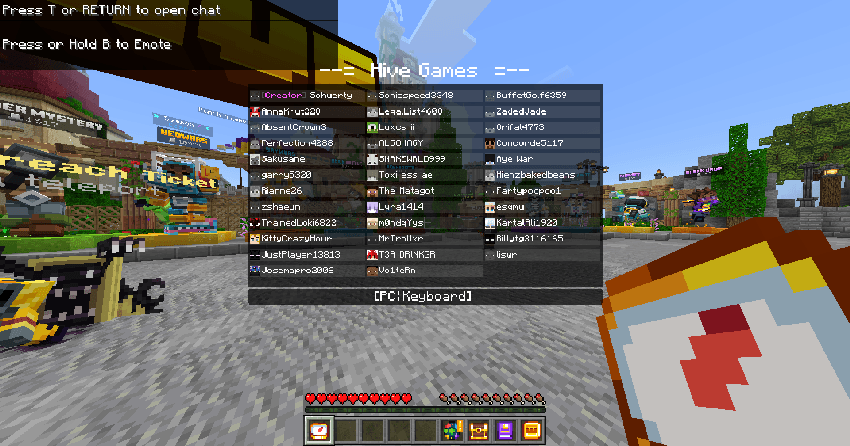
The tablist displays the players, your device, world name and when turned on coordinates!
Tab List کیسے انسٹال کریں
With Millida Launcher
Install Millida Launcher
The launcher is free: download it at millida.net/launcher and sign in with any nickname.
Click “Install” on this page
The launcher opens and installs the resource pack for Minecraft 1.21.100–1.21.132 automatically.
Launch the game
A profile with it appears in the launcher: click “Play”.
Manually
Download the archive
Pick the file tablist_V1.0.0.mcpack (5 KB) for your game version. No need to unpack it.
Put it in the resourcepacks folder
The easiest way: “Options”, then “Resource Packs”, then “Open Pack Folder”, and drag the archive there.
Enable the pack
In the same window, move the pack to the right-hand “Selected” column and click “Done”.
ورژنز
ڈیپنڈنسیز کے ساتھ
| Minecraft | لوڈر | فائل | تاریخ | اقدامات |
|---|---|---|---|---|
| 1.21.101 | — | tablist_V1.0.04.8 KB |
عمومی سوالات
Which Minecraft versions does Tab List work on?
There are files for 1.21.100–1.21.132, 12 versions in total. The newest is 1.21.132.
Where can I download Tab List safely?
On this page: the file tablist_V1.0.0.mcpack (5 KB) is stored on Millida’s server, with no link shorteners. SHA-1 checksum: ed7013c14a0833ad3cb1d1b6273a288173e89ae8.
ریویوز
Tab List کو ریٹ کرنے والے پہلے شخص بنیں



