

Minecraft 26.50 کے لیے Sans Visual Shade ریسورس پیک
Sans Visual Shade ایک shader ہے Undertale کے شائقین کے لیے، مگر خاص طور پر صرف Sans کے لیے۔ یہ shader آپ کے visuals کو بہتر بنائے گا۔ یہ PBR، ACE tone mapping، white balance temperature، اور پیچیدہ midtones سے لیس ہے۔
Sans Visual Shade ریسورس پیک کے بارے میں
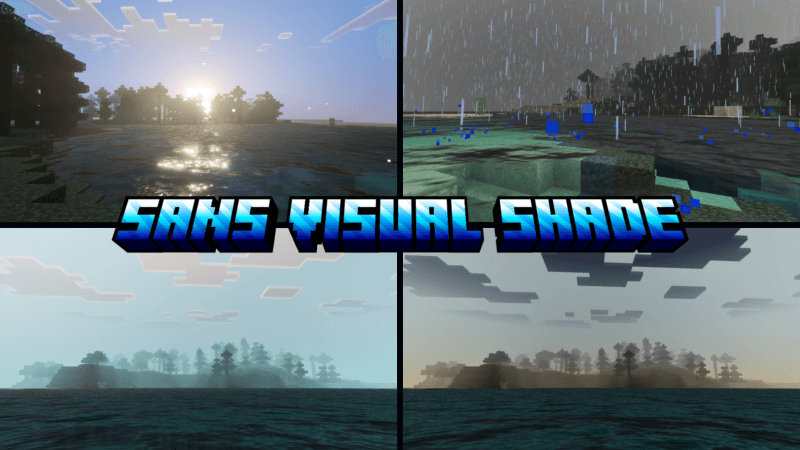
Sans Visual Shade is dedicated to the character Sans from the Undertale game, where the visual aspect will naturally change into a Sans theme.
This shader will enhance your visuals. It is equipped with PBR, ACE tone mapping, white balance temperature, and complex midtones. This shader is not dark like other shaders; everything is balanced like in real life.
(All photos can be checked in the media or below)

Sans Visual Shade کیسے انسٹال کریں
With Millida Launcher
Install Millida Launcher
The launcher is free: download it at millida.net/launcher and sign in with any nickname.
Click “Install” on this page
The launcher opens and installs the resource pack for Minecraft 26.40–26.50 automatically.
Launch the game
A profile with it appears in the launcher: click “Play”.
Manually
Download the archive
Pick the file Sans Visual Shade 1.9.mcpack (292 KB) for your game version. No need to unpack it.
Put it in the resourcepacks folder
The easiest way: “Options”, then “Resource Packs”, then “Open Pack Folder”, and drag the archive there.
Enable the pack
In the same window, move the pack to the right-hand “Selected” column and click “Done”.
ورژنز
ڈیپنڈنسیز کے ساتھ
| Minecraft | لوڈر | فائل | تاریخ | اقدامات |
|---|---|---|---|---|
| 26.40 | — | Sans Visual Shade 1.9292 KB |
عمومی سوالات
Which Minecraft versions does Sans Visual Shade work on?
There are files for 26.50, 26.40. The newest is 26.50.
Where can I download Sans Visual Shade safely?
On this page: the file Sans Visual Shade 1.9.mcpack (292 KB) is stored on Millida’s server, with no link shorteners. SHA-1 checksum: 3f66e008ffb4f87fdaadbdb3e2b64a41465ee957.
ریویوز
Sans Visual Shade کو ریٹ کرنے والے پہلے شخص بنیں


