
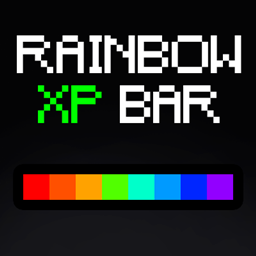
Minecraft 1.20.1, 1.21.1 کے لیے Rainbow XP Progress Bar ریسورس پیک
Rainbow XP Progress Bar ایک روشن ٹیکسچر پیک ہے جو آپ کے Minecraft XP بار کو شاندار RGB (رینبو) اثر کے ساتھ زیادہ بصری طور پر دلکش بنانے کے لیے ڈیزائن کیا گیا ہے
Rainbow XP Progress Bar ریسورس پیک کے بارے میں

Rainbow XP Progress Bar is a vibrant texture pack designed to make your Minecraft XP bar more visually appealing with a stunning RGB (rainbow) effect. Say goodbye to the plain old green bar and enjoy a dynamic, colorful experience every time you gain experience points.

- Transforms the XP bar into a beautiful, continuously changing rainbow of colors.
- Adds a visually exciting element to your gameplay.
- Easy to install and compatible with other texture packs.
How to Install:
- Download the texture pack file from CurseForge.
- Open Minecraft and go to the resource packs menu.
- Click on "Open Pack Folder" and move the downloaded file into this folder.
- Return to Minecraft and activate the Rainbow XP Progress Bar texture pack.
Enjoy a more colorful and lively Minecraft adventure with the Rainbow XP Progress Bar!

Rainbow XP Progress Bar کیسے انسٹال کریں
With Millida Launcher
Install Millida Launcher
The launcher is free: download it at millida.net/launcher and sign in with any nickname.
Click “Install” on this page
The launcher opens and installs the resource pack for Minecraft 1.12–26.1.2 automatically.
Launch the game
A profile with it appears in the launcher: click “Play”.
Manually
Download the archive
Pick the file Rainbow XP Bar.zip (61 KB) for your game version. No need to unpack it.
Put it in the resourcepacks folder
The easiest way: “Options”, then “Resource Packs”, then “Open Pack Folder”, and drag the archive there.
Enable the pack
In the same window, move the pack to the right-hand “Selected” column and click “Done”.
ورژنز
ڈیپنڈنسیز کے ساتھ
| Minecraft | لوڈر | فائل | تاریخ | اقدامات |
|---|---|---|---|---|
| 1.16.3 | — | Rainbow XP Bar60.9 KB 3 |
عمومی سوالات
Which Minecraft versions does Rainbow XP Progress Bar work on?
There are files for 1.12–26.1.2, 52 versions in total. The newest is 26.1.2.
Where can I download Rainbow XP Progress Bar safely?
On this page: the file Rainbow XP Bar.zip (61 KB) is stored on Millida’s server, with no link shorteners. SHA-1 checksum: f9d77b011f3ad0c733dea787a2a290c778a2e061.
ریویوز
Rainbow XP Progress Bar کو ریٹ کرنے والے پہلے شخص بنیں



