

Dynamic Crosshairs ریسورس پیک کے بارے میں
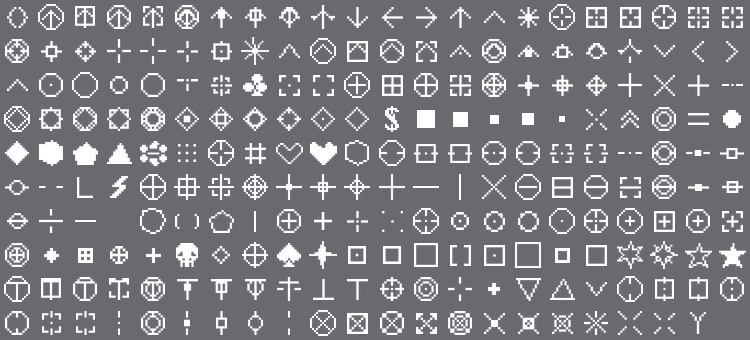
200+ unique crosshair styles for Minecraft Bedrock - all packed into a single resource pack with subpacks. Dots, circles, diamonds, scopes, hearts, skulls, arrows, reticles, and dozens of combo styles. Pick your style and get the exact crosshair you want on your screen.

✦ Features
- 200+ crosshair styles - dots, circles, diamonds, crosses, scopes, reticles, hearts, skulls, stars, arrows, chevrons, and many more
- Combo crosshairs - mix and match styles like Cross + Circle, Diamond + Double Ring, Chevron + Box, and dozens of other combinations
- PvP-ready styles - classic PvP, sniper scope, gunsight, target, and dot-only crosshairs for precise aiming
- Unique shapes - flower, lightning, sparkle, skull, spade, club, heart outline, filled pentagon, filled hexagon and more
- No Crosshair option - remove the crosshair entirely for a clean immersive look
- Subpack system - select your style directly from Global Resources in Settings, no extra tools needed
- Zero gameplay impact - purely visual, no performance hit

✦ How to Use
Apply the pack in Settings → Global Resources. Tap the pack and use the subpack selector to choose your preferred crosshair style. Change it anytime without restarting.

Dynamic Crosshairs کیسے انسٹال کریں
With Millida Launcher
Install Millida Launcher
The launcher is free: download it at millida.net/launcher and sign in with any nickname.
Click “Install” on this page
The launcher opens and installs the resource pack for Minecraft 26.50 automatically.
Launch the game
A profile with it appears in the launcher: click “Play”.
Manually
Download the archive
Pick the file Dynamic_Crosshairs.mcpack (2.1 MB) for your game version. No need to unpack it.
Put it in the resourcepacks folder
The easiest way: “Options”, then “Resource Packs”, then “Open Pack Folder”, and drag the archive there.
Enable the pack
In the same window, move the pack to the right-hand “Selected” column and click “Done”.
ورژنز
ڈیپنڈنسیز کے ساتھ
| Minecraft | لوڈر | فائل | تاریخ | اقدامات |
|---|---|---|---|---|
| 26.50 | — | Dynamic_Crosshairs.mcpack2.1 MB 2 |
عمومی سوالات
Which Minecraft versions does Dynamic Crosshairs work on?
Only Minecraft 26.50: there are no files for other versions.
Where can I download Dynamic Crosshairs safely?
On this page: the file Dynamic_Crosshairs.mcpack (2.1 MB) is stored on Millida’s server, with no link shorteners. SHA-1 checksum: 79b5b55229d971209673a77e19f214bdc30b74dc.
ریویوز
Dynamic Crosshairs کو ریٹ کرنے والے پہلے شخص بنیں


