
Minecraft 1.20.1, 1.21.1 کے لیے NMS - Normal Map Shaders
ایک شیڈر جو آپ کی دنیا کو نارمل میپ میں بدل دیتا ہے
NMS - Normal Map Shaders شیڈرز کے بارے میں
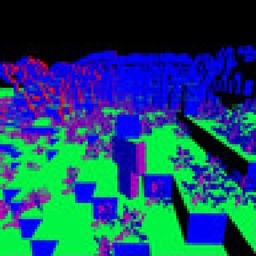
This shader pack turns your world into a normal map. This is mostly useful for Minecraft graphic designers as it allows the designer to choose a specific face and color it separately from everything else.
NMS - Normal Map Shaders کیسے انسٹال کریں
With Millida Launcher
Install Millida Launcher
The launcher is free: download it at millida.net/launcher and sign in with any nickname.
Click “Install” on this page
The launcher opens and installs the shaders for Minecraft 1.16–1.21.11 automatically.
Launch the game
A profile with it appears in the launcher: click “Play”.
Manually
Install Iris or OptiFine
Without a shader mod the game cannot see shaders. Install it for the same Minecraft version.
Download the shader archive
Pick the file NMS 1.6.zip (10 KB) and do not unpack it.
Put it in the shaderpacks folder
“Options”, then “Video Settings”, then “Shader Packs”, then “Open Shader Pack Folder”, and drag the archive there.
Select the shaders
In the same window, click the pack name and “Apply”.
ورژنز
ڈیپنڈنسیز کے ساتھ
| Minecraft | لوڈر | فائل | تاریخ | اقدامات |
|---|---|---|---|---|
| 1.16.3 | — | NMS 1.6.zip10.5 KB |
عمومی سوالات
Which Minecraft versions does NMS - Normal Map Shaders work on?
There are files for 1.16–1.21.11, 35 versions in total. The newest is 1.21.11.
Where can I download NMS - Normal Map Shaders safely?
On this page: the file NMS 1.6.zip (10 KB) is stored on Millida’s server, with no link shorteners. SHA-1 checksum: a1c13225e0c0940e905305547b4150694e1eb653.
ریویوز
NMS - Normal Map Shaders کو ریٹ کرنے والے پہلے شخص بنیں


