

Minecraft 1.20.1, 1.21.1 کے لیے Dithering3D شیڈر
Pixelated, retro, Dark Fantasy, gradient, B&W, RGB and more
 Fabric
 OptiFine
🎨 Dithering3D - Surface-Stable Fractal Dithering
🖼️ Screenshots
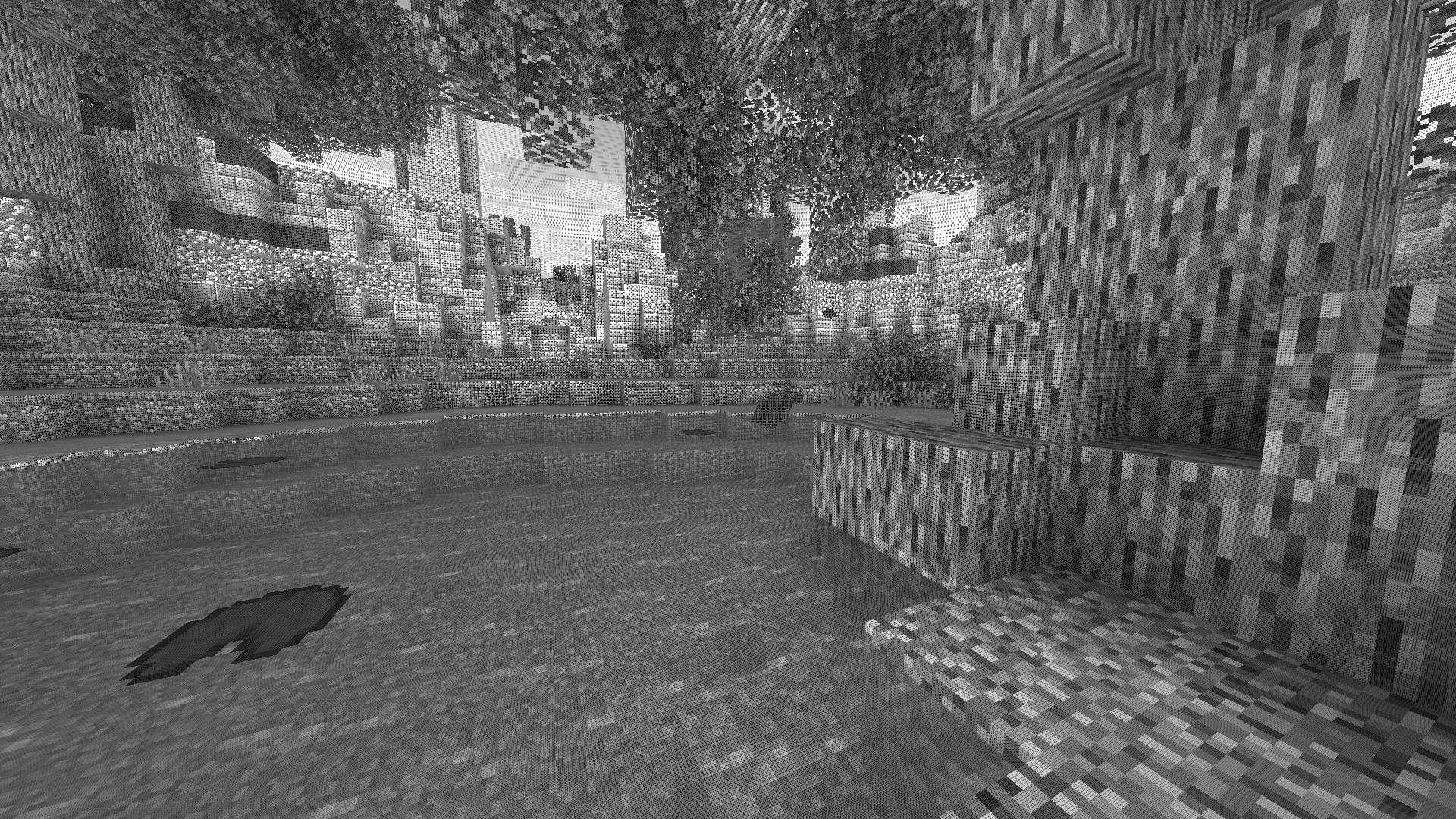
✨ A Revolutionary Visual Experience
Transform your Minecraft world with Surface-Stable Fractal Dithering — a groundbreaking rendering technique where dither dots stick to 3D surfaces instead of the screen, creating a unique manga/comic book aesthetic that feels alive.
🎬 Based on the innovative work by Rune Skovbo Johansen — Watch the explainer video

🖼️ What Makes This Shader Special?
📌 Surface-Stable Dots
Unlike traditional dithering where patterns "swim" on screen, Dither3D anchors each dot to the actual 3D surface. Walk around blocks, and the dots stay perfectly attached!

🔄 Fractal Scaling Magic
As you move closer or farther from surfaces, dots dynamically split or merge to maintain constant screen-space density. It's mesmerizing to watch!
🎨 Three Color Modes
Mode - Description
Grayscale - Classic black & white dithering — clean, minimalist, timeless RGB - Each color channel gets its own dot layer — vibrant and unique CMYK Halftone - Authentic newspaper/comic print simulation with rotated dot angles
⚡ Features at a Glance
Feature - Description
🎯 Precision Dithering - SVD-based frequency analysis for mathematically perfect dot placement 🌀 Anti-Stretch Technology - Anisotropic smoothing keeps dots circular even on oblique surfaces 🎥 Camera Stable - Radial compensation prevents dot swimming during camera rotation ⚙️ Highly Configurable - 10+ parameters to fine-tune your perfect look 🚀 Performance Optimized - Efficient 3D texture sampling for smooth gameplay 📱 Universal Compatibility - Works with OptiFine AND Iris on virtually any Minecraft version
🎛️ Customization Options
Fine-tune every aspect of the dithering effect with our intuitive in-game sliders:
🔧 Dither Settings
Parameter - Range - Effect
Dot Scale - 2 - 10 - Control overall dot size (exponential) Size Variability - 0 - 1 - 0 = Bayer pattern, 1 = Halftone style Dot Contrast - 0 - 2 - Sharpen or soften dot edges Stretch Smooth - 0 - 2 - Combat stretched dots on angled surfaces
💡 Input Controls
Parameter - Range - Effect
Exposure - 0 - 5 - Brightness multiplier Offset - -1 to 1 - Brightness offset adjustment
🎮 Additional Options
- Inverse Dots — Flip dot colors for a negative effect
- Radial Compensation — Stabilize during camera rotation (recommended!)
- Quantize Layers — Prevent dot morphing for a more "classic" look
- Debug Mode — Visualize fractal layers for development
📦 Installation
For OptiFine Users
- Download and extract the shader pack
- Place the shaders folder in .minecraft/shaderpacks/
- Launch Minecraft → Options → Video Settings → Shaders
- Select Dithering3D and enjoy!
For Iris Users (Fabric/Quilt)
- Install Iris Shaders mod (1.2.0+)
- Download and extract the shader pack
- Place the shaders folder in .minecraft/shaderpacks/
- Press O in-game to open shader menu
- Select Dithering3D
💡 Tip: Press F3 + T to quickly reload shaders after making changes!
🎨 Preset Profiles
Choose from pre-configured profiles for instant results:
Profile - Color Mode - Dot Scale - Best For
🟢 LOW - Grayscale - 4.0 - Performance, retro feel 🟡 MEDIUM - Grayscale - 5.0 - Balanced experience 🟠 HIGH - RGB - 5.0 - Colorful, artistic 🔴 ULTRA - CMYK - 6.0 - Maximum visual impact
🌟 Perfect For
📸 Screenshot enthusiasts - Create unique, artistic captures
🎬 Content creators - Stand out with a distinctive visual style 🎮 Retro lovers - Relive the charm of 1-bit graphics 🎨 Artists - Manga, comic book, and newspaper aesthetics 🧪 Tech enthusiasts - Experience cutting-edge rendering techniques
❓ FAQ
Q: Does this work with other shaders? Dithering3D is a standalone shader pack. Combining with other shaders may cause conflicts.
Q: Why do some surfaces look different? The sky and some special effects may appear different as surface-stable dithering reveals flat geometry.
Q: Performance impact? Moderate. The 3D texture sampling is optimized but more demanding than vanilla rendering. Most GPUs handle it smoothly.
Q: Can I use this in my modpack? Yes! Under MPL-2.0 license. Credit appreciated.
🔬 The Science Behind It
Dithering3D uses Singular Value Decomposition (SVD) to analyze UV coordinate derivatives in real-time, determining the exact frequency and direction of surface textures. This mathematical approach enables:
✅ Perfectly uniform dot density regardless of distance ✅ Seamless fractal transitions between detail levels ✅ Circular dots even on extremely angled surfaces ✅ Rotation-stable patterns that don't "swim"
📚 Credits & Resources
Resource - Link
🔗 Original Algorithm - Rune Skovbo Johansen 🎥 Technique Explanation - YouTube Video 💬 Technical Discussion - FAQ Thread
📄 License
Mozilla Public License 2.0 (MPL-2.0)
🎨 Transform your world. Experience Dithering3D. 🎨
If you enjoy this shader, consider leaving a ⭐ and sharing this shader page !
Dithering3D کیسے انسٹال کریں
With Millida Launcher
Install Millida Launcher
The launcher is free: download it at millida.net/launcher and sign in with any nickname.
Click “Install” on this page
The launcher opens and installs the shaders for Minecraft 1.0–26.1.2 automatically.
Launch the game
A profile with it appears in the launcher: click “Play”.
Manually
Install Iris or OptiFine
Without a shader mod the game cannot see shaders. Install it for the same Minecraft version.
Download the shader archive
Pick the file Dithering3D-V0.5.zip (56 KB) and do not unpack it.
Put it in the shaderpacks folder
“Options”, then “Video Settings”, then “Shader Packs”, then “Open Shader Pack Folder”, and drag the archive there.
Select the shaders
In the same window, click the pack name and “Apply”.
ورژنز
ڈیپنڈنسیز کے ساتھ
| Minecraft | لوڈر | فائل | تاریخ | اقدامات |
|---|---|---|---|---|
| 1.17.1 | Iris, OptiFine | 1.17.156.1 KB 1 | ||
| 1.15.2 | Iris, OptiFine | 1.15.256.1 KB | ||
| 1.14.4 | Iris, OptiFine | 1.14.456.1 KB | ||
| 1.7.10 | Iris, OptiFine | 1.7.1056.1 KB | ||
| 26.1 | Iris, OptiFine | 26.156.1 KB 1 | — | |
| 1.21.11 | Iris, OptiFine | 1.21.1156.1 KB | — | |
| 1.21 | Iris, OptiFine | 1.2156.1 KB | — | |
| 1.20.1 | Iris, OptiFine | 1.20.156.1 KB | — |
عمومی سوالات
Which Minecraft versions does Dithering3D work on?
There are files for 1.0–26.1.2, 110 versions in total. The newest is 26.1.2.
What do I need to run Dithering3D?
Shaders are loaded through Iris or OptiFine: without one of them the game cannot see them.
Where can I download Dithering3D safely?
On this page: the file Dithering3D-V0.5.zip (56 KB) is stored on Millida’s server, with no link shorteners. SHA-1 checksum: 910e89e30ae53f4e7f9eb7ffdffa7bde8d5dbee5.
ریویوز
Dithering3D کو ریٹ کرنے والے پہلے شخص بنیں


