
SignCodePad پلگ ان کے بارے میں
SignCodePad
This is a plugin to create a codepad on a wallsign. It works without any client modification.
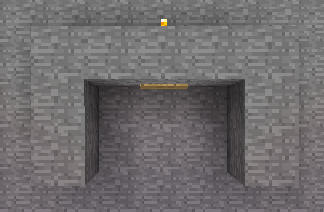
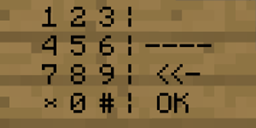
This Plugin adds a codepad to minecraft based on minecraft wallsigns. If you've entered the correct code, a redstonetorch is powered and you can activate any sort of mechanism for example open an door or pushing some piston. If you've entered the wrong code an other redstonetorch can be powered and you can for example remove the floor with pistons to let the player fall in lava or something like that. The positions of the redstone torches are configurable when creating the sign. The time how long the redstonetorch should be activate is also configurable. When the redstonetorchs aren't powered there are normal torchs in there position to simply helping you to build your redstone mechanism. A SignCodePad can only be destroyed by the owner or by admins with the required permission.
Features:
- Full functional CodePad
- No file configuration needed
- Positions of torchs configurable
- Codes are saved as MD5
- Powers RedStone Mechanism
- SuperPermis support
- Calibration for different types of Texturepacks (Please read Texturepacks and Calibration)
Download:
- DevBukkit
- Jenkins
Instalation:
To install the plugin simply download and move the jar file into your plugins folder.
Permissions: Changed in verion 2.0.3
- signcodepad.use (Permission to use a SignCodePad an the SignCodePad Calibration)[User]
- signcodepad.create (Permission to create a SignCodePad)[User]
- signcodepad.replaceblock (Permission to replace a not air block with a torch)[Admin]
- signcodepad.masterdestroy (Permission to destroy SignCodePads without being the owner)[Admin]
HowTo:
Calibration HowTo Normal HowTo Advanced
Known issues:
- None known
Changelog:
V2.2.0
- Updated To 1.6.2
V2.1.0
- Updated To 1.1-R6 and 1.2.3-R0.2
- Added block locking. Enter B in the second line and The Code to The third Line Of a sign Above the block that should be locked.
V2.0.3
- Finally fixed NoLagg bug
- Fixed Permissions
- You need to write the permission nodes to lower case: signcodepad
V2.0.2
- Fixed version 2.0.1
V2.0.1
- Fixed noLag Bug
- Added permissions in lower case
- Fixed blockbreaking behind signs
- Improved getWorld by string
V2.0
- Added advanced calibration by CalA
- Block break behind SignCodePad is now blocked
- Fixed NPE with deleted world
- Fixed NPE with the wrong code
- Checks if a SignCodePad exists while loading. If not the entry is removed.
- Torch "generation" is fixed. Only modify not create a torch
- Corrected enable and disable Message
- Changed version in plugin.yml (forgot that the last versions)
- Using default calibration values if user has not calibrated
V1.2.1
- Fixed player can't destroy own sign
V1.2
- Added message if a player created the wrong sign.
- Added * and # to use in Codes.
- Language fix
V1.1
- Added shortcut [SCP] (Thanks to isikerkan for the hint)
- Removed the possibility to create Normal signs as SignCodePad which aren't usable
V1.0.1
- CB 1337
- Bug while saving fixed
V1.0
- Publishing

SignCodePad کیسے انسٹال کریں
A server on Paper or Spigot
The plugin runs on the server core; players do not need to install anything.
File goes into the plugins folder
Download the file signcodepad-2.2.0.jar (56 KB) and put it into the server’s plugins folder.
Restart the server
On startup the plugin creates its own settings folder in plugins.
Use the “To server” button
On Millida Hosting, the button at the top of the page uploads the file to your server and restarts it for you.
ورژنز
ڈیپنڈنسیز کے ساتھ
| Minecraft | لوڈر | فائل | تاریخ | اقدامات |
|---|---|---|---|---|
| — | — | V2.2.056.2 KB | ||
| — | — | V2.1.050 KB |
عمومی سوالات
Do players need to install SignCodePad?
No, the plugin goes only on the server, into the plugins folder: players do not need to download anything.
Where can I download SignCodePad safely?
On this page: the file signcodepad-2.2.0.jar (56 KB) is stored on Millida’s server, with no link shorteners. SHA-1 checksum: 6870d45c2bef72a923949f9fde55bf902be7da8a.
ریویوز
SignCodePad کو ریٹ کرنے والے پہلے شخص بنیں



