

Minecraft 1.20.1, 1.21.1 کے لیے Head Drop پلگ ان
موت پر کھلاڑی کا سر گرا دیں۔ مکمل طور پر حسب ضرورت
 Bukkit
 Folia
Folia Paper
Paper Purpur
 Spigot
Head Drop
🤝 Our Partner

Need a game server ? We're partnered with Voltra, one plan, every game, from $1.99/mo, with a 2 day free trial and no card charged today.
Use code GAB10 at checkout, or just click the banner above, either way you get 10% off.
Clicking the banner above supports the development of this plugin at no extra cost to you ♥️
📌 About
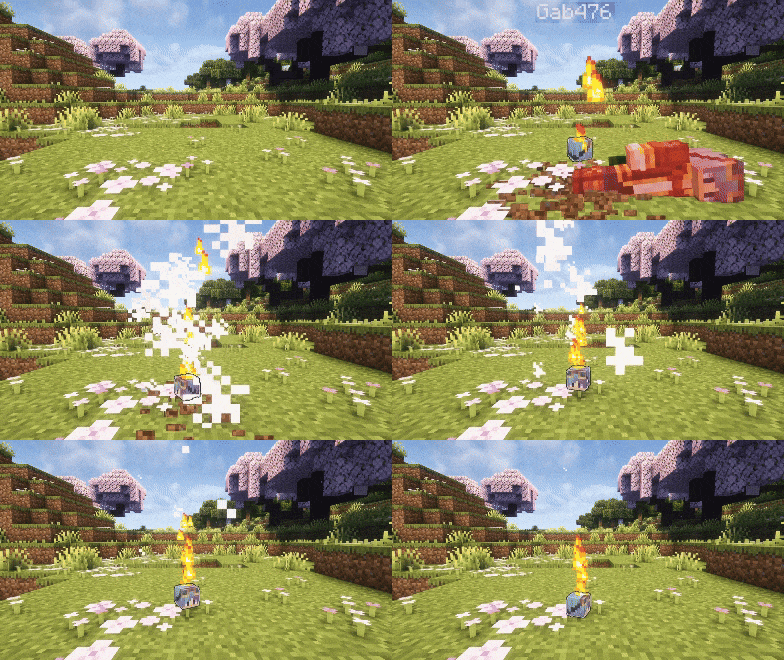
This Minecraft plugin makes players drop their head upon death. Configure head drops, glowing effects, particles, broadcast messages, per-player statistics, and much more, all from a single config.yml
Runs natively on Spigot, Paper, Purpur and Folia, with no extra dependencies
💡 Features
- PvP / PvE / All Drop Modes
Choose when heads drop : on any death, only player kills (pvp), or only environmental deaths (pve)
- Custom Drop Chance
Configure the exact probability of a head dropping (0% → 100%)
- Per-Player Drop Limit
Optionally cap how many heads a single player can ever drop (great for farm prevention). Reset any player with a command
- World Blacklist
Disable head drops entirely in specific worlds
- Invisibility Protection
Optionally prevent head drops when the dying player is invisible
- Drop as Item or Place on the Ground
Choose whether heads drop as a normal item, or are placed directly on the ground as a head block, facing the direction the player was looking. When placing on the ground, HeadDrop searches nearby for a free, supported spot (with a configurable fallback to a normal drop if none is found)
- Custom Head Item
- Editable display name
- Single-line or multi-line lore
- 10 placeholders (player, killer, weapon, world, coordinates, XP, death cause, date & time…)
- Configurable date format and timezone
- Optional despawn timer
- Option to block renaming in anvils (only for plugin heads)
- Optional name & lore persistence : heads keep their identity even after being placed, mined, or blown up (TNT, creepers, end crystals…)
- Hex & Legacy Colors
Every text option (head name, lore, broadcast message) supports both legacy color codes (&a) and hex colors (&#FF00AA), so you're no longer limited to the 16 vanilla colors
- Broadcast Messages
Toggle a global chat message whenever a head drops, with full placeholder and color-code support
- Optional Effects
- Visual lightning bolt (no damage)
- Custom sound on drop
- Particles with 7 shapes (upward, circle, burst, cycle, pulse, wave, spiral) and a configurable duration (or infinite)
- Colored glowing outline (16 colors, hex accepted and matched to the closest one, timed or infinite)
- Statistics System
An in-game GUI (/head stats) showing every player's head-drop count and last drop time, with :
- Global server stats (total heads, unique players, most recent & oldest drop)
- Sorting by count, last drop, or name (ascending / descending)
- Single-player view and live player skins
- Persistent storage that survives restarts
- Give Command
Hand out any player's head by username with /head give, styled with the exact same name and lore as a dropped head
- Automatic Config Migration
Updating the plugin never breaks your config : on startup, an outdated config.yml is automatically backed up and upgraded to the new version, keeping every setting you've already configured
- Built-in Update Checker
Get notified in the console when a new version is released on Modrinth
All these features can be fully configured in the config.yml
Default behavior : If you don't modify the config, head drops function just like vanilla : no effects, no broadcasts, no special visuals
🛠️ Setup
- Download the version of the plugin that matches your Minecraft server
- Place the .jar file in your plugins folder
- Restart your server to activate the plugin
Most settings can be customized in the config.yml file, make sure to review it for full configuration options
🎮 Commands & Permissions
Command - Description - Permission (default)
/head help - Show the help menu - head.command.help (everyone) `/head stats [player\ - page]` - Open the statistics GUI - head.command.stats (everyone) /head give - Give a player's head to someone - head.command.give (OP) /head reset - Reset a player's drop counter - head.command.reset (OP) /head reload - Reload the configuration - head.command.reload (OP)
The /head stats command can be fully disabled from the config if you don't want it on your server
🏷️ Placeholders
Usable in the head name, lore and broadcast message :
%head_player% · %head_player_uuid% · %head_killer% · %head_weapon% · %head_world% · %head_coordinates% · %head_datetime% · %head_xp% · %head_id% · %head_death_cause%
⚙️ Config
After modifying your config.yml, use the command /head reload to apply your changes without restarting the server This command is only available to OP players
When you update the plugin, an outdated config.yml is migrated automatically : a timestamped backup is saved to plugins/HeadDrop/config-backups/ before anything changes, so nothing you configured is ever lost
🤝 Community & Support
Need help, found a bug, or just want to chat ? Join our Discord community, we're always happy to hear your feedback and suggestions !
If you enjoy this plugin and want to support its development, consider buying me a coffee on Ko-fi ❤️
❓ FAQ
Q: Where can I find the config.yml file ? A: After the first launch, the file appears at : /plugins/HeadDrop/config.yml
Q: Does this plugin work on Folia ? A: Yes ! HeadDrop runs natively on Folia, as well as Spigot, Paper and Purpur, no separate build required
Q: How do I update the plugin to a newer version ? A: Download the latest release, replace the old .jar file in your plugins folder, then restart your server. Your config.yml is migrated automatically, with a backup saved first
Q: How do I report bugs ? A: Join the Discord server and post the issue in the bug-reporting channel
Q: What happens if I delete the config.yml file ? A: The plugin automatically regenerates a fresh default configuration file the next time the server starts
📊 Metrics
This plugin collects anonymous usage data (player and server counts, server software and version…) through two open statistics services : FastStats and bStats
FastStats is privacy-first : it does not store IP addresses or any data that could identify you, and is fully GDPR-compliant. You can see the live numbers on the public project page
bStats is open-source and equally anonymous. If you prefer to disable it, open /plugins/bStats/config.yml and set enabled to false
Head Drop کیسے انسٹال کریں
A server on Paper, Purpur, Spigot, Bukkit or Folia
The plugin runs on the server core for Minecraft 1.18–26.2; players do not need to install anything.
File goes into the plugins folder
Download the file headdrop-3.1.0.jar (594 KB) and put it into the server’s plugins folder.
Restart the server
On startup the plugin creates its own settings folder in plugins.
Use the “To server” button
On Millida Hosting, the button at the top of the page uploads the file to your server and restarts it for you.
ورژنز
ڈیپنڈنسیز کے ساتھ
| Minecraft | لوڈر | فائل | اقدامات |
|---|---|---|---|
| 26.2 | Bukkit, Folia, Paper, Purpur, Spigot | 26.2594 KB 1 | |
| 26.1 | Bukkit, Folia, Paper, Purpur, Spigot | 26.1594 KB 1 | |
| 1.21.11 | Bukkit, Paper, Purpur, Spigot | 1.21.1195.6 KB | |
| 1.21 | Bukkit, Paper, Purpur, Spigot | 1.2195.6 KB | |
| 1.20.1 | Bukkit, Paper, Purpur, Spigot | 1.20.185.5 KB | |
| 1.19.2 | Bukkit, Paper, Purpur, Spigot | 1.19.285.5 KB | |
| 1.18.2 | Bukkit, Paper, Purpur, Spigot | 1.18.285.5 KB |
ریویوز
Head Drop کو ریٹ کرنے والے پہلے شخص بنیں


