
Minecraft 1.8.1 کے لیے Color Portals پلگ ان
Wool سے مختلف رنگوں کے Portals بنائیں اور مزہ شروع کریں! (کوئی Commands ضروری نہیں)
Color Portals lets users create portals in game with little effort and no commands to type!
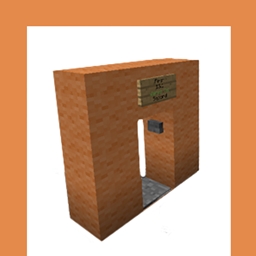
Using wool, a sign, a pressure plate, and a button, players can create their own portals!

Features:
- No commands necessary to set up portals.
- Portals link automatically. No running back and forth setting locations.
- MultiVerse/MultiWorld compatible. Teleport between worlds with ease.
- No permissions required. (But are supported)
- No configuration required. (But many options are supported)
- Plug and Play.
Download now and try it out for yourself!
Optional Commands:
- /portal info or /cp info - Use while standing in or looking at a portal to get more information on the portal and where it warps to.
- /portal list or /cp list - Displays how many portals are registered on the server.
Color Portals is by far the easiest to use portal plugin to date and is also the most fun. People on your server will not be able to get enough!
I have put many hours of work into this plugin and it is my hope than anyone who enjoys the features it brings to their server will donate.
Color Portals کیسے انسٹال کریں
A server on Paper or Spigot
The plugin runs on the server core for Minecraft 1.8.1; players do not need to install anything.
File goes into the plugins folder
Download the file ColorPortals.jar (42 KB) and put it into the server’s plugins folder.
Restart the server
On startup the plugin creates its own settings folder in plugins.
Use the “To server” button
On Millida Hosting, the button at the top of the page uploads the file to your server and restarts it for you.
Minecraft 1.8.1 runs on Java 8: with a different Java version the game may close right after launch.
ورژنز
ڈیپنڈنسیز کے ساتھ
| Minecraft | لوڈر | فائل | تاریخ | اقدامات |
|---|---|---|---|---|
| 1.8.1 | — | Color Portals v1.642.5 KB |
عمومی سوالات
Which Minecraft versions does Color Portals work on?
Only Minecraft 1.8.1: there are no files for other versions.
Do players need to install Color Portals?
No, the plugin goes only on the server, into the plugins folder: players do not need to download anything.
Which Java does Color Portals need?
Minecraft 1.8.1 runs on Java 8. If the game closes right after launch, the usual cause is the wrong Java version in the profile settings.
Where can I download Color Portals safely?
On this page: the file ColorPortals.jar (42 KB) is stored on Millida’s server, with no link shorteners. SHA-1 checksum: 21b4e6876c08f621da3a09ccc41bc5fa075f3245.
ریویوز
Color Portals کو ریٹ کرنے والے پہلے شخص بنیں



