

- ڈاؤن لوڈز
- 3 ڈاؤن لوڈز
- ویوز
- 42 ویوز
- اپ ڈیٹ شدہ
- اپ ڈیٹ شدہ 22.10.2026
- 1.20.1
 Fabric
Zenith موڈ کے بارے میں
یہ پروجیکٹ Zenith Renewed سے بدل دیا گیا ہے، جو Zenith کا ایک فورک ہے جس پر اس وقت کام اور اپ ڈیٹ جاری ہے۔ اس کے Curseforge صفحے پر جانے کے لیے براہ کرم یہاں کلک کریں۔
معلومات
Zenith، Shadows کے Apotheosis موڈ کا ایک غیر سرکاری fabric پورٹ ہے - جو آپ یہاں تلاش کر سکتے ہیں۔
1.20 ورژنز کے لیے Zenith Attributes اور FakerLib درکار ہیں!
Zenith 1.20 میں Apotheosis کے forge ورژن کے ساتھ برابری ہے - درج ذیل ماڈیولز دستیاب ہیں:
اصل forge کوڈ کے لیے ShadowsofFire اور آرٹ کے لیے Faellynna کو کریڈٹ!
- Enchantment ماڈیول
Enchantment ماڈیول انچانٹمنٹ سسٹم کی مکمل تبدیلی اور نئے انچانٹمنٹس شامل کرنے پر مرکوز ہے۔ یہ ماڈیول آپ کو پہلے کی مقرر کردہ حدود سے کہیں زیادہ طاقتور بننے دے گا، اور ساتھ ہی ایسے دلچسپ نئے انچانٹمنٹس متعارف کرائے گا جو آپ کو دنیا کی مہم جوئی اور فتح میں مدد دیں۔
- Spawner ماڈیول
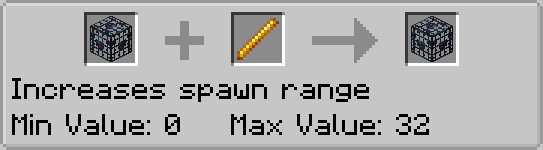
Spawner ماڈیول Mob Spawners میں ہونے والی تمام تبدیلیوں کا ذریعہ ہے۔ یہ آپ کو صرف موجودہ vanilla بلاکس اور آئٹمز استعمال کرتے ہوئے پیچیدہ mob فارمز بنانے کی اجازت دیتا ہے۔
- Garden ماڈیول
Garden ماڈیول میں عمودی طور پر اگنے والے بلاکس کے لیے کچھ توسیعات ہیں۔ خاص طور پر، یہ گنے، کیکٹس اور بانس کو پہلے سے زیادہ بلندی تک اگنے دیتا ہے۔ اس میں mobs کو اٹھانے اور منتقل کرنے کے لیے ایک آئٹم بھی شامل ہے۔
- Potion ماڈیول
Potion ماڈیول میں نئی potions شامل ہیں، پہلے ناقابلِ حصول potions کے لیے نئی ترکیبیں شامل کرتا ہے، اور potions کے استعمال کی معاونت کے لیے کچھ دیگر نیا مواد بھی شامل کرتا ہے۔
- Village ماڈیول
Village ماڈیول گاؤں، گاؤں والوں اور ان سے متعلقہ بلاکس کے لیے نیا مواد متعارف کرانے پر مرکوز ہے۔
- Adventure ماڈیول
Adventure ماڈیول bosses، gems اور gear کے لیے ایک نیا affix سسٹم شامل کرتا ہے۔
todo تصاویر
Zenith، Apotheosis کا ایک غیر سرکاری پورٹ ہے - براہ کرم اس fabric پورٹ کے لیے ان کے discord سرورز یا github ریپوزٹریز پر مدد نہ مانگیں۔
Zenith کیسے انسٹال کریں
With Millida Launcher
Install Millida Launcher
The launcher is free: download it at millida.net/launcher and sign in with any nickname.
Click “Install” on this page
The launcher opens and installs the mod for Minecraft 1.20.1 on Fabric automatically.
Launch the game
A profile with it appears in the launcher: click “Play”.
Manually
Install Fabric
The loader must match the game version of the mod file, for example Minecraft 1.20.1. After installing it, a separate profile appears in your launcher.
Download the file for your version
In the version list above, pick the file zenith-1.2.5-1.20.1.jar (5.8 MB) for your game version.
Put it in the mods folder
The folder is inside .minecraft (Windows: %appdata%\.minecraft\mods). If it does not exist, create it.
Launch the loader profile
Open “Mods” in the main menu: Zenith should be in the list.
Minecraft 1.20.1 runs on Java 17: with a different Java version the game may close right after launch.
ورژنز
ڈیپنڈنسیز کے ساتھ
| Minecraft | لوڈر | فائل | تاریخ | اقدامات |
|---|---|---|---|---|
| 1.20.1 | Fabric | zenith-1.2.5-1.20.15.8 MB 3 | ||
| 1.20.1 | Fabric | zenith-0.2.4-1.20.12.4 MB |
عمومی سوالات
Which Minecraft versions does Zenith work on?
Only Minecraft 1.20.1: there are no files for other versions.
Is Zenith for Forge or Fabric?
Only for Fabric: 1.20.1. There are no files for Forge or NeoForge: a mod for another loader will not start.
Does Zenith need other mods?
The author lists no required dependencies: the Fabric loader is enough.
Which Java does Zenith need?
Minecraft 1.20.1 runs on Java 17. If the game closes right after launch, the usual cause is the wrong Java version in the profile settings.
Where can I download Zenith safely?
On this page: the file zenith-1.2.5-1.20.1.jar (5.8 MB) is stored on Millida’s server, with no link shorteners. SHA-1 checksum: 529bc6770f2c2d6a88d6db35b335bc8d61bdb11f.
ریویوز
Zenith کو ریٹ کرنے والے پہلے شخص بنیں


