

Minecraft 1.21.4 کے لیے Wooled Boots موڈ
پیڈڈ بوٹس جو کچھ کمپنوں کو خاموش کرتی ہیں تاکہ Sculk اور Warden کی شناخت کو روکا جا سکے۔
 Fabric
 Quilt
Quilt NeoForge
 Forge
ForgeWooled Boots موڈ کے بارے میں
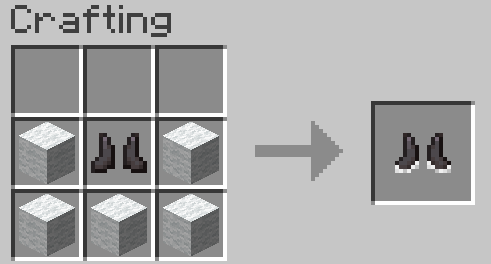
Pad your boots with wool, prevent Sculk and Warden Detection.
Fully compatible with the official 1.19+ Warden!
Think these boots make the Deep Dark too easy? Download Warden Walkers for something more balanced: https://www.curseforge.com/minecraft/mc-mods/warden-walkers
These Boots Silence the Vibrations of:
- Stepping
- Falling and hitting the ground
- Throwing a projectile (A projectile hitting something will still be detected, but it will be traced to the projectile rather than you)
Tiers:
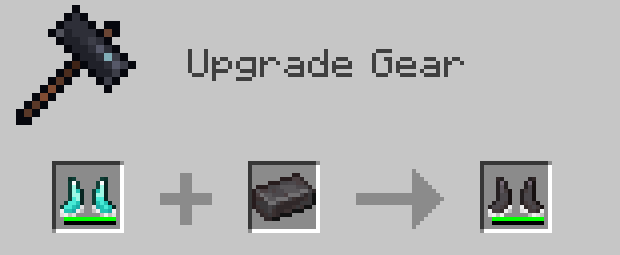
Leather | Chainmail | Iron | Golden | Diamond | Netherite
Wooled Boots in Action
Wooled Boots Showcase Begins at 1:29
Quick Access Links to Supported Versions (Forge & Fabric)
Play this mod with your friends! Use code "jackbusters" for 25% off Minecraft Server Hosting.
Warden Mod Support
Some mods, which add the Warden, are compatible with Wooled Boots. These mods include:
- The Wild Mod by lukebattle04 (and the FrozenBlock Modding Team)
Boot Mod Support
- Mekanism Tools [Forge]
- Copper Equipment [Fabric]
- Therrassium [Fabric]
Modpack Policy
You are free to include this mod in any Modpack hosted on CurseForge.
Wooled Boots کیسے انسٹال کریں
With Millida Launcher
Install Millida Launcher
The launcher is free: download it at millida.net/launcher and sign in with any nickname.
Click “Install” on this page
The launcher opens and installs the mod for Minecraft 1.21.4 on Fabric, Forge, NeoForge or Quilt automatically.
Launch the game
A profile with it appears in the launcher: click “Play”.
Manually
Install Fabric, Forge, NeoForge or Quilt
The loader must match the game version of the mod file, for example Minecraft 1.21.4. After installing it, a separate profile appears in your launcher.
Download the file for your version
In the version list above, pick the file wooledboots-1.9-fabric-mc1.21.4.jar (80 KB) for your game version and loader.
Put it in the mods folder
The folder is inside .minecraft (Windows: %appdata%\.minecraft\mods). If it does not exist, create it.
Launch the loader profile
Open “Mods” in the main menu: Wooled Boots should be in the list.
Minecraft 1.21.4 runs on Java 21: with a different Java version the game may close right after launch.
ورژنز
ڈیپنڈنسیز کے ساتھ
| Minecraft | لوڈر | فائل | تاریخ | اقدامات |
|---|---|---|---|---|
| 1.21.4 | Fabric, Quilt | [Fabric 1.21.4] Wooled Boots v1.979.8 KB | ||
| 1.21.4 | NeoForge | [NeoForge 1.21.4] Wooled Boots v1.977.8 KB | ||
| 1.21.4 | Forge | [Forge 1.21.4] Wooled Boots v1.979.1 KB 1 | ||
| — | Fabric | Wooled-Boots-v1.3-FABRIC-MC1.19PreRelease150.1 KB |
عمومی سوالات
Which Minecraft versions does Wooled Boots work on?
Only Minecraft 1.21.4: there are no files for other versions.
Is Wooled Boots for Forge or Fabric?
There are files for Fabric: 1.21.4, for Forge: 1.21.4, for NeoForge: 1.21.4 and for Quilt: 1.21.4.
Does Wooled Boots need other mods?
The author lists no required dependencies: the Fabric, Forge, NeoForge or Quilt loader is enough.
Which Java does Wooled Boots need?
Minecraft 1.21.4 runs on Java 21. If the game closes right after launch, the usual cause is the wrong Java version in the profile settings.
Where can I download Wooled Boots safely?
On this page: the file wooledboots-1.9-fabric-mc1.21.4.jar (80 KB) is stored on Millida’s server, with no link shorteners. SHA-1 checksum: 083b884e1dd8ea4bccce9ea3075c22425afa26f0.
ریویوز
Wooled Boots کو ریٹ کرنے والے پہلے شخص بنیں


