
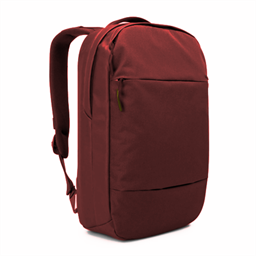
Minecraft 1.21.1, 1.12.2 کے لیے Useful Backpacks موڈ
مزید سلاٹس چاہیے؟ یہ بیک پیک آزمائیں
 NeoForge
 Forge
Forge Fabric
Useful Backpacks موڈ کے بارے میں
کیا آپ کو مزید انوینٹری اسٹوریج کی ضرورت ہے؟
تو یہ موڈ آزمائیں۔ یہ تین نئے بیک پیک شامل کرتا ہے جن میں چھوٹی، درمیانی اور بڑی انوینٹری ہوتی ہے۔
اس موڈ کے لیے uteamcore درکار ہے!
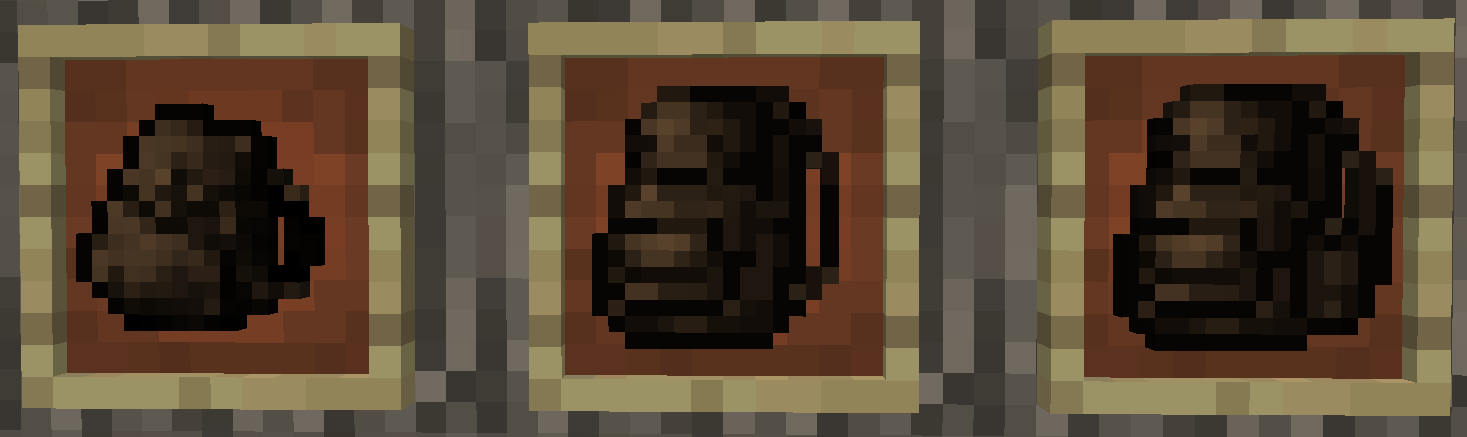
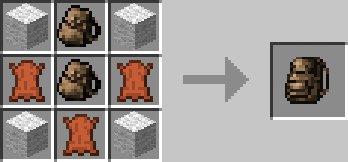
کرافٹنگ ریسیپیز:
- بیک پیک سمال:
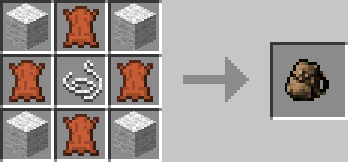
- درمیانے بیک پیکس:
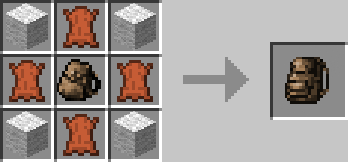
- بڑے بیک پیکس:
میں کسی بھی پرانے بیک پیک موڈ کا ڈویلپر نہیں ہوں۔ ٹیکسچرز Might Porky کے بیک پیک موڈ سے ہیں، جو اس نے Eydamos کو سونپ دیا تھا۔ اسی وجہ سے مجھے لگتا ہے کہ میں جلد ہی ٹیکسچر کو اپنے بنائے ہوئے ٹیکسچر سے بدل دوں گا۔ میرا Eydamos سے کسی بھی طرح کا رابطہ نہیں ہے۔
یہ موڈ آپ کی مرضی کے ہر موڈپیک میں شامل کیا جا سکتا ہے :)
سورس کوڈ اوپر لنک کیا گیا ہے اور Apache License 2.0 کے تحت دستیاب ہے۔
مسائل اوپر لنک کردہ Issuetracker پر بھیجیں۔
Useful Backpacks کیسے انسٹال کریں
With Millida Launcher
Install Millida Launcher
The launcher is free: download it at millida.net/launcher and sign in with any nickname.
Click “Install” on this page
The launcher opens and installs the mod for Minecraft 1.12.2–1.21.1 on Fabric, Forge or NeoForge automatically.
Launch the game
A profile with it appears in the launcher: click “Play”.
Manually
Install Fabric, Forge or NeoForge
The loader must match the game version of the mod file, for example Minecraft 1.21.1. After installing it, a separate profile appears in your launcher.
Download the file for your version
In the version list above, pick the file useful_backpacks-neoforge-1.21.1-3.0.2.129.jar (180 KB) for your game version and loader.
Put it in the mods folder
The folder is inside .minecraft (Windows: %appdata%\.minecraft\mods). If it does not exist, create it.
Launch the loader profile
Open “Mods” in the main menu: Useful Backpacks should be in the list.
Minecraft 1.21.1 runs on Java 21: with a different Java version the game may close right after launch.
ورژنز
ڈیپنڈنسیز کے ساتھ
| Minecraft | لوڈر | فائل | تاریخ | اقدامات |
|---|---|---|---|---|
| 1.21.1 | NeoForge | Useful-Backpacks-NeoForge-1.21.1-3.0.2.129180 KB 18 | ||
| 1.21.1 | Forge | Useful-Backpacks-Forge-1.21.1-3.0.2.129167 KB 15 | ||
| 1.21.1 | Fabric | Useful-Backpacks-Fabric-1.21.1-3.0.2.129173 KB 14 | ||
| 1.20.2 | Forge | Useful-Backpacks-Forge-1.20.2-2.0.1.123182 KB 1 | ||
| 1.20.2 | Fabric | Useful-Backpacks-Fabric-1.20.2-2.0.1.123158 KB 3 | ||
| 1.12.2 | — | Useful-Backpacks-1.12.2-1.5.4.8561.9 KB 2 | ||
| 1.16.2 | — | Useful-Backpacks-1.16.2-1.11.4.79101 KB | ||
| 1.15.2 | — | Useful-Backpacks-1.15.2-1.10.0.64-SNAPSHOT72.7 KB 1 |
عمومی سوالات
Which Minecraft versions does Useful Backpacks work on?
There are files for 1.21.1, 1.20.2, 1.16.2, 1.15.2, 1.12.2. The newest is 1.21.1.
Is Useful Backpacks for Forge or Fabric?
There are files for Fabric: 1.20.2–1.21.1, for Forge: 1.20.2–1.21.1 and for NeoForge: 1.21.1.
Does Useful Backpacks need other mods?
The author lists no required dependencies: the Fabric, Forge or NeoForge loader is enough.
Which Java does Useful Backpacks need?
Minecraft 1.21.1 runs on Java 21. If the game closes right after launch, the usual cause is the wrong Java version in the profile settings.
Where can I download Useful Backpacks safely?
On this page: the file useful_backpacks-neoforge-1.21.1-3.0.2.129.jar (180 KB) is stored on Millida’s server, with no link shorteners. SHA-1 checksum: 8183758d22fa3606775f8532d1430dd43a192f16.
ریویوز
Useful Backpacks کو ریٹ کرنے والے پہلے شخص بنیں


