
Minecraft 1.20.1, 1.21.5 کے لیے Transparent موڈ
ریسورس پیکس کو اجازت دیتا ہے کہ وہ مخصوص entities کے لیے شفافیت کی حمایت کریں۔
 Fabric
 Quilt
Quilt NeoForge
 Forge
ForgeTransparent موڈ کے بارے میں
Transparent ریسورس پیکس کو یہ اجازت دیتا ہے کہ وہ مخصوص entities کو شفاف (یا نیم شفاف) پکسلز والی ٹیکسچرز دے سکیں۔ استعمال کرنے کے لیے، بس موڈ انسٹال کریں اور ایک ریسورس پیک استعمال کریں یا بنائیں جو معاون entities میں سے کسی ایک کو شفاف ٹیکسچر دے۔
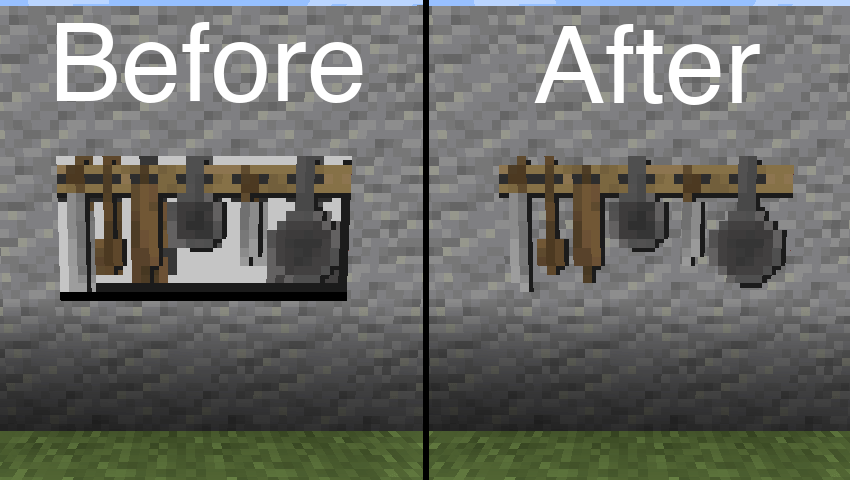
اوپر دی گئی تصویر میں استعمال ہونے والا ریسورس پیک: BwW Texturepack۔
سرکاری طور پر Paintings++ Mod کو سپورٹ کرتا ہے!
معاون Entities
- Armor Stand (1.19.4+)
- End Crystal
- End Crystal Beam (1.21+)
- Item Frame
- Painting
- Player Cape (1.21+)
- Player Armor (1.21+)
- Beacon Beam (ڈیفالٹ طور پر غیر فعال)
اگر آپ چاہتے ہیں کہ اس موڈ کے ذریعے کوئی اور entity بھی معاون ہو، تو براہ کرم مجھے Discord یا GitHub Issues پر بتائیں۔
کنفیگریشن
ڈیفالٹ کنفیگریشن کو تبدیل کرنے کے لیے، درج ذیل json فائل کا مواد اپنے ریسورس پیک میں /assets/transparent/transparent.json پر موجود فائل میں پیسٹ کریں۔
{ "armorstand": true, "beaconbeam": false, "endcrystal": true, "endcrystalbeam": true, "itemframe": true, "painting": true, "playercape": true, "playerarmor": true }
کسی بھی مسئلے کی اطلاع GitHub پر دیں۔ Discord میں transparent چینل پر بات چیت کریں۔
Ko-fi پر میرے موڈز کی ترقی میں معاونت کریں۔
Transparent کیسے انسٹال کریں
With Millida Launcher
Install Millida Launcher
The launcher is free: download it at millida.net/launcher and sign in with any nickname.
Click “Install” on this page
The launcher opens and installs the mod for Minecraft 1.20.1–1.21.5 on Fabric, Forge, NeoForge or Quilt automatically.
Launch the game
A profile with it appears in the launcher: click “Play”.
Manually
Install Fabric, Forge, NeoForge or Quilt
The loader must match the game version of the mod file, for example Minecraft 1.21.5. After installing it, a separate profile appears in your launcher.
Download the file for your version
In the version list above, pick the file transparent-fabric-21.5.0.jar (35 KB) for your game version and loader.
Put it in the mods folder
The folder is inside .minecraft (Windows: %appdata%\.minecraft\mods). If it does not exist, create it.
Launch the loader profile
Open “Mods” in the main menu: Transparent should be in the list.
Minecraft 1.21.5 runs on Java 21: with a different Java version the game may close right after launch.
ورژنز
ڈیپنڈنسیز کے ساتھ
| Minecraft | لوڈر | فائل | تاریخ | اقدامات |
|---|---|---|---|---|
| 1.21.5 | Fabric, Quilt | [Fabric 1.21.5] v21.5.035.3 KB | ||
| 1.21.5 | NeoForge | [NeoForge 1.21.5] v21.5.033.6 KB | ||
| 1.20.6 | Forge | [Forge 1.20.6] v20.6.125.8 KB | ||
| 1.20.1 | Quilt | [Quilt 1.20.1] v8.0.129.4 KB |
عمومی سوالات
Which Minecraft versions does Transparent work on?
There are files for 1.21.5, 1.20.6, 1.20.1. The newest is 1.21.5.
Is Transparent for Forge or Fabric?
There are files for Fabric: 1.21.5, for Forge: 1.20.6, for NeoForge: 1.21.5 and for Quilt: 1.20.1–1.21.5.
Does Transparent need other mods?
The author lists no required dependencies: the Fabric, Forge, NeoForge or Quilt loader is enough.
Which Java does Transparent need?
Minecraft 1.21.5 runs on Java 21. If the game closes right after launch, the usual cause is the wrong Java version in the profile settings.
Where can I download Transparent safely?
On this page: the file transparent-fabric-21.5.0.jar (35 KB) is stored on Millida’s server, with no link shorteners. SHA-1 checksum: b1ad3807de859e41029047644e38377a0f023716.
ریویوز
Transparent کو ریٹ کرنے والے پہلے شخص بنیں


