

Minecraft 1.16.5, 26.3 کے لیے Tool Stats موڈ
آئٹمز کے لیے اضافی tooltip معلومات فراہم کرتا ہے
 NeoForge
 Fabric
 Forge
ForgeTool Stats موڈ کے بارے میں
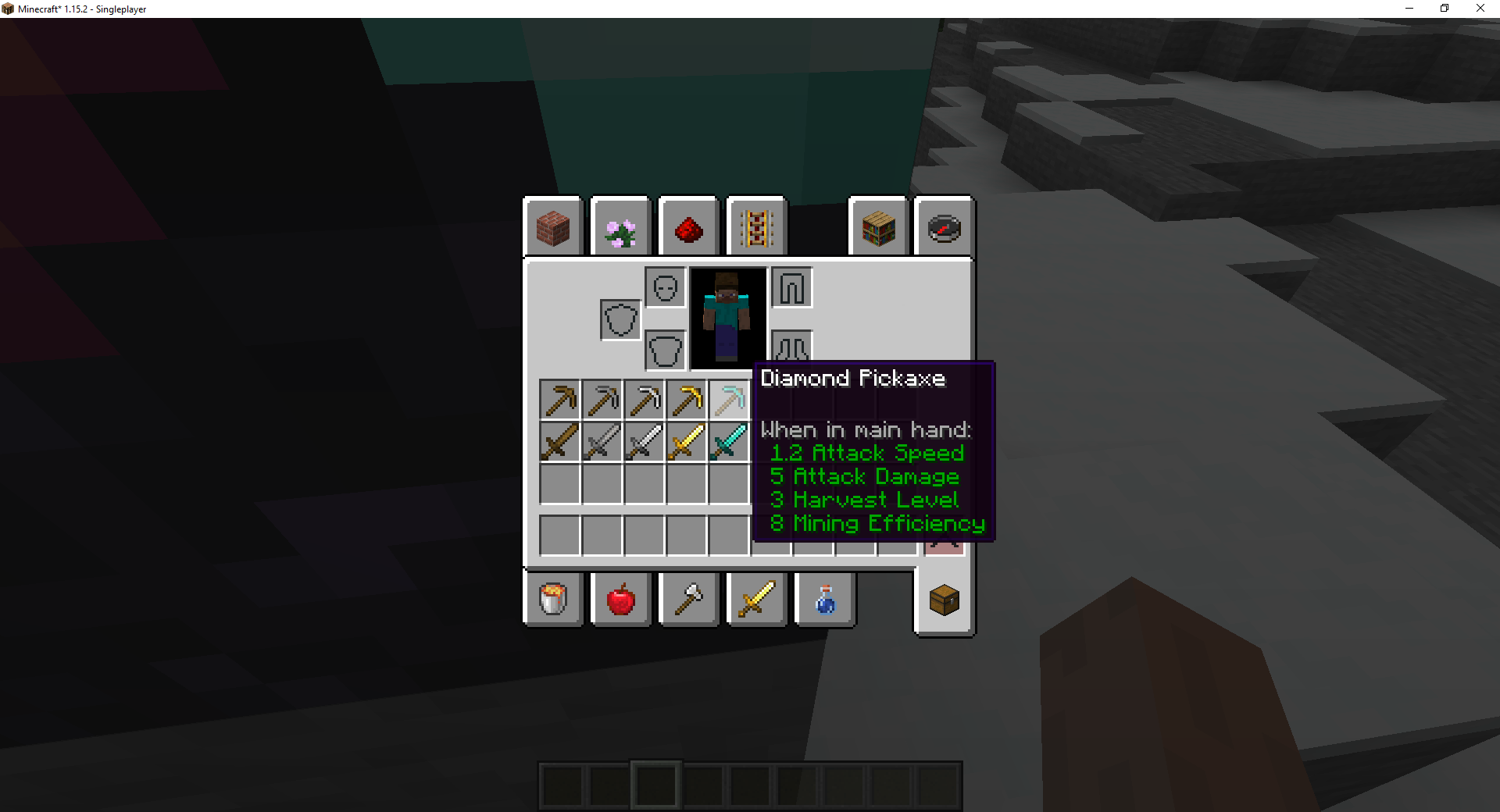
یہ موڈ Minecraft میں مختلف آلات کے ٹول ٹپ میں اضافی ٹول اعداد و شمار شامل کرتا ہے۔ یہ موڈ قابلِ ترتیب ہے، جس سے مخصوص معلومات کو غیر فعال کیا جا سکتا ہے۔
موجودہ خصوصیات
- Harvest Level (صرف درجہ بند اشیاء جیسے pickaxe پر)
- Mining Efficiency (صرف درجہ بند اشیاء جیسے pickaxe پر)
- Enchantability (تمام جادو کے قابل اشیاء پر دکھایا جاتا ہے جب enchantment table GUI میں ہوں)
- Tool Durability (ٹولز پر دکھایا جاتا ہے جب وہ خراب ہوں)
موڈ پسند آیا اور میری مدد کرنا چاہتے ہیں؟
- Twitter پر مجھے فالو کریں
- میرے Discord میں شامل ہوں
- Patreon پر تعاون کریں
- میری ویب سائٹ دیکھیں
لوگو Lorc نے Game Icons پر بنایا اور CC By 3.0 کے تحت لائسنس یافتہ ہے۔
یہ پروجیکٹ Nodecraft کے زیرِ کفالت ہے۔ اپنی پہلی ماہ کی سروس پر 30% رعایت کے لیے کوڈ DARKHAX استعمال کریں!
Tool Stats کیسے انسٹال کریں
With Millida Launcher
Install Millida Launcher
The launcher is free: download it at millida.net/launcher and sign in with any nickname.
Click “Install” on this page
The launcher opens and installs the mod for Minecraft 1.16.5–26.3 on Fabric, Forge or NeoForge automatically, together with its dependencies: Fabric API, Prickle, Bookshelf.
Launch the game
A profile with it appears in the launcher: click “Play”.
Manually
Install Fabric, Forge or NeoForge
The loader must match the game version of the mod file, for example Minecraft 26.3. After installing it, a separate profile appears in your launcher.
Download the file for your version
In the version list above, pick the file ToolStats-neoforge-MC26.3-26.3.0.1.jar (23 KB) for your game version and loader.
Put it in the mods folder
The folder is inside .minecraft (Windows: %appdata%\.minecraft\mods). If it does not exist, create it. Required dependencies go there too: Fabric API, Prickle, Bookshelf.
Launch the loader profile
Open “Mods” in the main menu: Tool Stats should be in the list.
On a server
A server on Fabric, Forge or NeoForge
The mod only works on a server with the same loader and game version, for example 26.3.
File goes into the server’s mods folder
Stop the server, put the mod file into the mods folder and start the server again.
Use the “To server” button
On Millida Hosting, the button at the top of the page uploads the file to your server and restarts it for you.
ورژنز
ڈیپنڈنسیز کے ساتھ
| Minecraft | لوڈر | فائل | تاریخ | اقدامات |
|---|---|---|---|---|
| 26.3 | NeoForge | 26.322.8 KB | ||
| 26.3 | Fabric | 26.323.3 KB 3 | ||
| 26.1 | Fabric | 26.123 KB | — | |
| 1.16.5 | Forge | 1.16.510.4 KB | — |
چلانے کے لیے کیا درکار ہے
- Fabric APIلازمی
- Prickleلازمی
- Bookshelfلازمی
عمومی سوالات
Which Minecraft versions does Tool Stats work on?
There are files for 26.3, 26.1.2, 26.1.1, 26.1, 1.16.5. The newest is 26.3.
Is Tool Stats for Forge or Fabric?
There are files for Fabric: 26.1–26.3, for Forge: 1.16.5 and for NeoForge: 26.3.
What does Tool Stats need to work?
Required: Fabric API, Prickle, Bookshelf. Without them the mod will not start: dependencies go into the same mods folder.
Does Tool Stats work on a server?
Yes. Tool Stats works both in singleplayer and on a server.
Where can I download Tool Stats safely?
On this page: the file ToolStats-neoforge-MC26.3-26.3.0.1.jar (23 KB) is stored on Millida’s server, with no link shorteners. SHA-1 checksum: 5e56b7354fbe9a095ca8daa8b27bb37b69114945.
ریویوز
Tool Stats کو ریٹ کرنے والے پہلے شخص بنیں


