

Minecraft 26.2 کے لیے Status Effect Bars موڈ
اثرات کی باقی مدت دکھانے کے لیے اسٹیٹس ایفیکٹس اوورلے میں حسب ضرورت بارز شامل کرتا ہے۔
 Fabric
 Quilt
QuiltStatus Effect Bars موڈ کے بارے میں
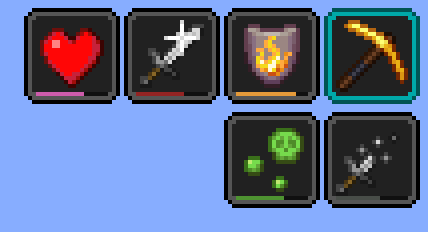
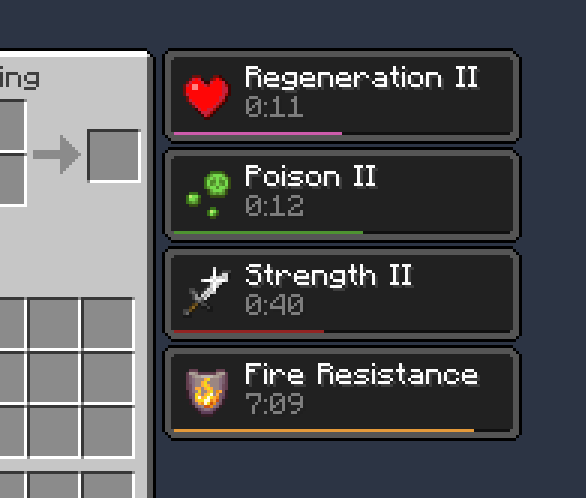
ایک کلائنٹ سائیڈ Fabric موڈ جو اسٹیٹس ایفیکٹس اوورلے اور انوینٹری میں چھوٹی حسبِ ضرورت بارز شامل کرتا ہے تاکہ ایفیکٹس کی باقی مدت دکھائی جا سکے۔
خصوصیات:

- پیاری سی چھوٹی بارز
- رنگ اور بارز کی پوزیشن تبدیل کرنے کے لیے کنفگ اسکرین
- کچھ مخصوص صورتوں میں بارز خودکار طور پر چھپائی جا سکتی ہیں تاکہ بھیڑ کم ہو (مثلاً بیکن ایفیکٹس اور بہت طویل مدت والے ایفیکٹس)
[Cloth Config] درکار ہے۔ کنفگ اسکرین Mod Menu کے ذریعے کھولی جا سکتی ہے۔
کریڈٹس
- ممکنہ طور پر SkyUI کے active effects HUD سے متاثر
- کنفگ اسکرین [Cloth Config] سے چلتی ہے
- ptbr ترجمہ FITFC کی طرف سے
لنکس: CurseForge · GitHub · Modrinth
[Cloth Config]: https://modrinth.com/mod/cloth-config

Status Effect Bars کیسے انسٹال کریں
With Millida Launcher
Install Millida Launcher
The launcher is free: download it at millida.net/launcher and sign in with any nickname.
Click “Install” on this page
The launcher opens and installs the mod for Minecraft 1.21.11–26.2 on Fabric or Quilt automatically.
Launch the game
A profile with it appears in the launcher: click “Play”.
Manually
Install Fabric or Quilt
The loader must match the game version of the mod file, for example Minecraft 26.2. After installing it, a separate profile appears in your launcher.
Download the file for your version
In the version list above, pick the file status-effect-bars-1.0.12.jar (44 KB) for your game version and loader.
Put it in the mods folder
The folder is inside .minecraft (Windows: %appdata%\.minecraft\mods). If it does not exist, create it.
Launch the loader profile
Open “Mods” in the main menu: Status Effect Bars should be in the list.
Status Effect Bars works on the player’s side only: there is no need to install it on a server.
ورژنز
ڈیپنڈنسیز کے ساتھ
| Minecraft | لوڈر | فائل | اقدامات |
|---|---|---|---|
| 26.2 | Fabric, Quilt | 26.243.9 KB 18 | |
| 26.1 | Fabric, Quilt | 26.147.4 KB 8 | |
| 1.21.11 | Fabric, Quilt | 1.21.1146.6 KB 63 |
عمومی سوالات
Which Minecraft versions does Status Effect Bars work on?
There are files for 26.2, 26.1.2, 26.1.1, 26.1, 1.21.11. The newest is 26.2.
Is Status Effect Bars for Forge or Fabric?
There are files for Fabric: 1.21.11–26.2 and for Quilt: 1.21.11–26.2. There are no files for Forge or NeoForge: a mod for another loader will not start.
Does Status Effect Bars need other mods?
The author lists no required dependencies: the Fabric or Quilt loader is enough.
Do I need to install Status Effect Bars on a server?
No. Status Effect Bars works on the player’s side only: there is no need to install it on a server.
Where can I download Status Effect Bars safely?
On this page: the file status-effect-bars-1.0.12.jar (44 KB) is stored on Millida’s server, with no link shorteners. SHA-1 checksum: f29719c3101ebe009dae76bca5215cf7482f8b9c.
ریویوز
Status Effect Bars کو ریٹ کرنے والے پہلے شخص بنیں


