

Minecraft 1.20.1, 1.21.1 کے لیے Productive Trees موڈ
افزائش پذیر درختوں کی اقسام
 NeoForge
 Forge
ForgeProductive Trees موڈ کے بارے میں
مائن کرافٹ کے لیے 'پروڈکٹو ٹریز' موڈ متعارف کرواتے ہوئے، جو فاریسٹری کے درختوں کی افزائش کے منی گیم کا روحانی جانشین ہے۔ اس موڈ کے ساتھ، آپ اب درختوں کی افزائش کے فن میں شامل ہو سکتے ہیں، جس سے آپ مختلف درختوں کی اقسام کو کراس پولینیٹ کر کے منفرد، ہائبرڈ اقسام اگا سکتے ہیں۔ 160 سے زائد نئے منفرد لکڑی کے سیٹوں کے مجموعے کے ساتھ، بورنگ پرانی ونیلا درختوں کی لکڑی سے تعمیر کرنے کے دن ختم ہو گئے ہیں۔
پروڈکٹو ٹریز کے ساتھ، آپ کے پاس حکمت عملی سے درختوں کی افزائش کرنے کی طاقت ہے تاکہ خوبصورت لکڑی کی اقسام حاصل ہوں۔ مختلف امتزاجوں کے ساتھ تجربہ کریں تاکہ بہت سی دلچسپ امکانات دریافت اور غیر مقفل ہوں۔ تصور کریں کہ ایسا درخت کاٹ رہے ہیں جو نہ صرف نایاب لکڑی فراہم کرتا ہے بلکہ مزیدار پھل یا گریاں بھی دیتا ہے!
اپنی جنگلاتی مہارتوں کو بہتر بنائیں، اپنی منفرد درختوں کی اقسام بنائیں، اور اپنی ان گیم دنیا کو اپنی مرضی سے اگائے گئے عجوبوں کے ایک پھلتے پھولتے ماحولیاتی نظام میں تبدیل کریں۔ آج ہی پروڈکٹو ٹریز موڈ ڈاؤن لوڈ کریں اور مائن کرافٹ کے وسیع پکسل والے مناظر میں درختوں کی جدت کے سفر پر نکلیں۔
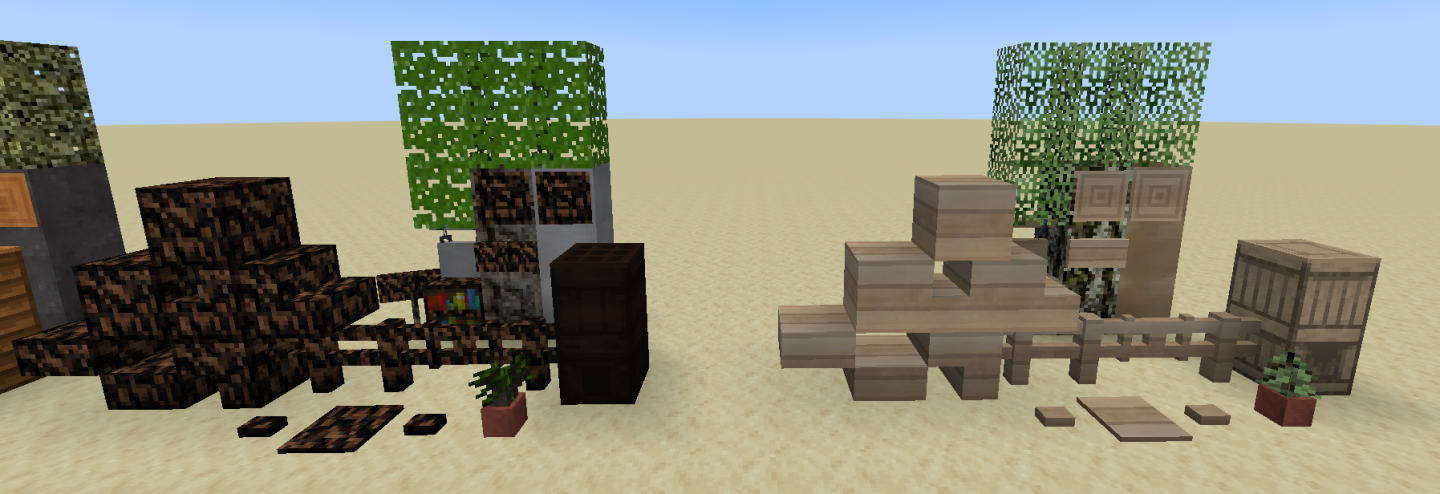
یہ موڈ بیٹا میں ہے اور ابھی مکمل نہیں ہوا۔ نمایاں طور پر غائب چیزیں درختوں کی خصوصیات ہیں (بڑے ہونے پر وہ کیسے دکھتے ہیں)۔
اگر آپ کو کچھ مدد کی ضرورت ہو یا آپ رک کر ٹیکسچرز کی تعریف کرنا چاہیں تو ایک ڈسکارڈ سرور موجود ہے۔
"اتنی لکڑی کہ آپ کو طبی امداد کی تلاش کرنی پڑے گی" - نامعلوم
Productive Trees کیسے انسٹال کریں
With Millida Launcher
Install Millida Launcher
The launcher is free: download it at millida.net/launcher and sign in with any nickname.
Click “Install” on this page
The launcher opens and installs the mod for Minecraft 1.20.1–1.21.1 on Forge or NeoForge automatically.
Launch the game
A profile with it appears in the launcher: click “Play”.
Manually
Install Forge or NeoForge
The loader must match the game version of the mod file, for example Minecraft 1.21.1. After installing it, a separate profile appears in your launcher.
Download the file for your version
In the version list above, pick the file productivetrees-1.21.1-1.1.1.jar (13 MB) for your game version and loader.
Put it in the mods folder
The folder is inside .minecraft (Windows: %appdata%\.minecraft\mods). If it does not exist, create it.
Launch the loader profile
Open “Mods” in the main menu: Productive Trees should be in the list.
Minecraft 1.21.1 runs on Java 21: with a different Java version the game may close right after launch.
ورژنز
ڈیپنڈنسیز کے ساتھ
| Minecraft | لوڈر | فائل | تاریخ | اقدامات |
|---|---|---|---|---|
| 1.21.1 | NeoForge | productivetrees-1.21.1-1.1.1.jar13.4 MB 2 | ||
| 1.21.1 | NeoForge | productivetrees-1.21.1-0.6.0.jar3.2 MB | ||
| 1.20.1 | NeoForge, Forge | productivetrees-1.20.1-0.2.6.jar14 MB | ||
| 1.20.1 | NeoForge, Forge | productivetrees-1.20.1-0.1.0.jar13.3 MB |
عمومی سوالات
Which Minecraft versions does Productive Trees work on?
There are files for 1.21.1, 1.20.1. The newest is 1.21.1.
Is Productive Trees for Forge or Fabric?
There are files for Forge: 1.20.1 and for NeoForge: 1.20.1–1.21.1. There are no files for Fabric: a mod for another loader will not start.
Does Productive Trees need other mods?
The author lists no required dependencies: the Forge or NeoForge loader is enough.
Which Java does Productive Trees need?
Minecraft 1.21.1 runs on Java 21. If the game closes right after launch, the usual cause is the wrong Java version in the profile settings.
Where can I download Productive Trees safely?
On this page: the file productivetrees-1.21.1-1.1.1.jar (13 MB) is stored on Millida’s server, with no link shorteners. SHA-1 checksum: 33b7f304e4e13297fdbbef4822f8b178d73868cc.
ریویوز
Productive Trees کو ریٹ کرنے والے پہلے شخص بنیں


