

 Fabric
 Forge
PlayerEx موڈ کے بارے میں
11 اگست 2023: میں موڈنگ سے وقفہ لے رہا ہوں۔ میں واپس آؤں گا، لیکن یقین نہیں کہ کب۔ جب موقع ملے گا تو تب بھی کمنٹس کا جواب دینے کی کوشش کروں گا۔ براہ کرم نوٹ کریں کہ صرف تازہ ترین ورژن کو سپورٹ دی جائے گی۔ مزید برآں، میں اب Forge کے لیے ڈیولپ نہیں کر رہا؛ یہ موڈ اب Fabric استعمال کرتا ہے۔
تفصیل

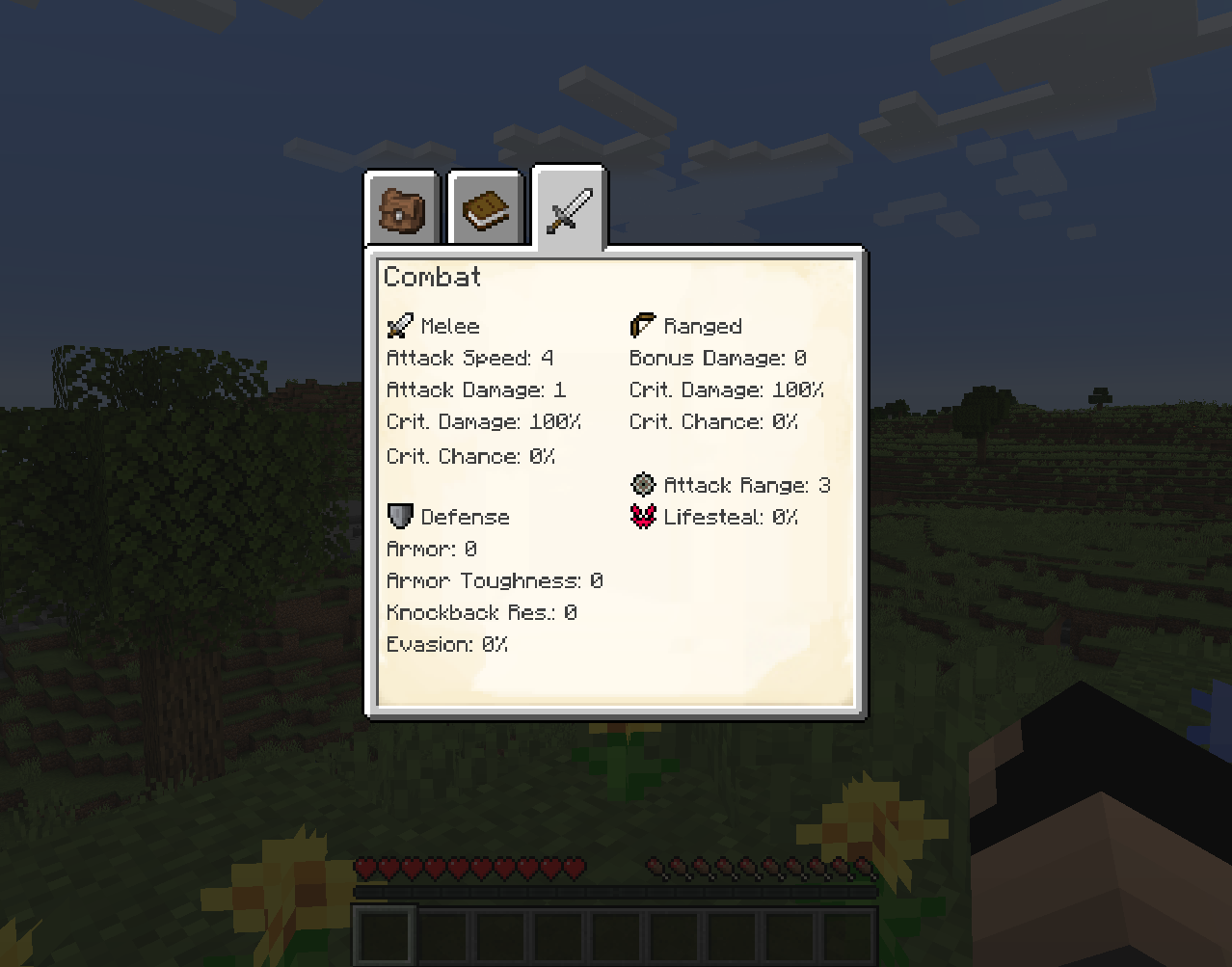
PlayerEx گیم میں مکمل طور پر فعال RPG تھیم والی خصوصیات رجسٹر کرتا ہے، اور انہیں بطور ڈیفالٹ پلیئر میں شامل کرتا ہے (یہ خصوصیات دیگر زندہ ہستیوں میں بھی شامل کی جا سکتی ہیں)۔ اس کے علاوہ لیولز، اسکل پوائنٹس اور قابل ترتیب لیولنگ بھی شامل کی گئی ہے۔ تازہ ترین ورژن Data Attributes پر مبنی ہے، جہاں سے زیادہ تر ترتیب پذیری آتی ہے - براہ کرم چیزیں کنفیگر کرنے کا طریقہ پوچھنے سے پہلے اس سے واقفیت حاصل کریں۔
فراہم کردہ مواد اور میکانکس پر مزید تفصیلی دستاویزات کے لیے، دیگر چیزوں کے علاوہ، براہ کرم ویکی پڑھیں۔
پرانا HUD ڈھونڈ رہے ہیں؟ یہ اب یہاں ایک علیحدہ موڈ کے طور پر دستیاب ہے۔
ایک ایڈون موڈ بھی دستیاب ہے: RelicEx؛ یہ موڈ PlayerEx خصوصیات کے لیے کچھ توسیعی آئٹمز پیش کرتا ہے۔ کچھ ویڈیوز جن میں بطور مہربانی PlayerEx شامل ہے:
- By Mischief of Mice (Forge)
- By bstylia14 (Forge)
- By AsianHalfSquat (Fabric)
نوٹس اور رہنمائی
- Forge کے لیے جاری کیا گیا آخری ورژن v1.1.8 تھا۔
- براہ کرم ہمیشہ تازہ ترین ورژن استعمال کریں۔
- کسی دوسرے ورژن میں اپ ڈیٹ کرنے سے پہلے براہ کرم کنفیگ فائلیں حذف کریں، کیونکہ جیسے جیسے مزید ترتیب پذیری نافذ ہوتی ہے، کنفیگ فائلیں بڑے ورژنز کے درمیان تبدیل ہوتی رہتی ہیں۔
- موڈپیکس ٹھیک ہیں۔
- یہ موڈ اپنے ساتھ (jar-in-jar) Cardinal Components (Base, Entity اور Chunk ماڈیولز)، TextPlaceholderAPI، OfflinePlayerCache اور exp4j لے کر آتا ہے (کریڈٹ دیا گیا ہے)۔
PlayerEx کیسے انسٹال کریں
With Millida Launcher
Install Millida Launcher
The launcher is free: download it at millida.net/launcher and sign in with any nickname.
Click “Install” on this page
The launcher opens and installs the mod for Minecraft 1.16.4–1.19.2 on Fabric or Forge automatically.
Launch the game
A profile with it appears in the launcher: click “Play”.
Manually
Install Fabric or Forge
The loader must match the game version of the mod file, for example Minecraft 1.19.2. After installing it, a separate profile appears in your launcher.
Download the file for your version
In the version list above, pick the file playerex-3.5.4+1.19.2.jar (607 KB) for your game version and loader.
Put it in the mods folder
The folder is inside .minecraft (Windows: %appdata%\.minecraft\mods). If it does not exist, create it.
Launch the loader profile
Open “Mods” in the main menu: PlayerEx should be in the list.
Minecraft 1.19.2 runs on Java 17: with a different Java version the game may close right after launch.
ورژنز
ڈیپنڈنسیز کے ساتھ
| Minecraft | لوڈر | فائل | تاریخ | اقدامات |
|---|---|---|---|---|
| 1.19.2 | Fabric | 3.5.4+1.19.2607 KB 1 | ||
| 1.16.5 | Forge | playerex-1.1.8-1.16.5.jar131 KB 3 |
عمومی سوالات
Which Minecraft versions does PlayerEx work on?
There are files for 1.19.2, 1.16.5, 1.16.4. The newest is 1.19.2.
Is PlayerEx for Forge or Fabric?
There are files for Fabric: 1.19.2 and for Forge: 1.16.4–1.16.5. There are no files for NeoForge: a mod for another loader will not start.
Does PlayerEx need other mods?
The author lists no required dependencies: the Fabric or Forge loader is enough.
Which Java does PlayerEx need?
Minecraft 1.19.2 runs on Java 17. If the game closes right after launch, the usual cause is the wrong Java version in the profile settings.
Where can I download PlayerEx safely?
On this page: the file playerex-3.5.4+1.19.2.jar (607 KB) is stored on Millida’s server, with no link shorteners. SHA-1 checksum: 48e9ef1dc6aafb45e9aa7c5d9ab2fe588f297d7c.
ریویوز
PlayerEx کو ریٹ کرنے والے پہلے شخص بنیں


