
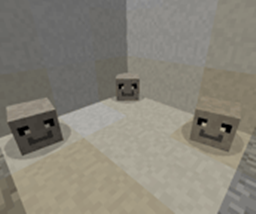
Minecraft 1.21.1, 1.12.2 کے لیے Petrock - Forge موڈ
پالتو پتھروں کے بارے میں ایک موڈ
 NeoForge
 Forge
ForgePetrock - Forge موڈ کے بارے میں
پالتو پتھر موڈ واحد پالتو پتھر موڈ ہے جو آپ کو کبھی درکار ہوگا۔ آپ کو کبھی اسے کھلانے، سیر کرانے، نہلانے، سنوارنے یا نس بندی کرانے کی ضرورت نہیں ہوگی! تمام پالتو پتھر "بیٹھنے" اور "رکنے" کی تربیت یافتہ آتے ہیں اور سب سے بہتر بات یہ ہے کہ آپ کا پالتو پتھر واحد پالتو ہے جو کبھی بھاگے گا نہیں!
ڈبے میں آپ کو کیا ملے گا:
- 1 پالتو پتھر
100% پتھر جیسی مضبوط ضمانت!
ایک کیسے حاصل کریں:
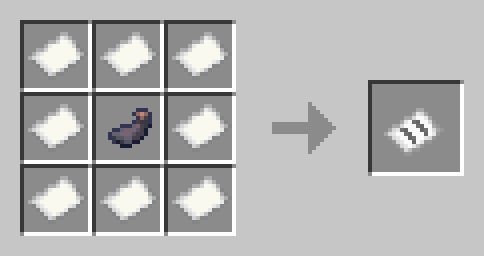
رائٹ کلک کریں اور آپ کو ڈبے میں پالتو پتھر مل جائے گا۔ اگر آپ ڈبے پر رائٹ کلک کریں گے تو ایک غیر تربیت یافتہ پالتو پتھر آپ کے قدموں میں پیدا ہوگا۔ پالتو پتھر کو سدھانے کے لیے آپ کو Stoneium Ore سے Stoneium حاصل کرنا ہوگا
خراب پتھر کو ٹھیک کرنے کے لیے آپ کو Rock Kibble بنانا ہوگا:
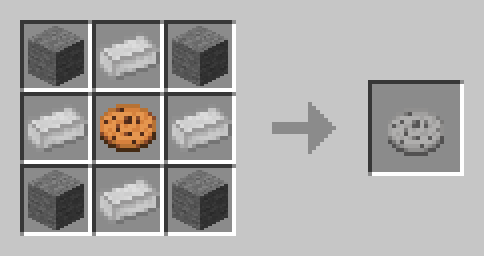
غیر تربیت یافتہ:
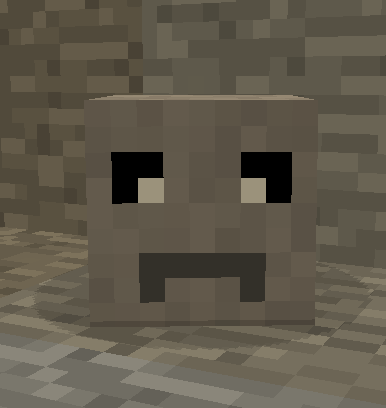
تربیت یافتہ: پیچھے آنا اور بیٹھنا:
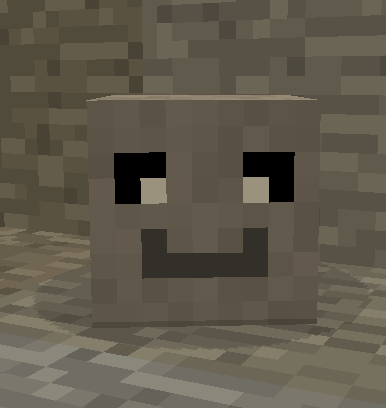
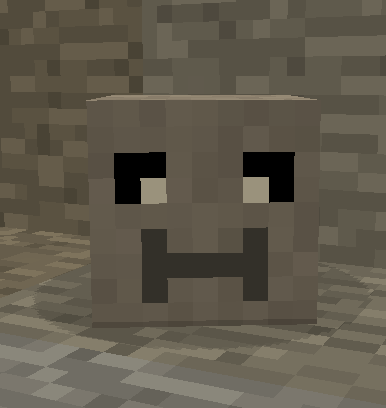
موڈ کی دوبارہ تقسیم کی معلومات:
CuseForge سے دوبارہ تقسیم کرنے کے لیے براہ کرم یہاں جائیں:
https://manmaed.net/mod-redistribution-info/
جواب غالباً نہیں ہوگا
Petrock - Forge کیسے انسٹال کریں
With Millida Launcher
Install Millida Launcher
The launcher is free: download it at millida.net/launcher and sign in with any nickname.
Click “Install” on this page
The launcher opens and installs the mod for Minecraft 1.10.2–1.21.1 on Forge or NeoForge automatically.
Launch the game
A profile with it appears in the launcher: click “Play”.
Manually
Install Forge or NeoForge
The loader must match the game version of the mod file, for example Minecraft 1.21.1. After installing it, a separate profile appears in your launcher.
Download the file for your version
In the version list above, pick the file petrock-neo-0.18.7.jar (658 KB) for your game version and loader.
Put it in the mods folder
The folder is inside .minecraft (Windows: %appdata%\.minecraft\mods). If it does not exist, create it.
Launch the loader profile
Open “Mods” in the main menu: Petrock - Forge should be in the list.
Minecraft 1.21.1 runs on Java 21: with a different Java version the game may close right after launch.
ورژنز
ڈیپنڈنسیز کے ساتھ
| Minecraft | لوڈر | فائل | تاریخ | اقدامات |
|---|---|---|---|---|
| 1.21 | NeoForge | PetRock v0.18.7 - NeoForge - 1.21658 KB | ||
| 1.21 | NeoForge | PetRock v0.18.4 - NeoForge - 1.21647 KB | ||
| 1.19.2 | Forge | Petrock v0.11.16 - 1.19.2240 KB | ||
| 1.19.2 | Forge | Petrock v0.11.14 - 1.19.2250 KB | ||
| 1.12.2 | — | PetRock v 0.3.0 - 1.12.286.1 KB | ||
| 1.10.2 | — | PetRock v0.1.0 - 1.10.238.5 KB |
عمومی سوالات
Which Minecraft versions does Petrock - Forge work on?
There are files for 1.21.1, 1.21, 1.19.2, 1.12.2, 1.10.2. The newest is 1.21.1.
Is Petrock - Forge for Forge or Fabric?
There are files for Forge: 1.19.2 and for NeoForge: 1.21–1.21.1. There are no files for Fabric: a mod for another loader will not start.
Does Petrock - Forge need other mods?
The author lists no required dependencies: the Forge or NeoForge loader is enough.
Which Java does Petrock - Forge need?
Minecraft 1.21.1 runs on Java 21. If the game closes right after launch, the usual cause is the wrong Java version in the profile settings.
Where can I download Petrock - Forge safely?
On this page: the file petrock-neo-0.18.7.jar (658 KB) is stored on Millida’s server, with no link shorteners. SHA-1 checksum: 600d8956869925d65bd8cbf181fe163b2fcfa9ac.
ریویوز
Petrock - Forge کو ریٹ کرنے والے پہلے شخص بنیں


