

Minecraft 1.20.1, 1.21.1 کے لیے Particle Effects موڈ
ایک بصری موڈ جو ونیلا Minecraft میں ہر اثر کے لیے منفرد ٹیکسچر والے ذرات شامل کرتا ہے!
 NeoForge
 Fabric
 Forge
Forge💬 تفصیل
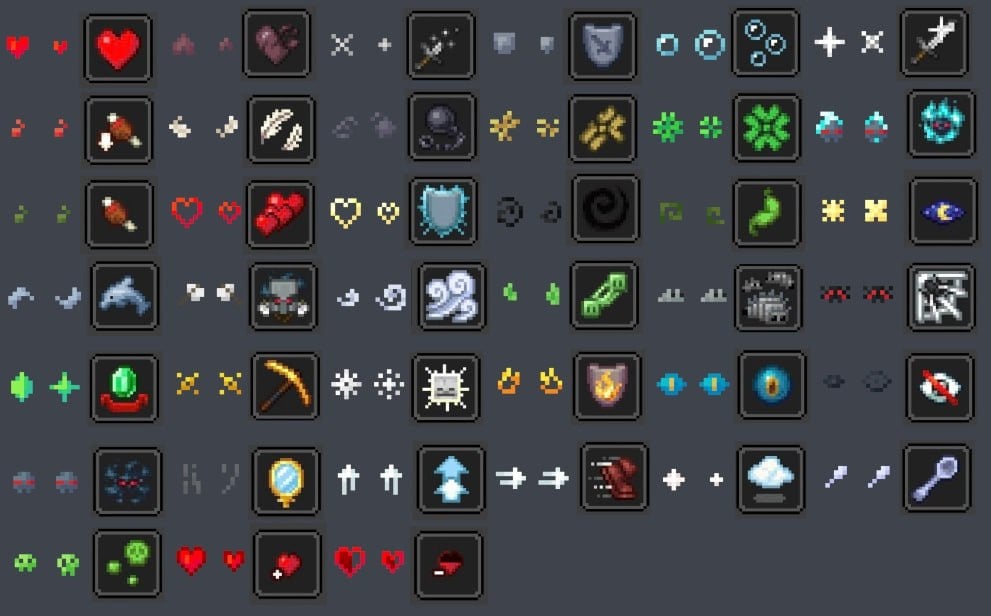
Particle Effects ایک سادہ بصری کلائنٹ سائیڈ موڈ ہے جو ونیلا مائن کرافٹ میں ہر اثر کے لیے منفرد ٹیکسچر والے ذرات شامل کرتا ہے! ملٹی پلیئر میں بھی کام کرتا ہے ^^

✨ ذرات
یہاں آپ ہر اثر کے لیے تمام منفرد ذرات دیکھ سکتے ہیں:
🌟 ریسورس پیکس
کچھ ریسورس پیکس بھی موجود ہیں جو اصل موڈ کے ذرات کی ظاہری شکل کو قدرے تبدیل کرتے ہیں۔
- Particles Updated بذریعہ zed1ker
- Updated Particles بذریعہ Timofeii7547
- Bare Bones x Particle Effects بذریعہ Dezert3

Particle Effects کیسے انسٹال کریں
With Millida Launcher
Install Millida Launcher
The launcher is free: download it at millida.net/launcher and sign in with any nickname.
Click “Install” on this page
The launcher opens and installs the mod for Minecraft 1.20.1–26.3 on Fabric, Forge or NeoForge automatically, together with its dependencies: Fabric API.
Launch the game
A profile with it appears in the launcher: click “Play”.
Manually
Install Fabric, Forge or NeoForge
The loader must match the game version of the mod file, for example Minecraft 26.3. After installing it, a separate profile appears in your launcher.
Download the file for your version
In the version list above, pick the file ParticleEffects-1.6.0+26.3+neoforge.jar (304 KB) for your game version and loader.
Put it in the mods folder
The folder is inside .minecraft (Windows: %appdata%\.minecraft\mods). If it does not exist, create it. Required dependencies go there too: Fabric API.
Launch the loader profile
Open “Mods” in the main menu: Particle Effects should be in the list.
Particle Effects works on the player’s side only: there is no need to install it on a server.
ورژنز
ڈیپنڈنسیز کے ساتھ
| Minecraft | لوڈر | فائل | تاریخ | اقدامات |
|---|---|---|---|---|
| 1.20.1 | Forge | 1.20.1491 KB 30 | ||
| 26.3 | NeoForge | 26.3304 KB 3 | ||
| 26.2 | NeoForge | 26.2304 KB 1 | ||
| 26.2 | NeoForge | 26.2304 KB 3 | ||
| 1.21.11 | NeoForge | 1.21.11304 KB 6 | ||
| 1.21.1 | NeoForge | 1.21.1303 KB 37 | ||
| 26.3 | Fabric | 26.3307 KB 139 | ||
| 26.2 | Fabric | 26.2308 KB 55 |
چلانے کے لیے کیا درکار ہے
- YetAnotherConfigLib (YACL)اختیاری
- Fabric APIلازمی
- Mod Menuاختیاری
وہ مواد جسے اس کی ضرورت ہے
عمومی سوالات
Which Minecraft versions does Particle Effects work on?
There are files for 1.20.1–26.3, 8 versions in total. The newest is 26.3.
Is Particle Effects for Forge or Fabric?
There are files for Fabric: 26.2–26.3, for Forge: 1.20.1 and for NeoForge: 1.21.1–26.3.
What does Particle Effects need to work?
Required: Fabric API. Without it the mod will not start: dependencies go into the same mods folder. Optional: YetAnotherConfigLib (YACL), Mod Menu.
Do I need to install Particle Effects on a server?
No. Particle Effects works on the player’s side only: there is no need to install it on a server.
Where can I download Particle Effects safely?
On this page: the file ParticleEffects-1.6.0+26.3+neoforge.jar (304 KB) is stored on Millida’s server, with no link shorteners. SHA-1 checksum: 02c8dc2c2a3ae5761513b10d02526a3b940f6dc3.
ریویوز
Particle Effects کو ریٹ کرنے والے پہلے شخص بنیں


