
Minecraft 1.20.1, 1.21.1 کے لیے Multi-Piston موڈ
کثیر الجہتی Piston Block
 NeoForge
 Forge
ForgeMulti-Piston موڈ کے بارے میں
ملٹی پسٹن ایک موڈ ہے جو Ldt-team نے بنایا ہے جو minecolonies، structurize، blockout اور armory بھی بناتی اور برقرار رکھتی ہے۔
ملٹی پسٹن گیم میں ایک ملٹی پسٹن بلاک شامل کرتا ہے جو آپ کو کسی بھی بلاک کو متعین سمت سے کھینچ کر کسی بھی سمت میں قابل تعین رفتار اور رینج کے ساتھ پھینکنے کی اجازت دیتا ہے
ترکیب:
افقی:
عمودی:
پل:
ترتیب:
عمومی سوالات:
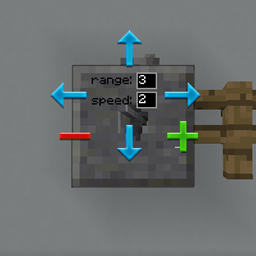
GUI کیسے کام کرتا ہے؟
- GUI کھولنے کے لیے بلاک پر دائیں کلک کریں۔
- ان پٹ سمت پر دائیں کلک کریں اور آؤٹ پٹ سمت پر بائیں کلک کریں
- رینج اور رفتار میں ترمیم کریں، escape بٹن کے ذریعے GUI سے باہر نکلیں۔
میں رینج کیسے بڑھا سکتا ہوں؟
- زیادہ سے زیادہ رینج 10 ہے، جب تک یہ کسی مختلف قسم کے بلاک تک نہ پہنچ جائے
کیا میں رفتار بڑھا سکتا ہوں؟
- صرف 3 تک، مستقبل میں مزید کی حمایت کر سکتا ہے۔
کیا میں آواز تبدیل کر سکتا ہوں؟
- مستقبل میں بھی شامل کیا جا سکتا ہے۔
کیا یہ ریڈسٹون کے ساتھ کام کرتا ہے؟
- جی ہاں، یہ بٹنوں، لیورز اور کسی بھی ریڈسٹون ان پٹ کے ساتھ عام پسٹن کی طرح کام کرتا ہے۔
Multi-Piston کیسے انسٹال کریں
With Millida Launcher
Install Millida Launcher
The launcher is free: download it at millida.net/launcher and sign in with any nickname.
Click “Install” on this page
The launcher opens and installs the mod for Minecraft 1.18.2–1.21.1 on Forge or NeoForge automatically.
Launch the game
A profile with it appears in the launcher: click “Play”.
Manually
Install Forge or NeoForge
The loader must match the game version of the mod file, for example Minecraft 1.21.1. After installing it, a separate profile appears in your launcher.
Download the file for your version
In the version list above, pick the file multipiston-1.2.58-1.21.1.jar (33 KB) for your game version and loader.
Put it in the mods folder
The folder is inside .minecraft (Windows: %appdata%\.minecraft\mods). If it does not exist, create it.
Launch the loader profile
Open “Mods” in the main menu: Multi-Piston should be in the list.
Minecraft 1.21.1 runs on Java 21: with a different Java version the game may close right after launch.
ورژنز
ڈیپنڈنسیز کے ساتھ
| Minecraft | لوڈر | فائل | تاریخ | اقدامات |
|---|---|---|---|---|
| 1.20.1 | Forge | multipiston-1.20-0.0.47-snapshot.jar38.6 KB 10 | ||
| 1.21 | NeoForge | multipiston-1.2.58-1.21.1.jar33.3 KB 9 | ||
| 1.21 | NeoForge | multipiston-1.2.55-1.21.1-snapshot.jar32.6 KB | ||
| 1.20.1 | NeoForge, Forge | multipiston-1.20-1.2.43-RELEASE.jar37.8 KB | ||
| 1.20.4 | NeoForge | multipiston-1.20.4-1.2.37-ALPHA-universal.jar33 KB | ||
| 1.20.1 | Forge | multipiston-1.20-1.2.32-ALPHA.jar37.8 KB | ||
| 1.18.2 | — | multi-piston-1.18.2-1.2.13-ALPHA.jar50.1 KB |
عمومی سوالات
Which Minecraft versions does Multi-Piston work on?
There are files for 1.21.1, 1.21, 1.20.4, 1.20.1, 1.20, 1.18.2. The newest is 1.21.1.
Is Multi-Piston for Forge or Fabric?
There are files for Forge: 1.20–1.20.1 and for NeoForge: 1.20–1.21.1. There are no files for Fabric: a mod for another loader will not start.
Does Multi-Piston need other mods?
The author lists no required dependencies: the Forge or NeoForge loader is enough.
Which Java does Multi-Piston need?
Minecraft 1.21.1 runs on Java 21. If the game closes right after launch, the usual cause is the wrong Java version in the profile settings.
Where can I download Multi-Piston safely?
On this page: the file multipiston-1.2.58-1.21.1.jar (33 KB) is stored on Millida’s server, with no link shorteners. SHA-1 checksum: 2b63be739da24247328e4052ec91c928230d0390.
ریویوز
Multi-Piston کو ریٹ کرنے والے پہلے شخص بنیں


