

Minecraft 1.20.1, 1.21.1 کے لیے Jade 🔍 موڈ
آپ جو دیکھ رہے ہیں اس کے بارے میں معلومات دکھاتا ہے۔ (Minecraft 1.16+ کے لیے Hwyla/Waila فورک)
 NeoForge
 Fabric
 Quilt
Quilt Forge
ForgeJade 🔍
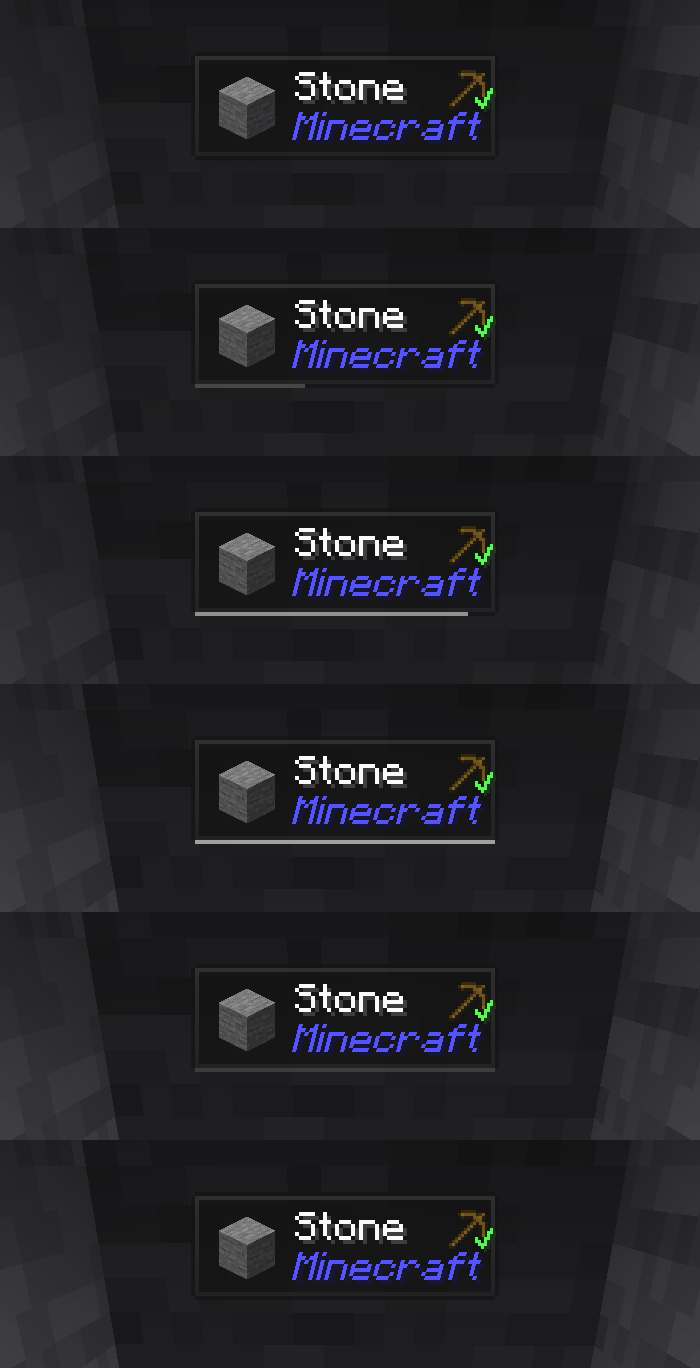
Jade ایک معلوماتی HUD موڈ ہے - جدید Minecraft ورژنز کے لیے Hwyla/Waila۔ بہتر صارف تجربے اور API کے لیے ڈیزائن کیا گیا ہے۔
Jade صرف کلائنٹ سائیڈ پر انسٹال کیا جا سکتا ہے۔ لیکن بہت سی خصوصیات کے لیے سرور سائیڈ پر Jade درکار ہے۔ (آئٹم اسٹوریج، بریونگ اسٹینڈ کے ایندھن کی مقدار، چھتے میں شہد کی مکھیاں...)
موڈ انٹیگریشن کے لیے، Jade Addons آزمائیں: NeoForge Fabric

کلیدیں (ڈیفالٹ):
- Keypad 0: کنفیگریشن اسکرین کھولیں
- Keypad 1: اوورلے ٹوگل کریں
- Keypad 2: مائع ڈسپلے ٹوگل کریں
- Keypad 3: ترکیبیں دکھائیں (JEI درکار)
- Keypad 4: استعمالات دکھائیں (JEI درکار)
- Keypad 5: ہدف کی روایت سنائیں

Hwyla کے مقابلے میں قابل ذکر تبدیلیاں:
- API کی دوبارہ ڈیزائننگ
- زیادہ ونیلا ایڈونز
- زیادہ کنفیگریبلٹی
- بہتر رسائی
جیسا کہ اصل پروجیکٹ Hwyla کی طرف سے مطلوب ہے، Jade Creative Commons Attribution-NonCommercial-ShareAlike 4.0 International (CC BY-NC-SA 4.0) لائسنس استعمال کرتا ہے۔
Jade 🔍 کیسے انسٹال کریں
With Millida Launcher
Install Millida Launcher
The launcher is free: download it at millida.net/launcher and sign in with any nickname.
Click “Install” on this page
The launcher opens and installs the mod for Minecraft 1.16–26.3 on Fabric, Forge, NeoForge or Quilt automatically, together with its dependencies: Fabric API.
Launch the game
A profile with it appears in the launcher: click “Play”.
Manually
Install Fabric, Forge, NeoForge or Quilt
The loader must match the game version of the mod file, for example Minecraft 26.3. After installing it, a separate profile appears in your launcher.
Download the file for your version
In the version list above, pick the file Jade-mc26.3-NeoForge-26.3.5.jar (1.0 MB) for your game version and loader.
Put it in the mods folder
The folder is inside .minecraft (Windows: %appdata%\.minecraft\mods). If it does not exist, create it. Required dependencies go there too: Fabric API.
Launch the loader profile
Open “Mods” in the main menu: Jade 🔍 should be in the list.
On a server
A server on Fabric, Forge, NeoForge or Quilt
The mod only works on a server with the same loader and game version, for example 26.3.
File goes into the server’s mods folder
Stop the server, put the mod file into the mods folder and start the server again.
Use the “To server” button
On Millida Hosting, the button at the top of the page uploads the file to your server and restarts it for you.
ورژنز
ڈیپنڈنسیز کے ساتھ
| Minecraft | لوڈر | فائل | تاریخ | اقدامات |
|---|---|---|---|---|
| 26.1.2 | NeoForge | 26.1.21005 KB 7 | ||
| 26.3 | NeoForge | 26.31 MB 18 | ||
| 26.3 | Fabric, Quilt | 26.31 MB 575 | ||
| 26.3 | NeoForge | 26.31 MB 1 | ||
| 26.3 | Fabric, Quilt | 26.31 MB | ||
| 26.3 | Fabric, Quilt | 26.31 MB | ||
| 26.3 | Fabric, Quilt | 26.31 MB | ||
| 26.3 | NeoForge | 26.31007 KB |
چلانے کے لیے کیا درکار ہے
- Fabric APIلازمی
- Just Enough Items (JEI)اختیاری
وہ مواد جسے اس کی ضرورت ہے
ریویوز
Jade 🔍 کو ریٹ کرنے والے پہلے شخص بنیں


