
Minecraft 1.12.2 کے لیے ISeeDragons موڈ
RLCraft اور Ice and Fire کے پرانے ورژنز میں ڈریگن رینڈر فاصلے کو ٹھیک کرتا ہے
- ڈاؤن لوڈز
- 1 ڈاؤن لوڈز
- ویوز
- 20 ویوز
- اپ ڈیٹ شدہ
- اپ ڈیٹ شدہ 18.10.2026
- 1.12.2
 Forge
Forge
ISeeDragons موڈ کے بارے میں
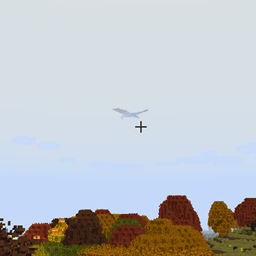
ISeeDragons ٹھیک ہے... RLCraft میں ڈریگن مشکل ہیں... لیکن کیا ان کے پاس ذاتی کلوکنگ ڈیوائس ہونا ضروری ہے جو صرف اس وقت فعال ہو جب وہ کھلاڑی سے 64+ بلاکس دور ہوں؟!
یہ موڈ Ice and Fire 1.7.1 (ایک پرانے ورژن) میں کچھ بڑے بگز ٹھیک کرتا ہے، Ice and Fire 1.8.x کے ساتھ استعمال کرنے سے غیر متعین رویہ (بگز، کریشز، وغیرہ) ہو سکتا ہے! یہ RLCraft موڈپیک میں استعمال کے لیے بنایا گیا ہے!
خصوصیات:
- Ice and Fire ڈریگن رینڈر فاصلہ ٹھیک کرتا ہے (قابل ترتیب، دیگر موڈ والی اینٹیٹیز کے ساتھ بھی کام کر سکتا ہے)
- Ice and Fire ڈریگنوں کے مارے جانے پر نہ جاگنے کا مسئلہ ٹھیک کرتا ہے
- کھلاڑیوں کے shift/dismount کے ذریعے ڈریگن کے جبڑوں سے فرار ہونے کا مسئلہ ٹھیک کرتا ہے
- Ice and Fire سی سرپنٹ آرمر کی مرمت ٹھیک کرتا ہے
- Dragonbone Axe ٹھیک کرتا ہے
- ڈریگنوں کے بلاکس توڑنے سے پیدا ہونے والے پارٹیکلز کم کرتا ہے تاکہ لگ نہ ہو (قابل ترتیب)
- Ice and Fire آئٹمز کے لیے OreDictionary اندراجات دوبارہ شامل کرتا ہے (Ice and Fire اب بھی لاگ میں اسپام کرتا ہے، TODO: لاگ اسپام بھی ہٹائیں)
- جن ٹولز کے پاس پہلے سے مرمت کا آئٹم نہیں ہے ان کے لیے حسب ضرورت مرمت آئٹمز مقرر کیے جا سکتے ہیں (قابل ترتیب)
- آئٹمز کو انڈیڈ دشمنوں کے خلاف حسب ضرورت اضافی نقصان دیا جا سکتا ہے (قابل ترتیب)
یہ موڈ کلائنٹ اور سرور دونوں پر انسٹال ہونا چاہیے، لیکن زیادہ تر فکسز صرف سرور پر انسٹال ہونے پر بھی کام کریں گے (کلائنٹ انسٹالیشن لازمی شرط نہیں ہے)۔
RLCraft موڈپیک: https://www.curseforge.com/minecraft/modpacks/rlcraft Ice and Fire موڈ: https://www.curseforge.com/minecraft/mc-mods/ice-and-fire-dragons
اس موڈ کو انسٹال کرنے کے لیے، jar فائل کو اپنے Minecraft انسٹینس فولڈر کے mods فولڈر میں رکھیں۔ Minecraft انسٹینس فولڈر کی جگہ اس بات پر منحصر ہوگی کہ آپ کون سا لانچر استعمال کر رہے ہیں!
سورس کوڈ: https://github.com/xcube16/ISeeDragons
ISeeDragons کیسے انسٹال کریں
With Millida Launcher
Install Millida Launcher
The launcher is free: download it at millida.net/launcher and sign in with any nickname.
Click “Install” on this page
The launcher opens and installs the mod for Minecraft 1.12.2 on Forge automatically.
Launch the game
A profile with it appears in the launcher: click “Play”.
Manually
Install Forge
The loader must match the game version of the mod file, for example Minecraft 1.12.2. After installing it, a separate profile appears in your launcher.
Download the file for your version
In the version list above, pick the file ISeeDragons-1.2.1.jar (64 KB) for your game version.
Put it in the mods folder
The folder is inside .minecraft (Windows: %appdata%\.minecraft\mods). If it does not exist, create it.
Launch the loader profile
Open “Mods” in the main menu: ISeeDragons should be in the list.
Minecraft 1.12.2 runs on Java 8: with a different Java version the game may close right after launch.
ورژنز
ڈیپنڈنسیز کے ساتھ
| Minecraft | لوڈر | فائل | تاریخ | اقدامات |
|---|---|---|---|---|
| 1.12.2 | Forge | ISeeDragons-1.2.163.7 KB 1 | ||
| 1.12.2 | Forge | ISeeDragons-0.1224.4 KB | ||
| 1.12.2 | Forge | ISeeDragons6.7 KB |
عمومی سوالات
Which Minecraft versions does ISeeDragons work on?
Only Minecraft 1.12.2: there are no files for other versions.
Is ISeeDragons for Forge or Fabric?
Only for Forge: 1.12.2. There are no files for Fabric or NeoForge: a mod for another loader will not start.
Does ISeeDragons need other mods?
The author lists no required dependencies: the Forge loader is enough.
Which Java does ISeeDragons need?
Minecraft 1.12.2 runs on Java 8. If the game closes right after launch, the usual cause is the wrong Java version in the profile settings.
Where can I download ISeeDragons safely?
On this page: the file ISeeDragons-1.2.1.jar (64 KB) is stored on Millida’s server, with no link shorteners. SHA-1 checksum: 0f8c5fee7eb2b76ab4a01adb08b63147f5a2a2fe.
ریویوز
ISeeDragons کو ریٹ کرنے والے پہلے شخص بنیں


