

 Forge
 Fabric
 NeoForge
InventoryHUD+ موڈ کے بارے میں
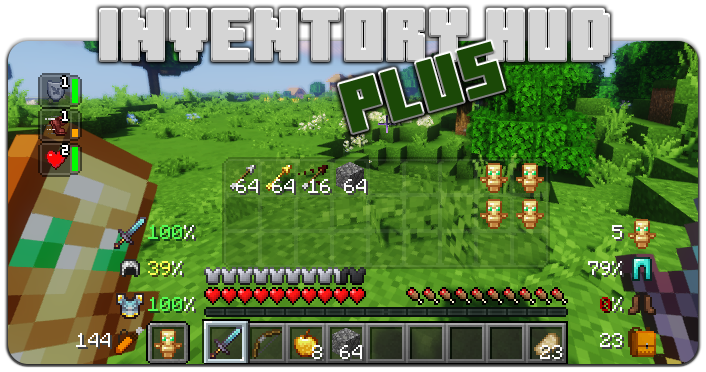
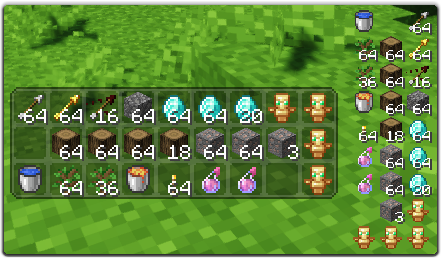
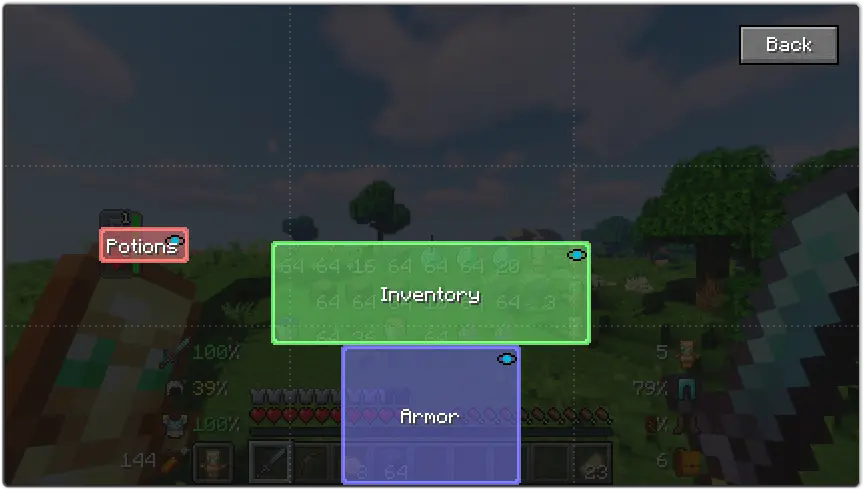
یہ موڈ کچھ خصوصیات پر مشتمل ہے، سب سے پہلے - Inventory HUD، یہ آپ کے کھیلتے وقت آپ کی انوینٹری دکھاتا ہے، آپ موڈز (منی/نارمل اور افقی/عمودی) کے درمیان تبدیل کر سکتے ہیں، نیز آپ بیک گراؤنڈ کی شفافیت تبدیل کر سکتے ہیں اور اینیمیشن کو آن/آف کر سکتے ہیں
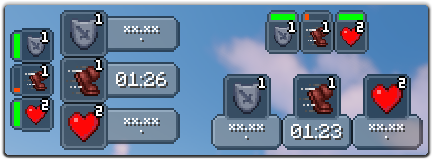
اگلی خصوصیت PotionHUD ہے، یہ آپ کے پوشن اثرات کو ٹائمر یا دورانیے کی بار کے ساتھ دکھاتا ہے اگر آپ منی موڈ استعمال کر رہے ہیں، آپ کنفگ میں اثرات کے درمیان فاصلہ اور بیک گراؤنڈ کی شفافیت تبدیل کر سکتے ہیں، اور آپ افقی موڈ بھی فعال کر سکتے ہیں
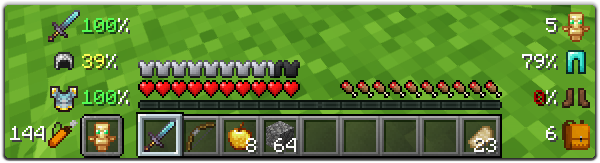
اور آخری لیکن کم اہم نہیں خصوصیت ArmorHUD ہے، یہ آپ کے آرمر اور سامان کی پائیداری دکھاتا ہے، نیز دکھاتا ہے کہ آپ کی انوینٹری میں کتنے خالی سلاٹ ہیں اور آپ کے پاس کتنے تیر ہیں۔ یہ HUD مکمل طور پر حسب ضرورت بنایا جا سکتا ہے، آپ اسکیل، ڈیمیج انڈیکیٹر کی قسم تبدیل کر سکتے ہیں یا اپنے سامان کے ہر حصے کو آن/آف کر سکتے ہیں
آپ کنفگ میں بہت سے اختیارات تبدیل کر سکتے ہیں (مین مینو میں "Mod" بٹن، پھر "Config")، نیز آپ ہر HUD کی پوزیشن کو صرف ڈریگ اور ڈراپ کر کے تبدیل کر سکتے ہیں۔ گیم کے اندر کنفگ اسکرین کھولنے کے لیے آپ کی بائنڈ استعمال کر سکتے ہیں (ڈیفالٹ میں "O")
اگر آپ اس موڈ کو بہتر بنانے میں میری مدد کرنا چاہتے ہیں، تو آپ اسے اپنی زبان میں ترجمہ کر کے json فائل مجھے بھیج سکتے ہیں۔
آپ اصل لینگ فائل یہاں تلاش کر سکتے ہیں: enus.json
معاون زبانیں
- چینی سادہ (مین لینڈ چین) (zhcn) (Satxm کا شکریہ)
- چینی روایتی (تائیوان) (zhtw) (yichifauzi کا شکریہ)
- چیک (cscz) (Janys159 کا شکریہ)
- انگریزی (enus)
- فرانسیسی (frfr) (Peperehobbits01 کا شکریہ)
- جرمن (dede) (arrowlevel کا شکریہ)
- ہنگیرین (huhu) (Kalmix88 کا شکریہ)
- اطالوی (itit) (cranos96 کا شکریہ)
- جاپانی (jajp) (co91 کا شکریہ)
- کورین (kokr) (gueso-gato1355 کا شکریہ)
- پرتگالی - برازیل (ptbr) (VitorLeonardo کا شکریہ)
- روسی (ruru)
- ہسپانوی (eses) (Zeedif کا شکریہ)
- ترکی (trtr) (MefeBey کا شکریہ)
- یوکرینی (ukua) (ElvisDanger کا شکریہ)
InventoryHUD+ کیسے انسٹال کریں
With Millida Launcher
Install Millida Launcher
The launcher is free: download it at millida.net/launcher and sign in with any nickname.
Click “Install” on this page
The launcher opens and installs the mod for Minecraft 1.8–26.3 on Fabric, Forge or NeoForge automatically.
Launch the game
A profile with it appears in the launcher: click “Play”.
Manually
Install Fabric, Forge or NeoForge
The loader must match the game version of the mod file, for example Minecraft 26.3. After installing it, a separate profile appears in your launcher.
Download the file for your version
In the version list above, pick the file inventoryhud.forge.26.3-3.4.37.jar (231 KB) for your game version and loader.
Put it in the mods folder
The folder is inside .minecraft (Windows: %appdata%\.minecraft\mods). If it does not exist, create it.
Launch the loader profile
Open “Mods” in the main menu: InventoryHUD+ should be in the list.
InventoryHUD+ works on the player’s side only: there is no need to install it on a server.
ورژنز
ڈیپنڈنسیز کے ساتھ
| Minecraft | لوڈر | فائل | تاریخ | اقدامات |
|---|---|---|---|---|
| 26.3 | Forge | 26.3231 KB 14 | ||
| 26.3 | Fabric | 26.3235 KB 56 | ||
| 26.3 | NeoForge | 26.3231 KB 1 | ||
| 26.3 | Forge | 26.3231 KB 13 | ||
| 26.3 | Fabric | 26.3235 KB 75 | ||
| 26.3 | NeoForge | 26.3231 KB 10 | ||
| 26.2 | Forge | 26.2231 KB 11 | — | |
| 26.1 | Forge | 26.1227 KB | — |
عمومی سوالات
Which Minecraft versions does InventoryHUD+ work on?
There are files for 1.8–26.3, 14 versions in total. The newest is 26.3.
Is InventoryHUD+ for Forge or Fabric?
There are files for Fabric: 1.16.2–26.3, for Forge: 1.8–26.3 and for NeoForge: 26.3.
Does InventoryHUD+ need other mods?
The author lists no required dependencies: the Fabric, Forge or NeoForge loader is enough.
Do I need to install InventoryHUD+ on a server?
No. InventoryHUD+ works on the player’s side only: there is no need to install it on a server.
How do I download InventoryHUD+?
With Millida Launcher: it installs InventoryHUD+ into a modpack by itself, for the right game version and loader. The launcher is free.
ریویوز
InventoryHUD+ کو ریٹ کرنے والے پہلے شخص بنیں


