

Minecraft 1.20.1, 1.21.1 کے لیے Immersive Armor HUD موڈ
آپ کے آرمر کی پائیداری کے بارے میں معلومات کو ہاٹ بار میں ونیلا کے مطابق انداز میں شامل کرتا ہے۔
 Fabric
 NeoForge
 Forge
ForgeImmersive Armor HUD موڈ کے بارے میں

Immersive Armor HUD موجودہ آرمر اسٹرینتھ بار کے اوپر HUD میں یہ معلومات شامل کرتا ہے کہ آپ اس وقت کس قسم کا آرمر پہنے ہوئے ہیں، ساتھ ہی ڈیوریبلیٹی کی معلومات بھی دکھاتا ہے کہ کون سے آرمرز ٹوٹنے والے ہیں۔


Immersive Armor HUD آرمر کی معلومات کو حسبِ ضرورت چھوٹے 7x7 آرمر آئیکنز کے ذریعے دکھاتا ہے، جو پکسل پرفیکٹ ہونے اور ونلا بارز کے ساتھ ہم آہنگ رہنے کے لیے ڈیزائن کیے گئے ہیں:
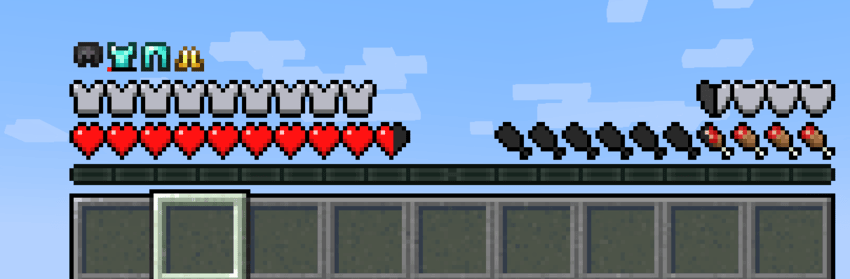
اور یہ دیگر موڈز جیسے Overflowing Bars اور Dynamic RPG Resource Bars کے ساتھ بہت اچھی طرح کام کرتا ہے:

آرمر HUD بار کی پوزیشن اور آفسیٹ قابلِ ترتیب ہے--آپ اسے دائیں طرف منتقل کر سکتے ہیں، یا X اور Y پوزیشن دستی طور پر ایڈجسٹ کر سکتے ہیں۔
یہ موڈ مختلف موڈز کے لیے موڈ کمپیٹ بھی فراہم کرتا ہے، فی الحال صرف The Aether کے آرمرز کو سپورٹ کرتا ہے۔
Immersive Armor HUD کیسے انسٹال کریں
With Millida Launcher
Install Millida Launcher
The launcher is free: download it at millida.net/launcher and sign in with any nickname.
Click “Install” on this page
The launcher opens and installs the mod for Minecraft 1.20–1.21.5 on Fabric, Forge or NeoForge automatically.
Launch the game
A profile with it appears in the launcher: click “Play”.
Manually
Install Fabric, Forge or NeoForge
The loader must match the game version of the mod file, for example Minecraft 1.21.5. After installing it, a separate profile appears in your launcher.
Download the file for your version
In the version list above, pick the file immersivearmorhud-fabric-1.0.1-1.21.5.jar (982 KB) for your game version and loader.
Put it in the mods folder
The folder is inside .minecraft (Windows: %appdata%\.minecraft\mods). If it does not exist, create it.
Launch the loader profile
Open “Mods” in the main menu: Immersive Armor HUD should be in the list.
Minecraft 1.21.5 runs on Java 21: with a different Java version the game may close right after launch.
ورژنز
ڈیپنڈنسیز کے ساتھ
| Minecraft | لوڈر | فائل | تاریخ | اقدامات |
|---|---|---|---|---|
| 1.21.5 | Fabric | ImmersiveArmorHUD Fabric 1.0.1 for 1.21.5982 KB 12 | ||
| 1.21.1 | NeoForge | ImmersiveArmorHUD Neoforge 1.0.1 for 1.21.1391 KB 4 | ||
| 1.20.1 | Forge | ImmersiveArmorHUD Forge 1.0.1 for 1.20.1570 KB 9 |
عمومی سوالات
Which Minecraft versions does Immersive Armor HUD work on?
There are files for 1.21.5, 1.21.1, 1.20.1, 1.20. The newest is 1.21.5.
Is Immersive Armor HUD for Forge or Fabric?
There are files for Fabric: 1.21.5, for Forge: 1.20–1.20.1 and for NeoForge: 1.21.1.
Does Immersive Armor HUD need other mods?
The author lists no required dependencies: the Fabric, Forge or NeoForge loader is enough.
Which Java does Immersive Armor HUD need?
Minecraft 1.21.5 runs on Java 21. If the game closes right after launch, the usual cause is the wrong Java version in the profile settings.
Where can I download Immersive Armor HUD safely?
On this page: the file immersivearmorhud-fabric-1.0.1-1.21.5.jar (982 KB) is stored on Millida’s server, with no link shorteners. SHA-1 checksum: 33488a135b35f9d91291de3aa01a515af6db05fe.
ریویوز
Immersive Armor HUD کو ریٹ کرنے والے پہلے شخص بنیں


