

Minecraft 1.12.2, 1.19.2 کے لیے Expanded Equivalence موڈ
ProjectE کے لیے مختلف موڈز کے آئٹمز اور کرافٹنگ میکانکس میں EMC شامل کرنا۔
- ڈاؤن لوڈز
- 1 ڈاؤن لوڈز
- ویوز
- 22 ویوز
- اپ ڈیٹ شدہ
- اپ ڈیٹ شدہ 24.10.2026
- 1.12.2 — 1.19.2
 Forge
Forge
Expanded Equivalence موڈ کے بارے میں
یہ ProjectE کا ایک ایڈ آن ہے۔
اس ایڈ آن کے لیے HammerLib درکار ہے۔
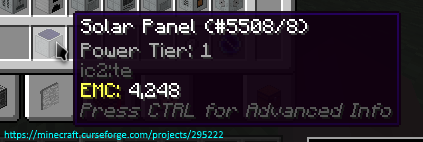
یہ ایڈ آن ProjectE اور بہت سی دیگر موڈز کے لیے انٹیگریشن شامل کرتا ہے۔ اس کا مقصد مختلف کرافٹنگ سسٹمز جیسے Draconic Evolution کی Fusion Crafting، Avaritia کی extreme crafting اور دیگر کے لیے EMC ویلیوز رجسٹر کرنا ہے۔
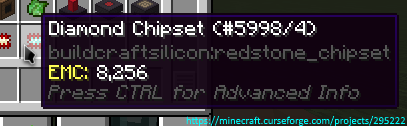
یہاں آپ تمام فی الحال معاون موڈز/پلانز دیکھ سکتے ہیں
اجازتیں:
- آپ اس موڈ کو اپنے موڈ پیک میں استعمال کر سکتے ہیں۔
- آپ کو CurseForge ڈاؤن لوڈ لنک اور میری اجازت فراہم کیے بغیر اس موڈ کو دیگر سائٹس پر دوبارہ شائع کرنے کی اجازت نہیں ہے (PM بھیجیں
Zeitheron کو، یا Discord کے ذریعے)
- آپ کو اس (یا DragonForge ٹیم کے کسی بھی دوسرے موڈ) کو اپنے موڈ میں شامل کرنے کی اجازت نہیں ہے۔ تاہم، ایڈ آنز بنانا جائز ہے، لیکن ایک دوستانہ PM اچھا ہوگا۔
نوٹ:
- Minecraft کا واحد معاون ورژن وہ تازہ ترین ورژن ہے جس کے لیے یہ موڈ موجود ہے۔ ڈاؤن گریڈ کرنے کے لیے نہ پوچھیں!
کچھ بات کرنا چاہتے ہیں؟ APIs کے ساتھ مدد چاہیے؟
Discord سرور جوائن کریں اور Twitter پر Zeitheron کو فالو کریں!
اگر آپ میرے کام کی حمایت کرنا چاہتے ہیں، تو آپ Patreon کے ذریعے patron بن سکتے ہیں۔
Expanded Equivalence کیسے انسٹال کریں
With Millida Launcher
Install Millida Launcher
The launcher is free: download it at millida.net/launcher and sign in with any nickname.
Click “Install” on this page
The launcher opens and installs the mod for Minecraft 1.12.2–1.19.2 on Forge automatically.
Launch the game
A profile with it appears in the launcher: click “Play”.
Manually
Install Forge
The loader must match the game version of the mod file, for example Minecraft 1.19.2. After installing it, a separate profile appears in your launcher.
Download the file for your version
In the version list above, pick the file ExpandedEquivalence-1.19.2-19.1.2.jar (87 KB) for your game version.
Put it in the mods folder
The folder is inside .minecraft (Windows: %appdata%\.minecraft\mods). If it does not exist, create it.
Launch the loader profile
Open “Mods” in the main menu: Expanded Equivalence should be in the list.
Minecraft 1.19.2 runs on Java 17: with a different Java version the game may close right after launch.
ورژنز
ڈیپنڈنسیز کے ساتھ
| Minecraft | لوڈر | فائل | تاریخ | اقدامات |
|---|---|---|---|---|
| 1.19.2 | Forge | [1.19.2] Expanded Equivalence - 19.1.287.1 KB | ||
| 1.19.2 | Forge | [1.19.2] Expanded Equivalence - 19.1.083 KB | ||
| 1.12.2 | — | [1.12.2] Expanded Equivalence - 12.3.1782.7 KB 1 | ||
| 1.12.2 | — | [1.12.2] Expanded Equivalence - 1b61.5 KB |
عمومی سوالات
Which Minecraft versions does Expanded Equivalence work on?
There are files for 1.19.2, 1.12.2. The newest is 1.19.2.
Is Expanded Equivalence for Forge or Fabric?
Only for Forge: 1.19.2. There are no files for Fabric or NeoForge: a mod for another loader will not start.
Does Expanded Equivalence need other mods?
The author lists no required dependencies: the Forge loader is enough.
Which Java does Expanded Equivalence need?
Minecraft 1.19.2 runs on Java 17. If the game closes right after launch, the usual cause is the wrong Java version in the profile settings.
Where can I download Expanded Equivalence safely?
On this page: the file ExpandedEquivalence-1.19.2-19.1.2.jar (87 KB) is stored on Millida’s server, with no link shorteners. SHA-1 checksum: 4f30d2cb6779b8448ed1e30f118102a740a022af.
ریویوز
Expanded Equivalence کو ریٹ کرنے والے پہلے شخص بنیں


