

Minecraft 1.20.1, 1.19.2 کے لیے Dark Paintings موڈ
Minecraft میں نئی پینٹنگز شامل کرتا ہے
 NeoForge
 Fabric
 Forge
Forge Quilt
QuiltDark Paintings موڈ کے بارے میں
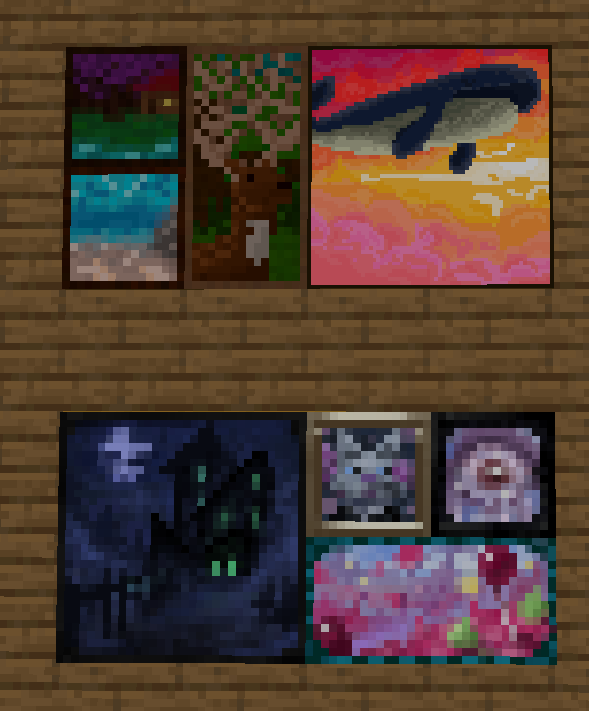
یہ موڈ گیم میں بہت سی نئی پینٹنگز شامل کرتا ہے! یہ پینٹنگز مختلف سائز اور آرٹ اسٹائلز میں دستیاب ہیں۔ ہر پینٹنگ ہماری کمیونٹی کے ایک رکن نے ڈیزائن اور بنائی ہے! یہ پینٹنگز ونیلا پینٹنگز کے ساتھ بغیر کسی رکاوٹ کے ضم ہو جاتی ہیں اور انہیں عام پینٹنگ آئٹم کے ذریعے دنیا میں رکھا جا سکتا ہے۔ کریئیٹو ٹیب میں ایسے آئٹمز بھی موجود ہیں جن کے ذریعے آپ کسی مخصوص ڈیزائن کو بالکل وہیں رکھ سکتے ہیں جہاں آپ چاہتے ہیں!
ان بہت سے باصلاحیت فنکاروں کا شکریہ جنہوں نے اس موڈ پر میرے ساتھ تعاون کیا، جن میں mmg28rtt، FuryDev، Axeonlotl، Wouter، Absolem Jackdaw، Punpudle، Superkat32، اور میں Darkhax lol شامل ہیں۔
یہ پروجیکٹ Nodecraft کے تعاون سے ہے۔ اپنی سروس کے پہلے مہینے پر 30% رعایت کے لیے کوڈ DARKHAX استعمال کریں!
Dark Paintings کیسے انسٹال کریں
With Millida Launcher
Install Millida Launcher
The launcher is free: download it at millida.net/launcher and sign in with any nickname.
Click “Install” on this page
The launcher opens and installs the mod for Minecraft 1.15.2–26.3 on Fabric, Forge, NeoForge or Quilt automatically.
Launch the game
A profile with it appears in the launcher: click “Play”.
Manually
Install Fabric, Forge, NeoForge or Quilt
The loader must match the game version of the mod file, for example Minecraft 26.3. After installing it, a separate profile appears in your launcher.
Download the file for your version
In the version list above, pick the file DarkPaintings-neoforge-MC26.3-26.3.0.1.jar (55 KB) for your game version and loader.
Put it in the mods folder
The folder is inside .minecraft (Windows: %appdata%\.minecraft\mods). If it does not exist, create it.
Launch the loader profile
Open “Mods” in the main menu: Dark Paintings should be in the list.
ورژنز
ڈیپنڈنسیز کے ساتھ
| Minecraft | لوڈر | فائل | تاریخ | اقدامات |
|---|---|---|---|---|
| 26.3 | NeoForge | DarkPaintings-neoforge-MC26.3-26.3.0.1.jar55.3 KB 2 | ||
| 26.3 | Fabric | DarkPaintings-fabric-MC26.3-26.3.0.1.jar57.8 KB 26 | ||
| 1.20.1 | Forge, NeoForge | DarkPaintings-Forge-1.20.1-17.0.6.jar51.4 KB 6 | ||
| 1.19.2 | Forge | DarkPaintings-Forge-1.19.2-13.1.4.jar38.6 KB | ||
| 1.19.2 | Fabric, Quilt | DarkPaintings-Fabric-1.19.2-13.1.4.jar33.8 KB | ||
| 1.17 | Fabric | DarkPaintings-fabric-1.17-rc2-3.0.5.jar12.7 KB | ||
| 1.15.2 | — | DarkPaintings-1.15.2-1.0.2.jar7.1 KB | ||
| 1.15.2 | — | DarkPaintings-1.15.2-1.0.1.jar28.8 KB |
عمومی سوالات
Which Minecraft versions does Dark Paintings work on?
There are files for 26.3, 1.20.1, 1.19.2, 1.17, 1.15.2. The newest is 26.3.
Is Dark Paintings for Forge or Fabric?
There are files for Fabric: 1.17–26.3, for Forge: 1.19.2–1.20.1, for NeoForge: 1.20.1–26.3 and for Quilt: 1.19.2.
Does Dark Paintings need other mods?
The author lists no required dependencies: the Fabric, Forge, NeoForge or Quilt loader is enough.
Where can I download Dark Paintings safely?
On this page: the file DarkPaintings-neoforge-MC26.3-26.3.0.1.jar (55 KB) is stored on Millida’s server, with no link shorteners. SHA-1 checksum: 15c9f13e2fa48507f646c9f0b133940516f6350c.
ریویوز
Dark Paintings کو ریٹ کرنے والے پہلے شخص بنیں


