
Minecraft 1.20.1, 1.21.1 کے لیے Create: Netherless ((Neo)Forge) موڈ
🚫 نیدر کی کبھی ضرورت کے بغیر نیدر کے وسائل جمع اور خودکار کریں
 NeoForge
 Forge
Create: Netherless ((Neo)Forge) موڈ کے بارے میں
اگر آپ فیبرک ورژن چاہتے ہیں تو یہاں کلک کریں
Create: Netherless، Create Mod کے لیے ایک ایڈ آن ہے؛
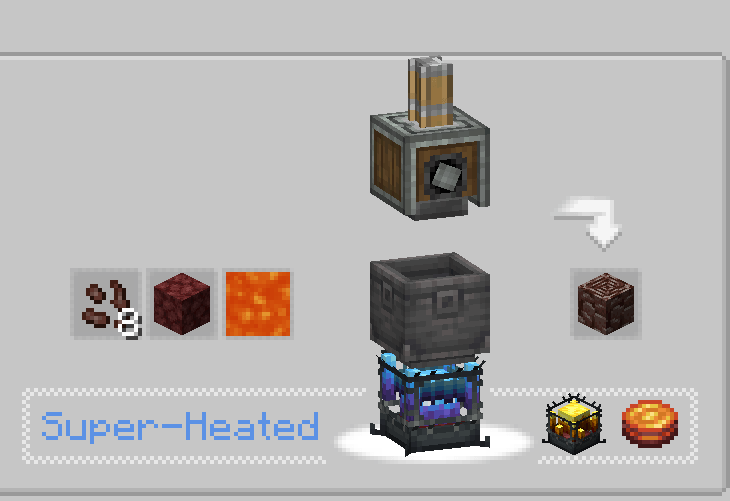
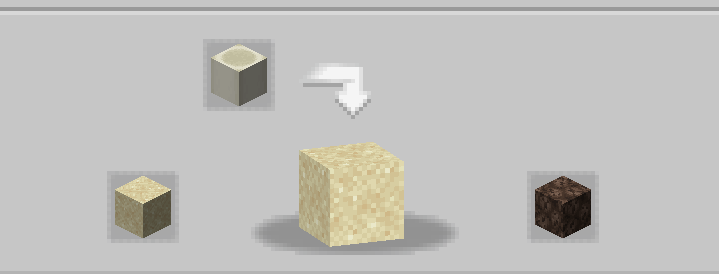
اس موڈ کا مقصد کھلاڑیوں کو یہ سہولت فراہم کرنا ہے کہ وہ نیدر تک رسائی کے بغیر بھی زیادہ تر نیدر وسائل بنا اور خودکار کر سکیں! اس میں Blazes، Netherite، Netherrack، یا کوئی بھی اور چیز شامل ہے جو نیدر کے پیچھے مقفل ہو۔ اگر آپ کو لگتا ہے کہ کچھ ترکیبیں غیر متوازن ہیں، کام نہیں کر رہیں، یا غائب ہیں، تو مجھے کمنٹس سیکشن میں بتائیں💬!
اکثر پوچھے جانے والے سوالات (FAQ):
▶س: میں ترکیبیں کیسے دیکھ سکتا ہوں؟ ج: آپ JEI یا EMI جیسے ترکیب دیکھنے والے موڈز استعمال کر سکتے ہیں۔
▶س: کیا اس ایڈ آن کو کسی موجودہ دنیا میں ہٹانے یا شامل کرنے سے مسائل پیدا ہوں گے؟ ج: آپ بغیر کسی مسئلے کے اس موڈ کو کسی بھی دنیا سے محفوظ طریقے سے حذف یا شامل کر سکتے ہیں۔
▶س: کیا یہ موڈ کبھی فیبرک پر آئے گا؟ ج: ہاں آئے گا! بس یہاں کلک کریں!
▶س: کیا یہ ایڈ آن 6.0.x کے لیے دستیاب ہے؟ ج: جی ہاں، ہے!
▶س: موڈ کے لیے آگے کیا ہے؟ ج: ایڈ آن فی الحال وقفے پر ہے کیونکہ ہم دیگر پروجیکٹس پر کام کر رہے ہیں۔ نئے مواد اور توازن کی منصوبہ بندی کی گئی ہے، مثلاً ectoplasm کا تعارف، لیکن فی الحال آپ کو انتظار کرنا پڑے گا!
▶کوئی اور سوالات؟ آپ Honeycomb Studio کے Discord سرور میں شامل ہو کر وہاں پوچھ سکتے ہیں!
معذرت اگر میں غلطیاں کروں، میں فرانسیسی ہوں.. اگر آپ کو ہجے کی غلطیاں نظر آئیں تو براہ کرم مجھے بتائیں!
یہ موڈ نیدر کو غیر فعال نہیں کرتا!
Create: Netherless ((Neo)Forge) کیسے انسٹال کریں
With Millida Launcher
Install Millida Launcher
The launcher is free: download it at millida.net/launcher and sign in with any nickname.
Click “Install” on this page
The launcher opens and installs the mod for Minecraft 1.19.2–1.21.1 on Forge or NeoForge automatically.
Launch the game
A profile with it appears in the launcher: click “Play”.
Manually
Install Forge or NeoForge
The loader must match the game version of the mod file, for example Minecraft 1.21.1. After installing it, a separate profile appears in your launcher.
Download the file for your version
In the version list above, pick the file create_netherless-2.0.0-1.21.1.jar (30 KB) for your game version and loader.
Put it in the mods folder
The folder is inside .minecraft (Windows: %appdata%\.minecraft\mods). If it does not exist, create it.
Launch the loader profile
Open “Mods” in the main menu: Create: Netherless ((Neo)Forge) should be in the list.
Minecraft 1.21.1 runs on Java 21: with a different Java version the game may close right after launch.
ورژنز
ڈیپنڈنسیز کے ساتھ
| Minecraft | لوڈر | فائل | تاریخ | اقدامات |
|---|---|---|---|---|
| 1.21.1 | NeoForge | create_netherless-2.0.0-1.21.1.jar30.2 KB 68 | ||
| 1.20.1 | Forge | create_netherless-2.0.0-1.20.1.jar30.1 KB 19 | ||
| 1.19.2 | Forge | Create: Netherless 1.19.2-1.137.6 KB 1 |
عمومی سوالات
Which Minecraft versions does Create: Netherless ((Neo)Forge) work on?
There are files for 1.21.1, 1.20.1, 1.19.2. The newest is 1.21.1.
Is Create: Netherless ((Neo)Forge) for Forge or Fabric?
There are files for Forge: 1.19.2–1.20.1 and for NeoForge: 1.21.1. There are no files for Fabric: a mod for another loader will not start.
Does Create: Netherless ((Neo)Forge) need other mods?
The author lists no required dependencies: the Forge or NeoForge loader is enough.
Which Java does Create: Netherless ((Neo)Forge) need?
Minecraft 1.21.1 runs on Java 21. If the game closes right after launch, the usual cause is the wrong Java version in the profile settings.
Where can I download Create: Netherless ((Neo)Forge) safely?
On this page: the file create_netherless-2.0.0-1.21.1.jar (30 KB) is stored on Millida’s server, with no link shorteners. SHA-1 checksum: 2d3499b77c8bcbe8c7a301750271c3d2a0b35cbe.
ریویوز
Create: Netherless ((Neo)Forge) کو ریٹ کرنے والے پہلے شخص بنیں


